
Most joins connect two different tables: customers to orders, products to categories. A self join connects a table to itself. That sounds strange at first, but it’s the standard answer to questions like “who is each employee’s manager?”, “which employees earn more than their boss?” or “which customers live in the same city?”.
There’s no special SELF JOIN keyword. It’s an ordinary JOIN where both sides are the same table, and the trick that makes it work is table aliases. This guide explains it step by step with one small table, then shows the most useful self-join patterns and the mistakes to avoid.
The sample table
Here’s an Employees table. Each employee has a ManagerID, which holds the EmployeeID of their manager. Sara is the CEO, so she has no manager (NULL).
| EmployeeID | FullName | JobTitle | ManagerID | City | Salary |
|---|---|---|---|---|---|
| 1 | Sara Ahmed | CEO | NULL | Manama | 3000 |
| 2 | Omar Khalid | IT Manager | 1 | Manama | 1800 |
| 3 | Lina Saleh | Sales Manager | 1 | Muharraq | 1700 |
| 4 | Ali Hassan | Developer | 2 | Manama | 1200 |
| 5 | Noor Jasim | Developer | 2 | Riffa | 1900 |
| 6 | Mona Fahad | Sales Rep | 3 | Muharraq | 900 |
| 7 | Yousef Ali | Sales Rep | 3 | Manama | 950 |
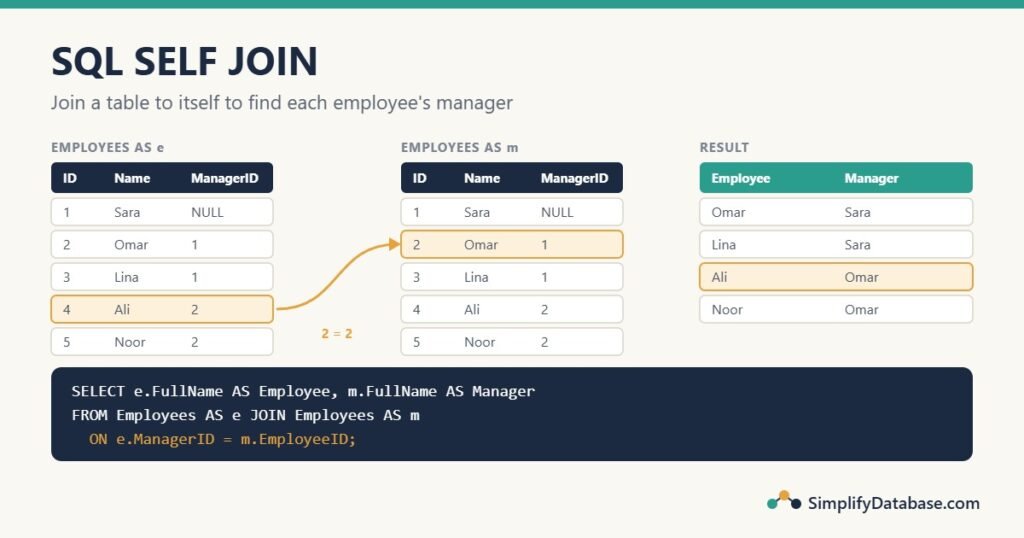
The manager’s name isn’t stored in Ali’s row, only the number 2. To show “Ali Hassan, manager: Omar Khalid”, we need to look up row 2 in the same table. That’s a self join.
Your first self join: employee and manager
Imagine two copies of the table side by side. Call the first copy e (the employees) and the second copy m (the managers). Then match each employee’s ManagerID to a manager’s EmployeeID:
SELECT e.FullName AS Employee,
       m.FullName AS Manager
FROM Employees AS e
JOIN Employees AS m
ON e.ManagerID = m.EmployeeID;| Employee | Manager |
|---|---|
| Omar Khalid | Sara Ahmed |
| Lina Saleh | Sara Ahmed |
| Ali Hassan | Omar Khalid |
| Noor Jasim | Omar Khalid |
| Mona Fahad | Lina Saleh |
| Yousef Ali | Lina Saleh |
Read the ON line carefully, because it’s where people get confused: the employee’s ManagerID equals the manager’s EmployeeID. If you swap the two sides, you’ll get each manager next to their employees instead, with the column names now meaning the opposite.
The aliases e and m are required. Without them, SQL has no way to know which copy you mean. SQL Server answers with “The objects “Employees” and “Employees” in the FROM clause have the same exposed names”, and MySQL with “Not unique table/alias”. If aliases are new to you, see SQL DISTINCT and Column Aliases Explained Simply.
Keep the CEO: use LEFT JOIN
Count the rows above: 6, not 7. Sara is missing, because her ManagerID is NULL and NULL doesn’t match anything, so the inner join drops her. Use a LEFT JOIN to keep every employee:
SELECT e.FullName AS Employee,
       e.JobTitle,
       COALESCE(m.FullName, '(no manager)') AS Manager
FROM Employees AS e
LEFT JOIN Employees AS m
ON e.ManagerID = m.EmployeeID;| Employee | JobTitle | Manager |
|---|---|---|
| Sara Ahmed | CEO | (no manager) |
| Omar Khalid | IT Manager | Sara Ahmed |
| Lina Saleh | Sales Manager | Sara Ahmed |
| Ali Hassan | Developer | Omar Khalid |
| Noor Jasim | Developer | Omar Khalid |
| Mona Fahad | Sales Rep | Lina Saleh |
| Yousef Ali | Sales Rep | Lina Saleh |
COALESCE replaces the NULL with friendly text. (More on that in NULL in SQL Explained Simply, and on LEFT JOIN in SQL JOINs Explained Simply.)
Pattern 1: count each manager’s team
Once employees and managers are joined, you can group by the manager:
SELECT m.FullName AS Manager,
       COUNT(*)   AS DirectReports
FROM Employees AS e
JOIN Employees AS m
     ON e.ManagerID = m.EmployeeID
GROUP BY m.EmployeeID, m.FullName;| Manager | DirectReports |
|---|---|
| Lina Saleh | 2 |
| Omar Khalid | 2 |
| Sara Ahmed | 2 |
Group by m.EmployeeID as well as the name, so two managers who happen to share a name are still counted separately.
Pattern 2: compare a row with a related row
A self join puts two related rows side by side, so you can compare their columns. Which employees earn more than their own manager?
SELECT e.FullName AS Employee,
       e.Salary,
       m.FullName AS Manager,
       m.Salary   AS ManagerSalary
FROM Employees AS e
JOIN Employees AS m
     ON e.ManagerID = m.EmployeeID
WHERE e.Salary > m.Salary;| Employee | Salary | Manager | ManagerSalary |
|---|---|---|---|
| Noor Jasim | 1900.00 | Omar Khalid | 1800.00 |
This is a classic interview question, and the same pattern answers many real ones: “orders shipped before they were approved”, “invoices whose amount differs from the original quote”, “products priced lower than their parent product”.
Pattern 3: find pairs in the same table
Self joins don’t have to follow a manager link. You can join on any column. Which employees live in the same city? A first attempt:
SELECT a.FullName, b.FullName, a.City
FROM Employees AS a
JOIN Employees AS b
     ON a.City = b.City;
This returns 21 rows for 7 employees, and most of them are useless. Every employee is paired with themselves (Sara with Sara), and every real pair appears twice (Sara with Omar, then Omar with Sara). The fix is one extra condition:
SELECT a.FullName AS Employee1,
       b.FullName AS Employee2,
       a.City
FROM Employees AS a
JOIN Employees AS b
     ON a.City = b.City
    AND a.EmployeeID < b.EmployeeID
ORDER BY a.City;| Employee1 | Employee2 | City |
|---|---|---|
| Sara Ahmed | Omar Khalid | Manama |
| Sara Ahmed | Ali Hassan | Manama |
| Sara Ahmed | Yousef Ali | Manama |
| Omar Khalid | Ali Hassan | Manama |
| Omar Khalid | Yousef Ali | Manama |
| Ali Hassan | Yousef Ali | Manama |
| Lina Saleh | Mona Fahad | Muharraq |
a.EmployeeID < b.EmployeeID keeps each pair exactly once and removes the self-pairs, because no ID is smaller than itself. Use <> instead if you want both directions but still no self-pairs.
The same pattern finds possible duplicates, which is very useful when cleaning data: join a Customers table to itself on Email (or phone number) with a.CustomerID < b.CustomerID, and every row in the result is two customer records that may be the same person.
Pattern 4: rows with no match
Who isn’t anybody’s manager? Combine a self join with the LEFT JOIN ... IS NULL pattern:
SELECT m.FullName
FROM Employees AS m
LEFT JOIN Employees AS e
       ON e.ManagerID = m.EmployeeID
WHERE e.EmployeeID IS NULL;
That returns Ali, Noor, Mona and Yousef: nobody reports to them.
Going up more than one level
To show each employee’s manager and their manager’s manager, join the table a third time:
SELECT e.FullName AS Employee,
       m.FullName AS Manager,
       g.FullName AS ManagersManager
FROM Employees AS e
JOIN Employees AS m ON e.ManagerID = m.EmployeeID
JOIN Employees AS g ON m.ManagerID = g.EmployeeID;
That works for a fixed number of levels. For a whole organisation chart, where you don’t know how deep it goes, use a recursive CTE: it repeats the self join until there are no more levels.
-- SQL Server (MySQL 8 and PostgreSQL: write WITH RECURSIVE)
WITH OrgChart AS (
    SELECT EmployeeID, FullName, 0 AS Level,
           CAST(FullName AS VARCHAR(500)) AS Path
    FROM Employees
    WHERE ManagerID IS NULL                     -- start at the top

    UNION ALL

    SELECT e.EmployeeID, e.FullName, o.Level + 1,
           CAST(o.Path + ' > ' + e.FullName AS VARCHAR(500))
    FROM Employees AS e
    JOIN OrgChart AS o ON e.ManagerID = o.EmployeeID   -- the self join
)
SELECT Level, FullName, Path
FROM OrgChart
ORDER BY Path;| Level | FullName | Path |
|---|---|---|
| 0 | Sara Ahmed | Sara Ahmed |
| 1 | Lina Saleh | Sara Ahmed > Lina Saleh |
| 2 | Mona Fahad | Sara Ahmed > Lina Saleh > Mona Fahad |
| 2 | Yousef Ali | Sara Ahmed > Lina Saleh > Yousef Ali |
| 1 | Omar Khalid | Sara Ahmed > Omar Khalid |
| 2 | Ali Hassan | Sara Ahmed > Omar Khalid > Ali Hassan |
| 2 | Noor Jasim | Sara Ahmed > Omar Khalid > Noor Jasim |
In MySQL, build the path with CONCAT(o.Path, ' > ', e.FullName) instead of +. The CAST matters in SQL Server: both parts of a recursive CTE must return exactly the same data type. CTEs themselves are explained in SQL Subqueries vs. CTEs Explained Simply.
Common mistakes
- No aliases.
FROM Employees JOIN Employeesis an error. Give each copy its own short, meaningful name (eandm, nota1anda2, when they play different roles). - The ON condition backwards.
e.ManagerID = m.EmployeeIDis “employee to manager”. Swap it and every column means the opposite of its name. - Losing the top row. An inner join drops rows whose
ManagerIDisNULL. UseLEFT JOINwhen everyone must appear. - Self-pairs and double pairs when matching on a shared value. Add
a.ID < b.ID. - Slow on big tables. Index the column you join on (here
ManagerID); the other side is usually the primary key, which is already indexed. See SQL Indexes Explained Simply.
Practice exercises
- List Ali Hassan’s colleagues: the employees who have the same manager as him (but not Ali himself).
- Show the employees who work in a different city from their manager.
- Show each employee with their manager’s job title.
Answers:
-- 1: returns Noor Jasim
SELECT c.FullName
FROM Employees AS a
JOIN Employees AS c
     ON c.ManagerID = a.ManagerID
    AND c.EmployeeID <> a.EmployeeID
WHERE a.FullName = 'Ali Hassan';

-- 2: returns Lina Saleh, Noor Jasim and Yousef Ali
SELECT e.FullName, e.City,
       m.FullName AS Manager, m.City AS ManagerCity
FROM Employees AS e
JOIN Employees AS m ON e.ManagerID = m.EmployeeID
WHERE e.City <> m.City;

-- 3: LEFT JOIN so the CEO still appears (with NULL)
SELECT e.FullName, m.JobTitle AS ManagerJobTitle
FROM Employees AS e
LEFT JOIN Employees AS m ON e.ManagerID = m.EmployeeID;
Summary
- A self join is a normal
JOINbetween a table and itself. There’s no special keyword. - Give the two copies different aliases (
eandm); without aliases the query fails. - The classic use is a hierarchy:
e.ManagerID = m.EmployeeIDputs each row next to its parent row. - Use
LEFT JOINto keep rows with no parent, anda.ID < b.IDto list pairs once. - Self joins compare related rows (employee vs manager salary) and find duplicates.
- For unlimited levels, use a recursive CTE.
Related articles
- SQL JOINs Explained Simply: INNER, LEFT and RIGHT joins between different tables.
- SQL DISTINCT and Column Aliases Explained Simply: table aliases, which every self join needs.
- SQL Subqueries vs. CTEs Explained Simply: the
WITHsyntax behind recursive CTEs. - Primary Keys vs. Foreign Keys Explained for Beginners:
ManagerIDis a foreign key that points back to its own table.