
When I first learned SQL, SELECT * FROM orders felt like magic. Then I ran it on a real table with 80,000 rows and my screen filled with a wall of data I couldn’t use. That’s when I realised the useful part of SQL isn’t getting data out. It’s getting the right data out.
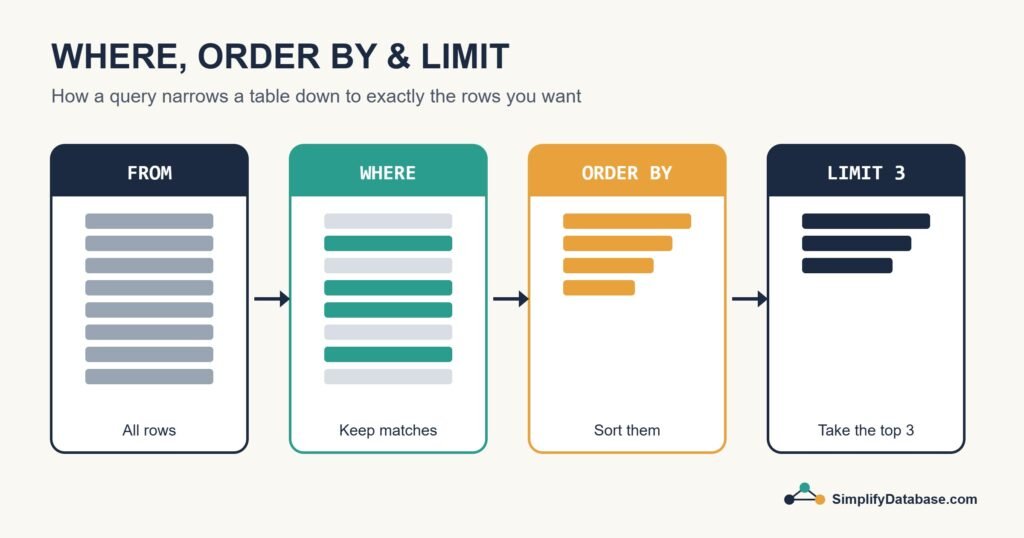
Three clauses do most of that work: WHERE, ORDER BY and LIMIT. Once you’re comfortable with them, you can answer most everyday questions about your data in one short query. If you haven’t written a query before, start with SQL for Complete Beginners and come back here.
The Sample Table We’ll Use
To keep things concrete, every example below uses a small orders table from an imaginary online bookshop:
| order_id | customer | city | amount | order_date |
|---|---|---|---|---|
| 1 | Sara | Manama | 25.00 | 2026-09-01 |
| 2 | Omar | Riffa | 80.50 | 2026-09-03 |
| 3 | Lina | Manama | 12.75 | 2026-09-04 |
| 4 | Yousef | Muharraq | 150.00 | 2026-09-10 |
| 5 | Huda | Manama | 64.20 | 2026-09-12 |
| 6 | Ali | Riffa | 9.99 | 2026-09-15 |
Six rows is tiny, but the queries work exactly the same on six million.
WHERE: Keep Only the Rows You Care About
WHERE is a filter. SQL checks every row against your condition and only keeps the ones where the condition is true.
SELECT customer, amount
FROM orders
WHERE city = 'Manama';
This returns Sara, Lina and Huda. Everyone else is dropped before you ever see them.
Comparison operators you’ll use all the time
| Operator | Meaning | Example |
|---|---|---|
= | Equal to | city = 'Riffa' |
<> or != | Not equal to | city <> 'Riffa' |
> / < | Greater / less than | amount > 50 |
>= / <= | Greater / less than or equal | amount <= 25 |
BETWEEN | Inside a range (inclusive) | amount BETWEEN 20 AND 100 |
IN | Matches any value in a list | city IN ('Riffa','Muharraq') |
LIKE | Matches a text pattern | customer LIKE 'S%' |
IS NULL | Has no value | city IS NULL |
Combining conditions with AND and OR
Real questions usually have more than one condition. “Show me big orders from Manama” becomes:
SELECT customer, amount
FROM orders
WHERE city = 'Manama'
  AND amount > 20;
That gives Sara (25.00) and Huda (64.20). Lina’s order is from Manama, but 12.75 doesn’t pass the second check.
Here’s a mistake I made more than once. Say you want orders over 50 from either Riffa or Muharraq:
-- Wrong: AND is evaluated before OR
WHERE city = 'Riffa' OR city = 'Muharraq' AND amount > 50

-- Right: brackets make your intent clear
WHERE (city = 'Riffa' OR city = 'Muharraq') AND amount > 50
Without brackets, SQL reads the first version as “any Riffa order, or a Muharraq order over 50”, so Ali’s 9.99 order sneaks in. When you mix AND and OR, just use brackets. It costs nothing and saves you from confusing results.
A quick word on NULL
NULL means “unknown”, and it doesn’t behave like a normal value. WHERE city = NULL returns nothing, ever. You have to write WHERE city IS NULL (or IS NOT NULL). Almost everyone trips on this at least once.
ORDER BY: Put the Results in a Useful Order
Without ORDER BY, the database returns rows in whatever order is convenient for it. That order can change, so never rely on it. If the order matters, ask for it:
SELECT customer, amount
FROM orders
ORDER BY amount DESC;
DESC means largest first. ASC (smallest first) is the default, so you can leave it out. Yousef’s 150.00 order comes out on top and Ali’s 9.99 is at the bottom.
Sorting by more than one column
You can sort by several columns. SQL sorts by the first one, then uses the next to break ties:
SELECT city, customer, amount
FROM orders
ORDER BY city ASC, amount DESC;
Now cities are listed alphabetically, and inside each city the biggest order comes first. This is handy for reports where you want groups that are easy to scan.
LIMIT: Only Take the First Few Rows
LIMIT tells the database to stop after a certain number of rows. On its own it isn’t very meaningful, but paired with ORDER BY it answers “top N” questions:
-- Top 3 biggest orders
SELECT customer, amount
FROM orders
ORDER BY amount DESC
LIMIT 3;
Result: Yousef (150.00), Omar (80.50), Huda (64.20).
One catch: not every database spells it LIMIT. MySQL, PostgreSQL and SQLite do. SQL Server uses TOP, and newer standard SQL uses FETCH FIRST:
| Database | Syntax for “top 3” |
|---|---|
| MySQL, PostgreSQL, SQLite | ... ORDER BY amount DESC LIMIT 3 |
| SQL Server | SELECT TOP 3 ... ORDER BY amount DESC |
| Oracle, PostgreSQL, SQL Server 2012+ | ... ORDER BY amount DESC OFFSET 0 ROWS FETCH FIRST 3 ROWS ONLY |
If you work with SQL Server a lot, like I do, you’ll be typing TOP far more often than LIMIT.
Paging with OFFSET
OFFSET skips rows before LIMIT starts counting. It’s how websites show “page 2” of results:
-- Rows 4 to 6 (page 2, 3 per page)
SELECT customer, amount
FROM orders
ORDER BY amount DESC
LIMIT 3 OFFSET 3;
Putting All Three Together
Here’s a query you might actually write at work: “Which two Manama orders this month were the largest?”
SELECT customer, amount, order_date
FROM orders
WHERE city = 'Manama'
  AND order_date >= '2026-09-01'
ORDER BY amount DESC
LIMIT 2;
Huda (64.20) and Sara (25.00). Short, readable, and it would work just as well on a table with millions of rows.
The Order SQL Actually Runs Things In
You write the clauses in one order, but the database processes them in another. Knowing this explains a lot of error messages:
FROMpicks the tableWHEREfilters the rowsSELECTpicks the columnsORDER BYsorts what’s leftLIMITcuts it down to size
This is why you can’t use a column alias from SELECT inside WHERE in most databases: at the time WHERE runs, the alias doesn’t exist yet. ORDER BY runs later, so it can use the alias.
Common Mistakes to Avoid
- Using
LIMITwithoutORDER BYand expecting the “top” rows. You’ll just get some rows. - Writing
= NULLinstead ofIS NULL. - Mixing
ANDandORwithout brackets. - Putting quotes around numbers (
amount > '50'). It often works, but it can force slow conversions or odd text comparisons. - Forgetting that text comparisons may be case-sensitive depending on the database settings.
Conclusion
WHERE decides which rows you keep, ORDER BY decides how they’re arranged, and LIMIT decides how many you see. Between them, they turn a huge table into a short, useful answer.
Try writing a few queries of your own on any table you have access to. Once these feel natural, the next step is summarising data with GROUP BY and aggregate functions, and then pulling data from more than one table with SQL JOINs.