
Names, email addresses, product codes, phone numbers, invoice numbers: a lot of what sits in a database is text. And a lot of everyday SQL work is fixing that text: trimming spaces from imported data, joining first and last names, pulling the domain out of an email, or padding an invoice number with zeros.
This guide covers the string functions you’ll use most, in both SQL Server and MySQL, with the small differences between them that cause the most confusion.
All the examples use this small Customers table. Notice the messy data: extra spaces, mixed case and a missing middle name, just like real imported data.
| CustomerID | FirstName | MiddleName | LastName | |
|---|---|---|---|---|
| 1 | ' sara ' | NULL | Ahmed | 'Sara.Ahmed@Example.com ' |
| 2 | Ali | K | Hassan | ali@mail.com |
| 3 | Mona | NULL | Saleh | mona@example.com |
1. Join text together: CONCAT and CONCAT_WS
-- Both SQL Server and MySQL
SELECT CONCAT(FirstName, ' ', LastName) AS FullName FROM Customers;

-- CONCAT_WS = "concat with separator": the separator goes first
SELECT CONCAT_WS(' ', FirstName, MiddleName, LastName) AS FullName FROM Customers;
-- Ali K Hassan
-- Mona Saleh      (the NULL middle name is skipped)
SQL Server also lets you join text with +, as in FirstName + ' ' + LastName. MySQL does not: there, + always means maths.
The NULL trap. This is the most common string bug, and the two databases behave differently:
| Expression | SQL Server | MySQL |
|---|---|---|
'Ali' + NULL | NULL | not used for text |
CONCAT('Ali', NULL) | 'Ali' (NULL is treated as empty) | NULL |
CONCAT_WS(' ', 'Ali', NULL, 'Hassan') | 'Ali Hassan' | 'Ali Hassan' |
So if one customer has no middle name, CONCAT(FirstName, ' ', MiddleName, ' ', LastName) returns NULL for that whole row in MySQL. CONCAT_WS skips NULL values in both databases (SQL Server 2017 and later), which makes it the safest choice for names and addresses. More about this in NULL in SQL Explained Simply.
2. Length of a string: LEN, CHAR_LENGTH and LENGTH
| You want | SQL Server | MySQL |
|---|---|---|
| Number of characters | LEN(s) | CHAR_LENGTH(s) |
| Number of bytes | DATALENGTH(s) | LENGTH(s) |
-- SQL Server
SELECT LEN('abc   ');          -- 3  (trailing spaces are NOT counted)
SELECT DATALENGTH(N'abc');     -- 6  (nvarchar uses 2 bytes per character)

-- MySQL (utf8mb4)
SELECT CHAR_LENGTH('café');    -- 4
SELECT LENGTH('café');         -- 5  (é takes 2 bytes)
Two surprises to remember. In SQL Server, LEN ignores spaces at the end of the text. In MySQL, LENGTH counts bytes, not characters, so any accented or Arabic text gives a bigger number than you expect. When you mean “how many characters”, use CHAR_LENGTH in MySQL.
3. Change case: UPPER and LOWER
SELECT UPPER('sql');   -- SQL
SELECT LOWER('SQL');   -- sql

-- Clean up email addresses before saving or comparing them
SELECT LOWER(TRIM(Email)) AS Email FROM Customers;
-- sara.ahmed@example.com
These work the same in both databases. You usually don’t need them for searching, though: the default settings (collation) in both SQL Server and MySQL are case-insensitive, so WHERE LastName = 'ahmed' already finds Ahmed.
4. Remove extra spaces: TRIM, LTRIM and RTRIM
SELECT TRIM('  sara ');    -- 'sara'   (both sides)
SELECT LTRIM('  sara ');   -- 'sara '  (left side only)
SELECT RTRIM('  sara ');   -- '  sara' (right side only)
LTRIM and RTRIM work everywhere. TRIM works in MySQL and in SQL Server 2017 and later. On older SQL Server versions, use LTRIM(RTRIM(s)).
Data imported from Excel or CSV files is often full of invisible spaces. They break comparisons and joins in ways that are hard to spot, so trim text columns when you import them.
5. Cut out part of a string: LEFT, RIGHT and SUBSTRING
SELECT LEFT('SimplifyDatabase', 8);          -- Simplify
SELECT RIGHT('INV-2026-0042', 4);            -- 0042
SELECT SUBSTRING('INV-2026-0042', 5, 4);     -- 2026  (start at position 5, take 4)

-- MySQL only: a negative start counts from the end
SELECT SUBSTRING('INV-2026-0042', -4);       -- 0042
Positions in SQL start at 1, not 0 as in most programming languages. In SQL Server, SUBSTRING always needs all three arguments. In MySQL, the length is optional.
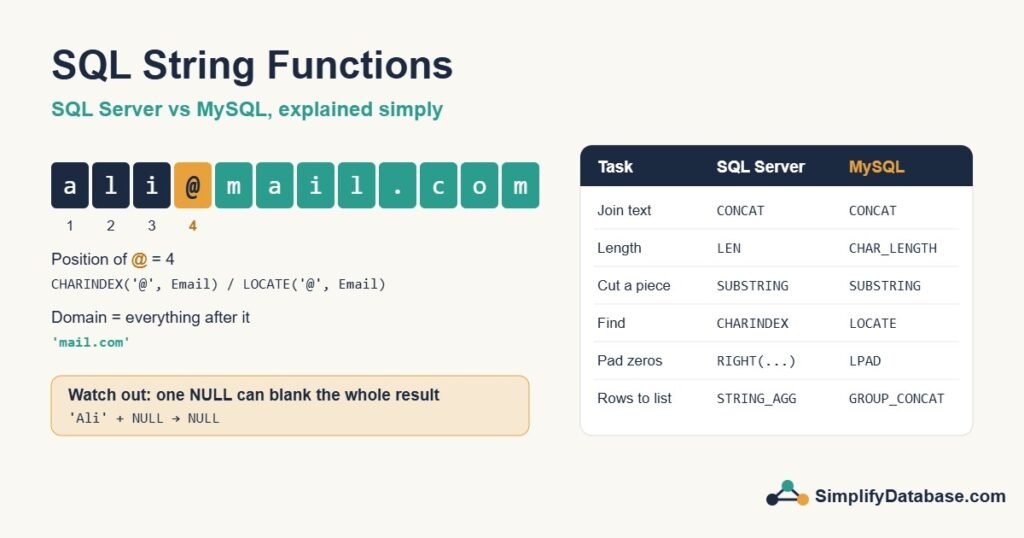
6. Find text inside a string: CHARINDEX and LOCATE
-- SQL Server: CHARINDEX(what_to_find, where_to_look)
SELECT CHARINDEX('@', 'ali@mail.com');      -- 4

-- MySQL: LOCATE(what_to_find, where_to_look)
SELECT LOCATE('@', 'ali@mail.com');         -- 4
-- or INSTR(where_to_look, what_to_find): note the reversed order!
SELECT INSTR('ali@mail.com', '@');          -- 4
If the text isn’t found, all three return 0. Finding a position is rarely the goal. You use it together with SUBSTRING, LEFT or RIGHT, as the next section shows.
7. Real example: split emails and names
Get the domain of each email address, and the first word of a full name:
-- SQL Server
SELECT Email,
       SUBSTRING(Email, CHARINDEX('@', Email) + 1, LEN(Email)) AS Domain
FROM Customers;

SELECT FullName,
       LEFT(FullName, CHARINDEX(' ', FullName + ' ') - 1) AS FirstWord
FROM Staff;
The FullName + ' ' trick adds a space at the end, so a single-word name like Sara still works instead of causing an error.
-- MySQL: SUBSTRING_INDEX(string, delimiter, count) makes this easy
SELECT Email, SUBSTRING_INDEX(Email, '@', -1) AS Domain FROM Customers;   -- everything after the last @
SELECT FullName, SUBSTRING_INDEX(FullName, ' ', 1) AS FirstWord FROM Staff; -- everything before the first space
8. Replace text: REPLACE
SELECT REPLACE('050-123-4567', '-', '');    -- 0501234567

-- Fix a renamed domain in every row
UPDATE Customers
SET Email = REPLACE(Email, '@oldcompany.com', '@newcompany.com')
WHERE Email LIKE '%@oldcompany.com';
REPLACE replaces every match. In MySQL it is case-sensitive. In SQL Server it follows the column’s collation, which is usually case-insensitive. Before running an UPDATE like this, run it as a SELECT first to check the result. See SQL INSERT, UPDATE and DELETE Explained Simply.
9. Pad numbers with zeros: LPAD and the RIGHT trick
-- MySQL
SELECT CONCAT('INV-', LPAD(7, 5, '0'));                         -- INV-00007

-- SQL Server has no LPAD. Add zeros in front, then keep the last 5 characters:
SELECT 'INV-' + RIGHT('00000' + CAST(7 AS varchar(5)), 5);      -- INV-00007
-- or, simpler but slower on big results:
SELECT 'INV-' + FORMAT(7, '00000');                              -- INV-00007
Don’t forget the CAST in SQL Server. Without it, '00000' + 7 is treated as maths and returns the number 7, not the text ‘00007’.
10. Turn many rows into one list: STRING_AGG and GROUP_CONCAT
-- SQL Server 2017 and later
SELECT City, STRING_AGG(FirstName, ', ') WITHIN GROUP (ORDER BY FirstName) AS Customers
FROM Customers
GROUP BY City;

-- MySQL
SELECT City, GROUP_CONCAT(FirstName ORDER BY FirstName SEPARATOR ', ') AS Customers
FROM Customers
GROUP BY City;

-- One row per city, for example:  Manama | Ali, Huda, Yusuf
This is handy for reports such as “all products in each order” on one line. In MySQL, GROUP_CONCAT cuts the result at 1,024 characters by default. Raise the group_concat_max_len setting if your lists are long. To learn more about grouping, read SQL GROUP BY & Aggregate Functions Explained Simply.
The opposite job, splitting ‘a,b,c’ into rows, is done with STRING_SPLIT('a,b,c', ',') in SQL Server 2016 and later. MySQL has no built-in equivalent.
Mistake: string functions on a column in WHERE
-- Slow on a big table: the index on LastName can't be used for a seek
WHERE LEFT(LastName, 2) = 'Ah'

-- Fast: same rows, and the index can be used
WHERE LastName LIKE 'Ah%'
The same rule applies to UPPER, TRIM and SUBSTRING. When you wrap the column in a function, the database must calculate it for every row. Keep the column bare in WHERE, and use string functions freely in SELECT. I explain why in Index Seek vs Index Scan: Why SQL Server Ignores Your Index.
One more warning: never build a SQL statement by joining strings with user input, for example 'SELECT * FROM Users WHERE Name = ''' + @input + ''''. That’s how SQL injection happens. Use parameters instead.
Cheat sheet: SQL Server vs MySQL
| Task | SQL Server | MySQL |
|---|---|---|
| Join text | CONCAT(a, b), a + b | CONCAT(a, b) |
| Join, skipping NULLs | CONCAT_WS(' ', a, b) | CONCAT_WS(' ', a, b) |
| Characters | LEN(s) | CHAR_LENGTH(s) |
| Bytes | DATALENGTH(s) | LENGTH(s) |
| Upper / lower case | UPPER(s), LOWER(s) | UPPER(s), LOWER(s) |
| Remove spaces | TRIM(s) (2017+) | TRIM(s) |
| First / last n characters | LEFT(s, n), RIGHT(s, n) | LEFT(s, n), RIGHT(s, n) |
| Part of a string | SUBSTRING(s, start, len) | SUBSTRING(s, start, len) |
| Find position | CHARINDEX(find, s) | LOCATE(find, s) |
| Replace | REPLACE(s, old, new) | REPLACE(s, old, new) |
| Pad with zeros | RIGHT('00000' + CAST(n AS varchar), 5) | LPAD(n, 5, '0') |
| Rows to one list | STRING_AGG(col, ', ') (2017+) | GROUP_CONCAT(col SEPARATOR ', ') |
Summary
- Use
CONCAT_WSto join names and addresses: it skips NULL values in both databases. - In MySQL,
CONCATreturns NULL if any part is NULL. In SQL Server,'a' + NULLis NULL. - Count characters with
LEN(SQL Server) orCHAR_LENGTH(MySQL). - Positions start at 1, and “not found” returns 0.
- Trim imported text, and keep string functions out of
WHEREon indexed columns.
Related articles
- SQL Date Functions Explained Simply: the same idea for dates, in SQL Server and MySQL.
- NULL in SQL Explained Simply: why one NULL can blank a whole result.
- SQL Data Types Explained Simply: varchar vs nvarchar, and choosing text lengths.
- The SQL CASE Expression Explained Simply: build text labels from your data.