
“Show me the latest order for each customer.” “Show the top 3 products in each category.” “Show each employee’s most recent salary change.” These look like simple reports, but GROUP BY alone can’t answer them. This problem is so common it has a name: Top N per group (or “greatest-n-per-group”).
This guide shows the standard way to solve it in SQL Server with ROW_NUMBER(), how to get the top 3 instead of the top 1, how to handle ties, and two other methods (CROSS APPLY and WITH TIES) with when to use each. The main method also works in MySQL 8 and PostgreSQL.
The sample data
We’ll use two tables: Customers and Orders. Lina is a customer who hasn’t ordered anything yet, and Sara placed two orders on the same day.
| OrderID | CustomerID | OrderDate | Amount |
|---|---|---|---|
| 1 | 1 (Ali) | 2026-09-03 | 250.00 |
| 2 | 1 (Ali) | 2026-09-20 | 120.00 |
| 3 | 1 (Ali) | 2026-10-02 | 310.00 |
| 4 | 2 (Sara) | 2026-09-11 | 90.00 |
| 5 | 2 (Sara) | 2026-10-05 | 400.00 |
| 6 | 2 (Sara) | 2026-10-05 | 75.00 |
| 7 | 3 (Omar) | 2026-08-15 | 500.00 |
| 8 | 3 (Omar) | 2026-09-28 | 60.00 |
The goal: one row per customer, showing their whole latest order (date and amount and order number).
Why GROUP BY isn’t enough
The first thing most people try is MAX:
SELECT CustomerID, MAX(OrderDate) AS LastOrderDate
FROM Orders
GROUP BY CustomerID;| CustomerID | LastOrderDate |
|---|---|
| 1 | 2026-10-02 |
| 2 | 2026-10-05 |
| 3 | 2026-09-28 |
That gives the date, but not the rest of the row. You can’t just add Amount to the SELECT, because SQL Server doesn’t know which amount you mean (it gives the error “Column ‘Orders.Amount’ is invalid in the select list”). And MAX(Amount) would return the biggest amount, which may come from a different order.
The old fix is to join the result back to Orders on the customer and the date. It works, but look at Sara:
| OrderID | CustomerID | OrderDate | Amount |
|---|---|---|---|
| 3 | 1 | 2026-10-02 | 310.00 |
| 5 | 2 | 2026-10-05 | 400.00 |
| 6 | 2 | 2026-10-05 | 75.00 |
| 8 | 3 | 2026-09-28 | 60.00 |
She has two orders on her latest date, so she appears twice. You asked for one row per customer and got four rows for three customers. In a report that sums the amounts, this quietly doubles numbers.
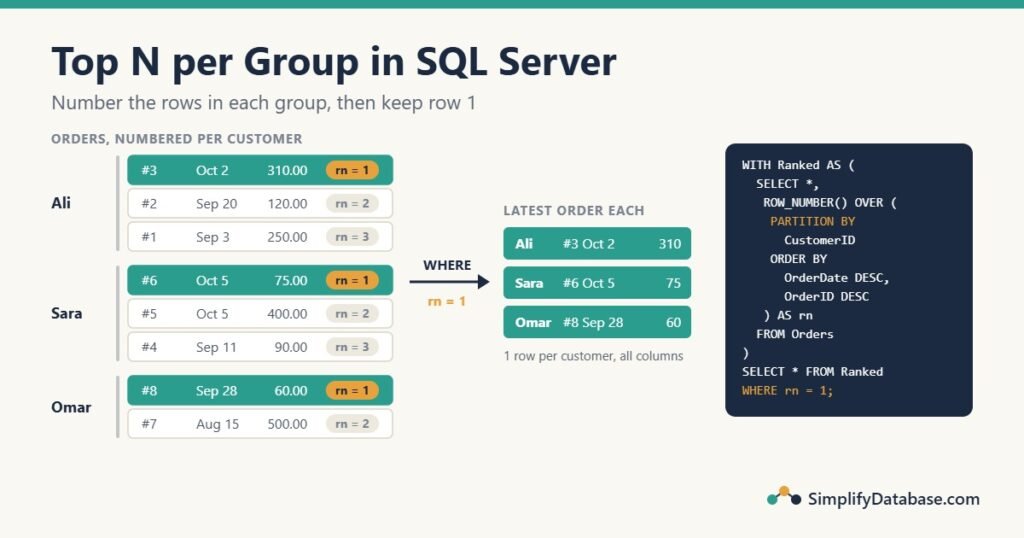
The standard method: ROW_NUMBER() in a CTE
ROW_NUMBER() numbers the rows inside each group. PARTITION BY says what a group is, and the ORDER BY inside OVER says which row gets number 1:
SELECT OrderID, CustomerID, OrderDate, Amount,
       ROW_NUMBER() OVER (PARTITION BY CustomerID
                          ORDER BY OrderDate DESC, OrderID DESC) AS rn
FROM Orders;| OrderID | CustomerID | OrderDate | Amount | rn |
|---|---|---|---|---|
| 3 | 1 | 2026-10-02 | 310.00 | 1 |
| 2 | 1 | 2026-09-20 | 120.00 | 2 |
| 1 | 1 | 2026-09-03 | 250.00 | 3 |
| 6 | 2 | 2026-10-05 | 75.00 | 1 |
| 5 | 2 | 2026-10-05 | 400.00 | 2 |
| 4 | 2 | 2026-09-11 | 90.00 | 3 |
| 8 | 3 | 2026-09-28 | 60.00 | 1 |
| 7 | 3 | 2026-08-15 | 500.00 | 2 |
The numbering starts again at 1 for every customer, and the newest order is always number 1. Now keep only those rows. You can’t filter on rn in the same query (more on that below), so wrap it in a CTE:
WITH Ranked AS (
    SELECT OrderID, CustomerID, OrderDate, Amount,
           ROW_NUMBER() OVER (PARTITION BY CustomerID
                              ORDER BY OrderDate DESC, OrderID DESC) AS rn
    FROM Orders
)
SELECT OrderID, CustomerID, OrderDate, Amount
FROM Ranked
WHERE rn = 1;| OrderID | CustomerID | OrderDate | Amount |
|---|---|---|---|
| 3 | 1 | 2026-10-02 | 310.00 |
| 6 | 2 | 2026-10-05 | 75.00 |
| 8 | 3 | 2026-09-28 | 60.00 |
Exactly one row per customer, with every column of that order. ROW_NUMBER() never gives two rows the same number, so duplicates are impossible. Sara’s tie is broken by OrderID DESC: order 6 was entered after order 5, so it counts as the latest.
If CTEs are new to you, see SQL Subqueries vs. CTEs Explained Simply. A derived table (FROM (SELECT ...) AS Ranked) works exactly the same way.
Top 3 instead of top 1
Change rn = 1 to rn <= 3, and change the ORDER BY to whatever “top” means. Here are each customer’s 2 biggest orders:
WITH Ranked AS (
    SELECT OrderID, CustomerID, Amount,
           ROW_NUMBER() OVER (PARTITION BY CustomerID
                              ORDER BY Amount DESC, OrderID) AS rn
    FROM Orders
)
SELECT CustomerID, OrderID, Amount, rn
FROM Ranked
WHERE rn <= 2
ORDER BY CustomerID, rn;| CustomerID | OrderID | Amount | rn |
|---|---|---|---|
| 1 | 3 | 310.00 | 1 |
| 1 | 1 | 250.00 | 2 |
| 2 | 5 | 400.00 | 1 |
| 2 | 4 | 90.00 | 2 |
| 3 | 7 | 500.00 | 1 |
| 3 | 8 | 60.00 | 2 |
The same pattern answers many report questions: the top 5 products per category (PARTITION BY CategoryID ORDER BY SalesQty DESC), the latest price per item, the last login per user, or the second-latest order (rn = 2).
Ties: ROW_NUMBER vs RANK vs DENSE_RANK
What should happen when two rows are equally “top”, like Sara’s two orders on 5 October? You choose with the function:
| OrderID | OrderDate | ROW_NUMBER | RANK | DENSE_RANK |
|---|---|---|---|---|
| 5 | 2026-10-05 | 1 | 1 | 1 |
| 6 | 2026-10-05 | 2 | 1 | 1 |
| 4 | 2026-09-11 | 3 | 3 | 2 |
(Here the ORDER BY is only OrderDate DESC, with no tie-breaker.)
- ROW_NUMBER: always exactly N rows per group. Ties are split, so add a tie-breaker column to decide how they’re split.
- RANK: tied rows share a number, so
rn = 1returns both of Sara’s orders. Use it when “all orders on the latest day” is what you want. - DENSE_RANK: like
RANKbut with no gaps (1, 1, 2). Use it for “the top 3 amounts“, where several rows may share an amount.
The most common mistake is using ROW_NUMBER with an ORDER BY that isn’t unique. Then the result for tied rows can change between runs, and two people running the same report get different answers. Always end the ORDER BY with a unique column, usually the ID.
Customers with no orders
Lina has no orders, so she can’t appear in a query that reads only Orders. To list every customer, start from Customers and LEFT JOIN the ranked rows:
WITH Ranked AS (
    SELECT CustomerID, OrderDate, Amount,
           ROW_NUMBER() OVER (PARTITION BY CustomerID
                              ORDER BY OrderDate DESC, OrderID DESC) AS rn
    FROM Orders
)
SELECT c.CustomerName, r.OrderDate AS LastOrderDate, r.Amount
FROM Customers AS c
LEFT JOIN Ranked AS r
       ON r.CustomerID = c.CustomerID
AND r.rn = 1;| CustomerName | LastOrderDate | Amount |
|---|---|---|
| Ali | 2026-10-02 | 310.00 |
| Sara | 2026-10-05 | 75.00 |
| Omar | 2026-09-28 | 60.00 |
| Lina | NULL | NULL |
Note that r.rn = 1 is in the ON clause, not in WHERE. In WHERE it would remove Lina again, because her rn is NULL. See NULL in SQL Explained Simply for more traps like this one.
Method 2: CROSS APPLY with TOP (SQL Server)
SQL Server has a second way that reads almost like English: “for each customer, get the TOP 1 order”.
SELECT c.CustomerName, o.OrderID, o.OrderDate, o.Amount
FROM Customers AS c
CROSS APPLY (
    SELECT TOP (1) OrderID, OrderDate, Amount
    FROM Orders
    WHERE Orders.CustomerID = c.CustomerID
    ORDER BY OrderDate DESC, OrderID DESC
) AS o;
CROSS APPLY runs the inner query once for each customer. Use OUTER APPLY instead to keep customers with no orders (Lina gets NULLs, like a LEFT JOIN). Change TOP (1) to TOP (3) for the top 3.
When is it better than ROW_NUMBER? When there are few groups with many rows each, and an index matches the inner query. For example, 200 customers with 50,000 orders each: with an index on (CustomerID, OrderDate DESC), SQL Server does 200 small index seeks and reads about 200 rows. ROW_NUMBER has to number all 10 million rows before it can throw most of them away.
The opposite is also true: with many groups and few rows each (a million customers with 3 orders each), ROW_NUMBER reading the table once is usually faster than a million seeks. When it matters, test both and compare them with SET STATISTICS IO ON and the execution plan.
In MySQL 8.0.14+ and PostgreSQL, the same idea is written CROSS JOIN LATERAL (... LIMIT 1).
Method 3: TOP (1) WITH TIES (short, but slow)
You’ll sometimes see this short trick:
SELECT TOP (1) WITH TIES OrderID, CustomerID, OrderDate, Amount
FROM Orders
ORDER BY ROW_NUMBER() OVER (PARTITION BY CustomerID
                            ORDER BY OrderDate DESC, OrderID DESC);
Every customer’s latest order has row number 1, and WITH TIES returns every row that ties with the first one, so you get one row per customer with no CTE. It’s correct, but SQL Server has to sort the whole result by the row number, which makes it slower on big tables. It’s fine for a quick ad-hoc query; use the CTE version in reports and stored procedures.
Where to put the filter
This one causes real bugs. Compare these two questions:
- “For each customer, the latest order of 100 or more.”
- “Customers whose latest order was 100 or more.”
They sound alike, but the filter goes in a different place:
-- 1: filter BEFORE numbering (inside the CTE)
WITH Ranked AS (
    SELECT OrderID, CustomerID, OrderDate, Amount,
           ROW_NUMBER() OVER (PARTITION BY CustomerID
                              ORDER BY OrderDate DESC, OrderID DESC) AS rn
    FROM Orders
    WHERE Amount >= 100
)
SELECT OrderID, CustomerID, OrderDate, Amount
FROM Ranked
WHERE rn = 1;

-- 2: filter AFTER numbering (outside the CTE)
WITH Ranked AS (
    SELECT OrderID, CustomerID, OrderDate, Amount,
           ROW_NUMBER() OVER (PARTITION BY CustomerID
                              ORDER BY OrderDate DESC, OrderID DESC) AS rn
    FROM Orders
)
SELECT OrderID, CustomerID, OrderDate, Amount
FROM Ranked
WHERE rn = 1 AND Amount >= 100;
The first returns 3 rows (orders 3, 5 and 7: Sara’s 400 and Omar’s 500 are older, but they’re the latest of 100 or more). The second returns only Ali’s order 3, because Sara’s and Omar’s latest orders are under 100. Decide which question you’re answering before you write the query.
Make it fast: the right index
Both main methods want an index that starts with the group column and then the order column, in the same direction as the query:
CREATE INDEX IX_Orders_Customer_Latest
ON Orders (CustomerID, OrderDate DESC, OrderID DESC)
INCLUDE (Amount);
With it, SQL Server can read each customer’s orders already sorted, so there’s no Sort operator in the plan, and INCLUDE means it doesn’t have to look up Amount in the table. Only add it if this query is slow and runs often; every index slows down inserts and updates a little. Missing Indexes in SQL Server explains how to decide.
Common mistakes
- Filtering on the row number in the same query.
WHERE rn = 1next to theROW_NUMBER()gives “Invalid column name ‘rn'”, becauseWHEREruns before theSELECTlist is calculated. Use a CTE or a derived table. - No tie-breaker.
ORDER BY OrderDate DESCalone can return a different row each time when dates tie. Add the ID. - Using
GROUP BY+MAXand joining back. It returns duplicates on ties. UseROW_NUMBER. rn = 1inWHEREafter aLEFT JOIN. It turns theLEFT JOINinto an inner join. Put it inON.- Filter in the wrong place. Inside the CTE and outside the CTE answer different questions.
In MySQL and PostgreSQL
The ROW_NUMBER() + CTE method works unchanged in MySQL 8.0+, MariaDB 10.2+ and PostgreSQL (all the examples above were tested on MariaDB). MySQL 5.7 has no window functions, so there you need the join-back method and must handle ties yourself.
PostgreSQL also has a shortcut for the top 1 per group:
SELECT DISTINCT ON (CustomerID) OrderID, CustomerID, OrderDate, Amount
FROM Orders
ORDER BY CustomerID, OrderDate DESC, OrderID DESC;
DISTINCT ON keeps the first row of each customer in the ORDER BY order. It only exists in PostgreSQL.
Practice exercises
- Show each customer’s first order (the oldest one).
- Show each customer’s second-latest order.
- Show the biggest order of each month (one row per month).
Answers:
-- 1: same pattern, ascending order
WITH R AS (
    SELECT CustomerID, OrderID, OrderDate,
           ROW_NUMBER() OVER (PARTITION BY CustomerID
                              ORDER BY OrderDate, OrderID) AS rn
    FROM Orders
)
SELECT CustomerID, OrderID, OrderDate FROM R WHERE rn = 1;

-- 2: rn = 2 (customers with only one order don't appear)
WITH R AS (
    SELECT CustomerID, OrderID, OrderDate,
           ROW_NUMBER() OVER (PARTITION BY CustomerID
                              ORDER BY OrderDate DESC, OrderID DESC) AS rn
    FROM Orders
)
SELECT CustomerID, OrderID, OrderDate FROM R WHERE rn = 2;

-- 3: the group is the month, not the customer
WITH R AS (
    SELECT YEAR(OrderDate) AS OrderYear, MONTH(OrderDate) AS OrderMonth,
           OrderID, CustomerID, Amount,
           ROW_NUMBER() OVER (PARTITION BY YEAR(OrderDate), MONTH(OrderDate)
                              ORDER BY Amount DESC, OrderID) AS rn
    FROM Orders
)
SELECT OrderYear, OrderMonth, OrderID, CustomerID, Amount
FROM R
WHERE rn = 1
ORDER BY OrderYear, OrderMonth;
Answer 3 returns order 7 (August, 500.00), order 1 (September, 250.00) and order 5 (October, 400.00).
Summary
- “Latest record per group” and “top N per group” are the same problem.
GROUP BYalone can’t return the whole row. - The standard answer:
ROW_NUMBER() OVER (PARTITION BY group ORDER BY ...)in a CTE, thenWHERE rn = 1(orrn <= N). - Always end the
ORDER BYwith a unique column. UseRANKorDENSE_RANKonly when you want ties returned. CROSS APPLY+TOPis often faster with few groups and many rows per group.OUTER APPLYkeeps groups with no rows.- Filter inside the CTE or outside it depending on the question, and index
(group column, order column).
Related articles
- SQL Window Functions Explained Simply: how
ROW_NUMBER,RANKandOVERwork, from the beginning. - Running Totals in SQL Server: the first article in this reporting series, with
SUM() OVER. - SQL Subqueries vs. CTEs Explained Simply: the
WITHsyntax used throughout this article. - SQL GROUP BY and Aggregate Functions Explained Simply: when one total per group is all you need.