
Your first SQL interview is usually not about tricky puzzles. Interviewers want to see that you understand the basics clearly: how tables connect, how grouping works, what NULL really means, and whether you can write a simple query without panicking.
Here are 25 questions that come up again and again for junior developer, data analyst and support roles. Each one has a short answer you can say out loud, and a link to a full article if you want to go deeper. The examples work in both SQL Server and MySQL unless noted.
How to use this list: read the question, try to answer it yourself first, then check. Saying an answer out loud is very different from recognising it on a page.
The examples use these tables: Employees (EmployeeID, Name, Email, ManagerID, DepartmentID, Salary), Departments (DepartmentID, DeptName) and Orders (OrderID, CustomerID, OrderDate, Amount).
Part 1: SQL basics
1. What is SQL, and what is a database?
A database is an organised collection of data, usually stored in tables made of rows and columns. A DBMS (database management system) such as SQL Server, MySQL or PostgreSQL is the software that stores the data and lets you work with it. SQL (Structured Query Language) is the language you use to ask it questions and change the data. More in What Is a Database?.
2. What are DDL, DML, DCL and TCL?
| Group | Meaning | Commands |
|---|---|---|
| DDL | Data Definition Language: defines structure | CREATE, ALTER, DROP, TRUNCATE |
| DML | Data Manipulation Language: works with the data | SELECT, INSERT, UPDATE, DELETE |
| DCL | Data Control Language: permissions | GRANT, REVOKE |
| TCL | Transaction Control Language | COMMIT, ROLLBACK, SAVEPOINT |
3. What is the difference between DELETE, TRUNCATE and DROP?
| DELETE | TRUNCATE | DROP | |
|---|---|---|---|
| Removes | Some or all rows | All rows | The whole table |
| WHERE allowed? | Yes | No | No |
| Table structure stays? | Yes | Yes | No |
| Speed on big tables | Slow (row by row) | Very fast | Very fast |
| Resets identity / auto-increment | No | Yes | Table is gone |
| Fires DELETE triggers | Yes | No | No |
A detail that impresses interviewers: in SQL Server you can roll back a TRUNCATE inside a transaction, but in MySQL TRUNCATE commits automatically and cannot be undone. See SQL INSERT, UPDATE and DELETE Explained Simply.
4. What is the difference between WHERE and HAVING?
WHERE filters rows before grouping. HAVING filters groups after GROUP BY, so it can use aggregates like SUM and COUNT.
SELECT DepartmentID, AVG(Salary) AS AvgSalary
FROM Employees
WHERE Salary > 3000            -- rows
GROUP BY DepartmentID
HAVING AVG(Salary) > 7000;     -- groups
Full explanation: HAVING vs WHERE in SQL.
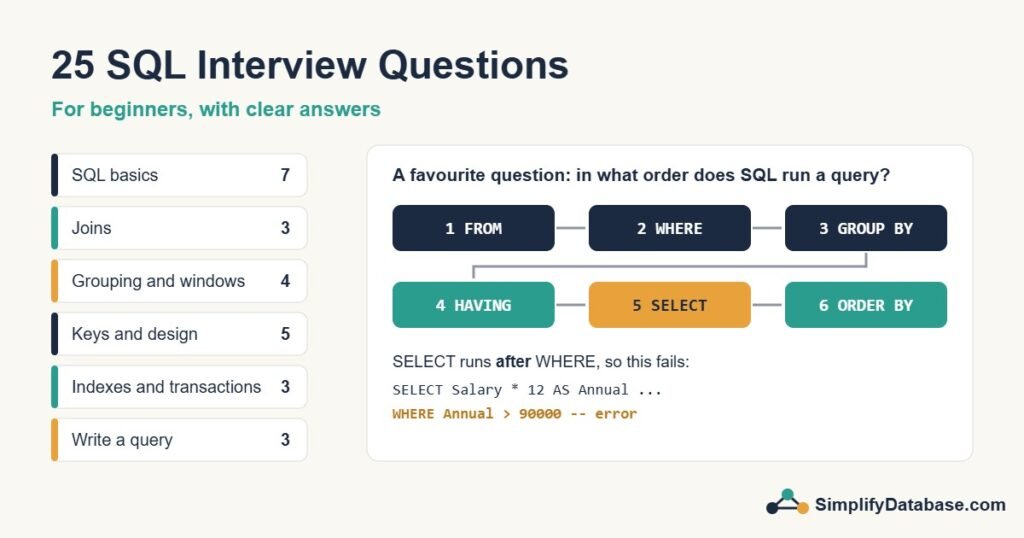
5. In what order does SQL run a SELECT query?
Not in the order you write it. The logical order is: FROM → WHERE → GROUP BY → HAVING → SELECT → ORDER BY. That’s why a column alias created in SELECT can’t be used in WHERE (it doesn’t exist yet), but can be used in ORDER BY:
SELECT Name, Salary * 12 AS AnnualSalary
FROM Employees
WHERE AnnualSalary > 90000;     -- error: unknown column 'AnnualSalary'

SELECT Name, Salary * 12 AS AnnualSalary
FROM Employees
WHERE Salary * 12 > 90000       -- works
ORDER BY AnnualSalary DESC;     -- alias is fine here
6. What is NULL? Why does “= NULL” not work?
NULL means “unknown” or “no value”. It is not zero and not an empty string. Any comparison with NULL, even NULL = NULL, gives unknown instead of true, so WHERE ManagerID = NULL returns no rows. Use IS NULL and IS NOT NULL:
SELECT Name FROM Employees WHERE ManagerID IS NULL; -- the top bossMore in NULL in SQL Explained Simply.
7. What is the difference between UNION and UNION ALL?
Both stack the results of two queries on top of each other. UNION removes duplicate rows, which takes extra work. UNION ALL keeps every row and is faster. Use UNION ALL unless you really need duplicates removed. See UNION vs UNION ALL.
Part 2: Joins
8. What types of joins are there?
- INNER JOIN: only rows that match in both tables.
- LEFT JOIN: all rows from the left table, plus matches from the right (NULL where there is no match).
- RIGHT JOIN: the opposite of LEFT JOIN. Rarely used, since you can swap the tables.
- FULL OUTER JOIN: all rows from both tables. SQL Server supports it. MySQL doesn’t, so you combine a LEFT and a RIGHT join with
UNION. - CROSS JOIN: every row combined with every row (rarely what you want).
With pictures and examples: SQL JOINs Explained Simply.
9. How do you find rows in one table with no match in another?
For example, departments that have no employees. Two common answers:
-- LEFT JOIN, then keep the rows where the right side is missing
SELECT d.DeptName
FROM Departments d
LEFT JOIN Employees e ON e.DepartmentID = d.DepartmentID
WHERE e.EmployeeID IS NULL;

-- NOT EXISTS: often the clearest
SELECT d.DeptName
FROM Departments d
WHERE NOT EXISTS (SELECT 1 FROM Employees e WHERE e.DepartmentID = d.DepartmentID);
Be careful with NOT IN: if the subquery returns even one NULL, NOT IN returns no rows at all.
10. What is a self join?
A table joined to itself. The classic example is employees and their managers, who are stored in the same table:
SELECT e.Name AS Employee, m.Name AS Manager
FROM Employees e
LEFT JOIN Employees m ON e.ManagerID = m.EmployeeID;

-- Follow-up question: who earns more than their manager?
SELECT e.Name, e.Salary, m.Name AS Manager, m.Salary AS ManagerSalary
FROM Employees e
JOIN Employees m ON e.ManagerID = m.EmployeeID
WHERE e.Salary > m.Salary;
Part 3: Grouping and window functions
11. What is the difference between COUNT(*), COUNT(column) and COUNT(DISTINCT column)?
COUNT(*)counts all rows.COUNT(DepartmentID)counts rows where DepartmentID is not NULL.COUNT(DISTINCT DepartmentID)counts the different non-NULL values.
So on a table of 6 employees where one has no department, these could return 6, 5 and 2.
12. What is the rule for columns in a GROUP BY query?
Every column in the SELECT list must either be inside an aggregate function (SUM, COUNT, AVG, MIN, MAX) or listed in GROUP BY. SELECT DepartmentID, Name, COUNT(*) ... GROUP BY DepartmentID is an error, because there are many names in each department and SQL doesn’t know which one to show. See SQL GROUP BY & Aggregate Functions Explained Simply.
13. What is the difference between a subquery and a CTE?
A subquery is a query inside another query. A CTE (Common Table Expression) is a named query written at the top with WITH. They can often do the same job, but a CTE is easier to read, can be referenced more than once in the same statement, and can be recursive (for example, to walk an employee-manager tree). More in SQL Subqueries vs CTEs Explained Simply.
14. What is the difference between ROW_NUMBER, RANK and DENSE_RANK?
They number rows in order, but treat ties differently. Two employees earning 7,500:
| Salary | ROW_NUMBER | RANK | DENSE_RANK |
|---|---|---|---|
| 9,000 | 1 | 1 | 1 |
| 8,200 | 2 | 2 | 2 |
| 7,500 | 3 | 3 | 3 |
| 7,500 | 4 | 3 | 3 |
| 7,000 | 5 | 5 | 4 |
ROW_NUMBER always gives unique numbers (which of the tied rows gets 3 is not guaranteed). RANK gives ties the same number and then skips. DENSE_RANK gives ties the same number and doesn’t skip. See SQL Window Functions Explained Simply.
Part 4: Keys, constraints and design
15. What is the difference between a primary key and a unique key?
Both stop duplicate values. A table can have only one primary key, and it can never be NULL. It can have many unique keys, and they allow NULL (SQL Server allows one NULL in a unique column, MySQL allows many). See SQL Constraints Explained Simply.
16. What is a foreign key?
A column that points to the primary key of another table, for example Employees.DepartmentID pointing to Departments.DepartmentID. The database then refuses values that don’t exist in the other table, which protects the data from “orphan” rows. See Primary Keys vs Foreign Keys.
17. What is normalization?
Organising tables so each fact is stored in only one place, which avoids duplicated data and update mistakes. A short answer: 1NF means one value per cell and no repeating groups, 2NF means every column depends on the whole key, and 3NF means non-key columns don’t depend on other non-key columns. See Database Normalization Explained Simply.
18. What is a view?
A saved SELECT query that you can use like a table. It stores the query, not the data (unless it’s an indexed or materialised view). Views hide complex joins and can limit which columns a user sees. See SQL Views Explained Simply.
19. What is the difference between a stored procedure and a function?
A function returns a value or a table and can be used inside a SELECT. It is meant for calculations, and in SQL Server it isn’t allowed to change table data. A stored procedure is called on its own (EXEC in SQL Server, CALL in MySQL) and can do almost anything: insert, update, use transactions and return several result sets. See SQL Stored Procedures Explained Simply.
Part 5: Indexes and transactions
20. What is an index? Clustered vs nonclustered?
An index is like the index at the back of a book: it lets the database find rows without reading the whole table. A clustered index decides the physical order of the table’s rows, so there can be only one per table. A nonclustered index is a separate structure that points back to the rows, and you can have many. In SQL Server the primary key is clustered by default. In MySQL (InnoDB) the table is always clustered by its primary key. See SQL Indexes Explained Simply.
21. Why might a query not use an index?
The most common reason is a function or calculation on the column in WHERE, such as WHERE YEAR(OrderDate) = 2026 or WHERE LEFT(Name, 2) = 'Ah'. Others: comparing different data types, a leading wildcard (LIKE '%son'), or a query that returns so many rows that scanning is cheaper. Rewrite to keep the column bare: WHERE OrderDate >= '2026-01-01' AND OrderDate < '2027-01-01'. See Index Seek vs Index Scan.
22. What is a transaction, and what does ACID mean?
A transaction is a group of statements that succeed or fail together, like moving money between two accounts. ACID describes what that guarantees: Atomicity (all or nothing), Consistency (the rules and constraints still hold), Isolation (transactions don't see each other's half-finished work) and Durability (once committed, the change survives a crash). See SQL Transactions and ACID Explained Simply.
Part 6: Write a query
Most interviews include at least one "write it on the whiteboard" task. These three are the most common.
23. Find duplicate email addresses
SELECT Email, COUNT(*) AS Times
FROM Employees
GROUP BY Email
HAVING COUNT(*) > 1;
24. Find the second-highest salary
-- Works everywhere
SELECT MAX(Salary) AS SecondHighest
FROM Employees
WHERE Salary < (SELECT MAX(Salary) FROM Employees);

-- With a window function (easy to change to 3rd, 4th, ...)
SELECT DISTINCT Salary
FROM (SELECT Salary, DENSE_RANK() OVER (ORDER BY Salary DESC) AS rnk
      FROM Employees) AS t
WHERE rnk = 2;
Mention that DENSE_RANK handles ties correctly. A simple ORDER BY Salary DESC with OFFSET 1 would return the wrong value if two people share the top salary.
25. Get the latest order for each customer
WITH Ranked AS (
    SELECT CustomerID, OrderID, OrderDate, Amount,
           ROW_NUMBER() OVER (PARTITION BY CustomerID ORDER BY OrderDate DESC) AS rn
    FROM Orders
)
SELECT CustomerID, OrderID, OrderDate, Amount
FROM Ranked
WHERE rn = 1;
PARTITION BY restarts the numbering for each customer, so rn = 1 is each customer's newest order. This "top 1 per group" pattern is useful in real reports too. A strong answer also mentions ties: if a customer can have two orders on the same date, add a tie-breaker such as OrderID DESC to the ORDER BY. The full pattern, including top 3 per group and CROSS APPLY, is in Top N per Group in SQL Server.
Tips for the interview itself
- Think out loud. Interviewers care about how you reach the answer, not just the final query.
- Ask about the data before writing: can this column be NULL? Can there be ties? How big is the table?
- Start simple, get a correct answer, then improve it.
- Say "I don't know, but here's how I'd find out" instead of guessing. It sounds far better than a confident wrong answer.
- Practise typing queries on a real database (SQL Server Express and MySQL are both free), not just reading them.
Related articles
- SQL for Complete Beginners: start here if some answers felt unfamiliar.
- SQL String Functions Explained Simply: CONCAT, SUBSTRING, TRIM and more.
- SQL Date Functions Explained Simply: date questions come up in almost every interview.
- SQL Server Performance Troubleshooting: for more senior roles.