
Every night at 2 a.m., a job copies yesterday’s orders into the data warehouse, and in the morning the managers see yesterday’s sales. That’s batch processing, and it’s how most reporting has worked for decades.
Now the business wants to see sales as they happen, block a suspicious card payment before it goes through, or alert someone the minute a machine overheats. Waiting until 2 a.m. isn’t good enough. That’s stream processing.
This guide explains both in plain terms, compares them side by side, shows the same report written as a batch query and as a streaming query (with real output), and helps you decide which one you actually need. If you know SQL, you already know more about stream processing than you think.
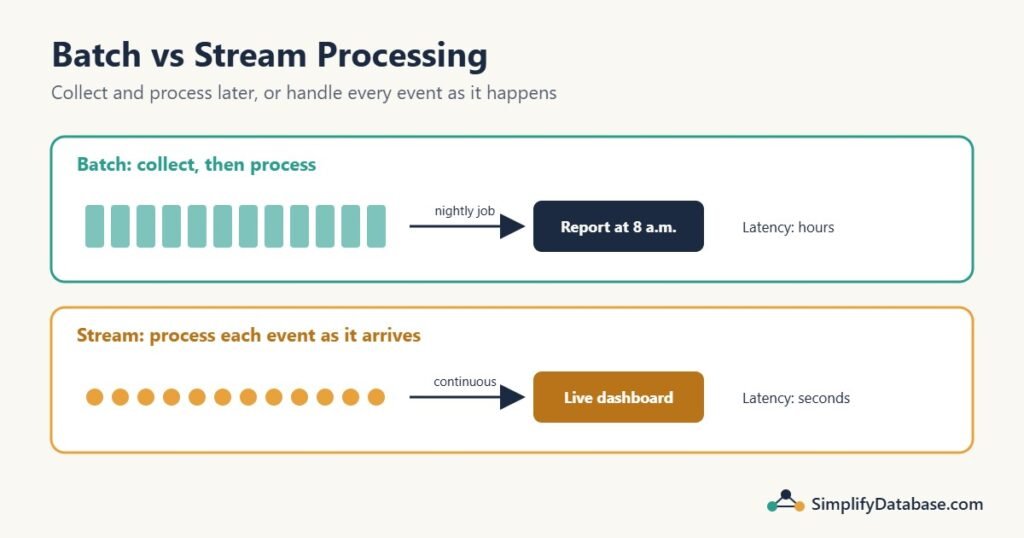
Table of Contents
Batch processing: collect, then process
In batch processing, data piles up for a while (an hour, a day, a month) and is then processed all at once:
- The nightly ETL job that loads yesterday’s orders into the warehouse.
- Month-end closing in an accounting system.
- Payroll, run once a month.
- A weekly report emailed every Monday.
The data has a clear start and end: “all orders from October 24”. The job reads it, transforms it, writes the result, and finishes. If something fails, you fix it and run the job again for the same day.
Batch is simple, reliable and efficient. Processing a million rows in one go is far cheaper per row than handling them one by one. Its weakness is latency: the answer is only as fresh as the last run. Most of the ETL and ELT pipelines you’ll meet are batch jobs.
Stream processing: process each event as it arrives
In stream processing, data is treated as an endless flow of events, and each event is processed within seconds (or less) of happening:
- A card payment is checked for fraud before it’s approved.
- A dashboard shows sales per store, updated every few seconds.
- A sensor reading above a limit triggers an alert immediately.
- A ride-sharing app matches drivers and riders continuously.
There’s no “end” to the data: the job runs forever, and results are updated as new events come in. Its strength is freshness. Its cost is complexity: you have to think about time, order and failures in ways batch jobs never need.
Side by side
| Batch | Stream | |
|---|---|---|
| Data | A bounded set (yesterday, last month) | An unbounded flow of events |
| When it runs | On a schedule, then stops | Continuously |
| Latency | Minutes to hours (or a day) | Milliseconds to seconds |
| Typical tools | SQL jobs, SSIS, Spark, dbt, Airflow | Kafka, Spark Structured Streaming, Flink, Kafka Streams, cloud services |
| Failure handling | Re-run the job | Checkpoints, replay from the event log |
| Hard parts | Volume, run time | Late and out-of-order events, state, exactly-once results |
| Cost and effort | Lower | Higher |
The same report, batch vs stream
Let’s take a simple question: revenue per store in 5-minute windows. Here are six sales events:
event_time,store,amount
2026-11-14 09:01:10,Manama,25.0
2026-11-14 09:02:45,Riffa,40.0
2026-11-14 09:04:30,Manama,15.0
2026-11-14 09:06:05,Manama,60.0
2026-11-14 09:07:50,Riffa,20.0
2026-11-14 09:11:20,Manama,35.0
As a batch query
If these rows are already in a table, it’s ordinary SQL. In SQL Server you’d round each time down to its 5-minute window and group by it (in SQL Server 2022, DATE_BUCKET(minute, 5, event_time) does the rounding for you). In Apache Spark SQL there’s a built-in window() function:
SELECT window(event_time, '5 minutes').start AS window_start,
       store,
       SUM(amount) AS revenue,
       COUNT(*)    AS orders
FROM sales
GROUP BY window(event_time, '5 minutes'), store
ORDER BY window_start, store;| window_start | store | revenue | orders |
|---|---|---|---|
| 09:00 | Manama | 40.0 | 2 |
| 09:00 | Riffa | 40.0 | 1 |
| 09:05 | Manama | 60.0 | 1 |
| 09:05 | Riffa | 20.0 | 1 |
| 09:10 | Manama | 35.0 | 1 |
As a streaming query
Here’s the same logic in Spark Structured Streaming (Python), reading events as they arrive in a folder. In real systems the source would usually be Kafka or a cloud event service rather than files:
from pyspark.sql import functions as F

events = (spark.readStream
               .schema("event_time TIMESTAMP, store STRING, amount DOUBLE")
               .csv("incoming/"))          # new files are picked up as they arrive

live = (events
        .withWatermark("event_time", "10 minutes")
        .groupBy(F.window("event_time", "5 minutes"), "store")
        .agg(F.sum("amount").alias("revenue"),
             F.count("*").alias("orders")))

query = (live.writeStream
             .outputMode("update")
             .format("memory")              # in real life: a database, Kafka, a dashboard
             .queryName("live_sales")
             .start())
Running this on the same six events produced exactly the same five rows as the batch query. (We ran both with PySpark 3.5 on a laptop.) The difference is that the streaming version doesn’t stop: drop a new file with more events into the folder, and the affected windows are updated within seconds.
Notice how similar the two are. The aggregation is the same GROUP BY with SUM and COUNT. What’s new is readStream/writeStream, and one line you never need in batch: the watermark.
The hard part of streaming: time
In a batch job, all of yesterday’s data is there before you start. In a stream, events arrive late and out of order: a phone loses signal and sends its events ten minutes later, or one server’s clock is slightly behind.
That raises questions batch never asks:
- Event time vs processing time. Should the 09:04 sale count in the 09:00-09:05 window even if it arrives at 09:12? Usually yes: you group by when the event happened (event time), not when you received it (processing time).
- How long do you wait for late events? You can’t keep every window open forever, or memory grows without limit. A watermark says: “accept events up to 10 minutes late; after that, consider the window final.” In the code above, that’s
withWatermark("event_time", "10 minutes"). - What kind of window? Tumbling windows are fixed and don’t overlap (09:00-09:05, 09:05-09:10). Sliding windows overlap (the last 5 minutes, recalculated every minute). Session windows group a user’s activity until they go quiet for a while.
- What if the job crashes? Streaming systems save checkpoints of their progress and state, and replay events from the source so that each event is counted once and only once (“exactly-once”), not missed and not doubled.
If you’ve worked through running totals and gaps and islands, the window ideas will feel familiar. The new part is that the data never stops arriving.
Kafka: the backbone of most streaming systems
Most streaming architectures have Apache Kafka (or a cloud equivalent such as Amazon Kinesis, Azure Event Hubs or Google Pub/Sub) in the middle. Kafka is a durable, ordered log of events:
- Producers (applications, websites, sensors) write events to a topic, such as
ordersorpayments. - Kafka stores them, in order, for a configured time (days or weeks).
- Consumers (a fraud checker, a dashboard, a job loading the warehouse) read the topic at their own pace, each keeping track of its own position.
Because events are kept, a new consumer can start from the beginning, and a crashed one can resume where it stopped. Kafka itself mostly moves and stores events; the processing is done by tools such as Spark Structured Streaming, Apache Flink or Kafka Streams. Flink and Spark both let you write streaming logic in SQL, so a SQL developer can be productive quickly.
A popular pattern for getting database changes into Kafka is change data capture (CDC): a tool like Debezium reads the SQL Server or MySQL transaction log and turns every insert, update and delete into an event, without changing the application.
Lambda and Kappa: combining the two
Companies often need both: fresh numbers now and accurate, complete numbers later.
- Lambda architecture runs two paths side by side: a streaming path for fast, approximate results, and a batch path that recalculates everything accurately each night. It works, but you maintain the same logic twice.
- Kappa architecture uses only streaming. When you need to recalculate, you replay the event log from Kafka through the same code. One codebase, but you rely completely on the streaming system.
In practice, many teams settle on something simpler: stream the few things that truly need to be live, and keep everything else in batch.
Do you need streaming? Probably less than you think
Streaming is exciting, and job ads love it, but it costs more to build and run. Ask:
- Who acts on the data, and how fast? If a person looks at a report once a day, a nightly batch is enough. If a machine must block a payment within 200 milliseconds, you need streaming.
- Would every 15 minutes be fine? Then a micro-batch job (a normal batch job that runs every 15 minutes, loading only new rows) is often good enough, and much simpler. Incremental loads with a “last loaded” watermark column, as described in the ETL article, get you most of the way.
- Is the data already in a database? For an operational dashboard on SQL Server data, a well-indexed query or a small summary table refreshed every minute may beat a whole streaming platform.
A sensible path for most companies: batch first, micro-batch when people ask for fresher data, and true streaming only for the use cases where seconds matter.
Practice exercises
Exercise 1. For each, choose batch, micro-batch or streaming: (a) monthly payroll; (b) blocking a fraudulent card payment; (c) a sales dashboard managers check a few times a day; (d) an alert when a freezer’s temperature goes above -15°C.
Exercise 2. A streaming job counts orders per 5-minute window. An event that happened at 09:03 arrives at 09:09. Using event time and a 10-minute watermark, which window does it go into, and is it counted?
Exercise 3. Why do most streaming systems keep events in a log like Kafka instead of processing them and throwing them away?
Answers
Answer 1. (a) Batch: it runs once a month on a complete set of data. (b) Streaming: the decision must happen before the payment is approved. (c) Micro-batch or batch: refreshing every 15-60 minutes is plenty. (d) Streaming (or at least near-real-time), because the alert is only useful if it’s immediate.
Answer 2. It goes into the 09:00-09:05 window, because grouping is by event time (when it happened). It arrives 6 minutes late, which is within the 10-minute watermark, so it is counted and that window’s result is updated.
Answer 3. So events can be replayed: a crashed consumer can resume from its last position, a new consumer can process history, and results can be recalculated after a bug fix. It also lets many independent consumers read the same events at their own pace.
Summary
- Batch processes a bounded set of data on a schedule: simple, cheap, reliable, but only as fresh as the last run.
- Streaming processes each event as it arrives: fresh results in seconds, at the cost of more complexity.
- The aggregations look the same; streaming adds time handling: event time, windows, watermarks for late data, and checkpoints.
- Kafka (or a cloud equivalent) usually carries the events; Spark, Flink or Kafka Streams process them, often in SQL.
- Start with batch, use micro-batch for fresher data, and reserve true streaming for decisions that can’t wait.
Related articles
- What Is Apache Spark?: the engine behind the examples, explained for SQL users.
- ETL vs ELT Explained Simply: the batch pipelines most companies start with, including incremental loads.
- Data Lakes vs Data Warehouses vs Data Lakehouses: where batch and streaming data usually end up.
- What is Big Data? Explained Simply: the volume and velocity that make these tools necessary.