
“How many working days are in December?” “Show sales for every day this month, including the days we sold nothing.” “What’s the due date if payment terms are 5 working days?”
All three are surprisingly awkward with date functions alone, and all three become simple joins once you have a calendar table: a table with one row per day, and a column for everything you’d want to know about that day. It’s one of the most useful tables a reporting database can have, and it takes ten minutes to build.
This guide shows how to create one in SQL Server and MySQL, which columns to include (including weekends that aren’t Saturday and Sunday), and the queries it makes easy.
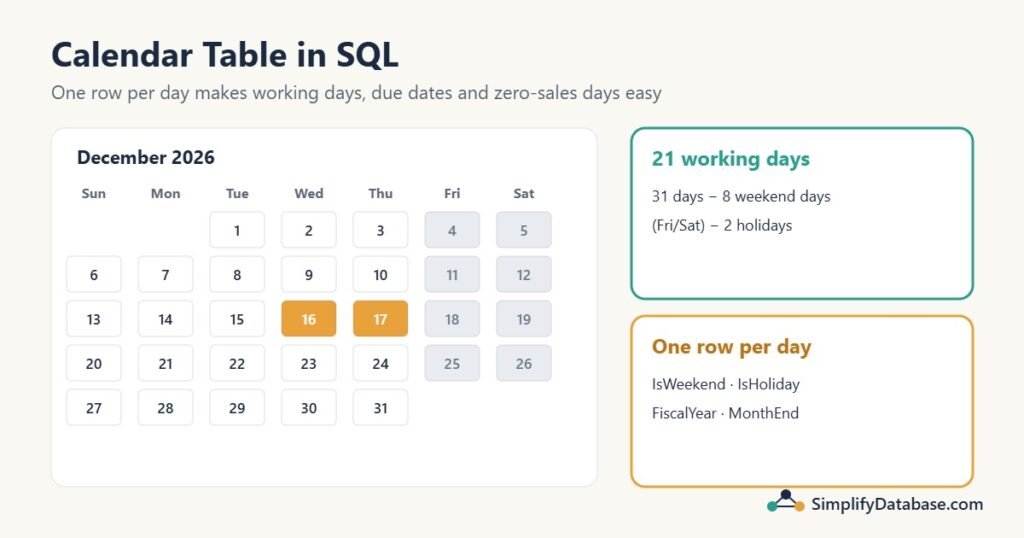
Table of Contents
What a calendar table looks like
One row per date, for as many years as your data needs (say 2020 to 2035, about 5,800 rows: tiny):
| DateKey | TheDate | TheYear | TheMonth | MonthName | DayName | IsWeekend | IsHoliday | HolidayName |
|---|---|---|---|---|---|---|---|---|
| 20261214 | 2026-12-14 | 2026 | 12 | December | Monday | 0 | 0 | |
| 20261215 | 2026-12-15 | 2026 | 12 | December | Tuesday | 0 | 0 | |
| 20261216 | 2026-12-16 | 2026 | 12 | December | Wednesday | 0 | 1 | National Day |
| 20261217 | 2026-12-17 | 2026 | 12 | December | Thursday | 0 | 1 | National Day |
| 20261218 | 2026-12-18 | 2026 | 12 | December | Friday | 1 | 0 | |
| 20261219 | 2026-12-19 | 2026 | 12 | December | Saturday | 1 | 0 |
Why store things you could calculate with YEAR() or DATENAME()? Three reasons:
- Some facts can’t be calculated. Public holidays, company shutdown days, fiscal periods and “is this a working day” come from business rules, not from the date.
- Every report agrees. When “weekend” and “fiscal year” are defined once in a table, nobody writes a slightly different
CASEin their own query. - Missing days become visible. A table of orders only has rows for days with orders. Joining from the calendar shows the days without any.
In a data warehouse, this is exactly the date dimension of a star schema.
Step 1: Create the table
CREATE TABLE dbo.Calendar (
    DateKey      INT         NOT NULL PRIMARY KEY,   -- 20261216
    TheDate      DATE        NOT NULL UNIQUE,
    TheYear      SMALLINT    NOT NULL,
    TheQuarter   TINYINT     NOT NULL,
    TheMonth     TINYINT     NOT NULL,
    MonthName    VARCHAR(10) NOT NULL,
    TheDay       TINYINT     NOT NULL,
    DayName      VARCHAR(10) NOT NULL,
    IsWeekend    BIT         NOT NULL,
    IsHoliday    BIT         NOT NULL DEFAULT 0,
    HolidayName  VARCHAR(50) NULL,
    FiscalYear   SMALLINT    NOT NULL,
    MonthStart   DATE        NOT NULL,
    MonthEnd     DATE        NOT NULL
);
The integer DateKey (20261216) is a common convention in data warehouses: it’s compact, sorts correctly and is easy to read. For joins with normal tables, you’ll usually use TheDate.
Add more columns as your reports need them: ISO week number, day of year, “is last working day of month”, fiscal quarter, Arabic or Hijri month names. It’s cheap to add a column and fill it once.
Step 2: Fill it
SQL Server
The easiest way in SQL Server 2022 and later is GENERATE_SERIES, which returns a list of numbers:
DECLARE @Start DATE = '2020-01-01', @End DATE = '2035-12-31';

INSERT INTO dbo.Calendar (DateKey, TheDate, TheYear, TheQuarter, TheMonth, MonthName,
                          TheDay, DayName, IsWeekend, FiscalYear, MonthStart, MonthEnd)
SELECT CONVERT(INT, FORMAT(d.TheDate, 'yyyyMMdd')),
       d.TheDate,
       YEAR(d.TheDate),
       DATEPART(quarter, d.TheDate),
       MONTH(d.TheDate),
       DATENAME(month, d.TheDate),
       DAY(d.TheDate),
       DATENAME(weekday, d.TheDate),
       CASE WHEN DATENAME(weekday, d.TheDate) IN ('Friday', 'Saturday') THEN 1 ELSE 0 END,
       CASE WHEN MONTH(d.TheDate) >= 4 THEN YEAR(d.TheDate) ELSE YEAR(d.TheDate) - 1 END,
       DATEFROMPARTS(YEAR(d.TheDate), MONTH(d.TheDate), 1),
       EOMONTH(d.TheDate)
FROM (
    SELECT DATEADD(day, s.value, @Start) AS TheDate
    FROM GENERATE_SERIES(0, DATEDIFF(day, @Start, @End)) AS s
) AS d;
On older versions, replace the GENERATE_SERIES part with a recursive CTE (add OPTION (MAXRECURSION 0) at the end, because the default limit is 100 levels) or a numbers table.
MySQL 8
SET SESSION cte_max_recursion_depth = 10000;   -- default is 1000

INSERT INTO Calendar (DateKey, TheDate, TheYear, TheQuarter, TheMonth, MonthName,
                      TheDay, DayName, IsWeekend, FiscalYear, MonthStart, MonthEnd)
WITH RECURSIVE d AS (
    SELECT DATE '2020-01-01' AS dt
    UNION ALL
    SELECT dt + INTERVAL 1 DAY FROM d WHERE dt < '2035-12-31'
)
SELECT YEAR(dt) * 10000 + MONTH(dt) * 100 + DAY(dt),
       dt, YEAR(dt), QUARTER(dt), MONTH(dt), MONTHNAME(dt), DAY(dt), DAYNAME(dt),
       CASE WHEN DAYNAME(dt) IN ('Friday', 'Saturday') THEN 1 ELSE 0 END,
       CASE WHEN MONTH(dt) >= 4 THEN YEAR(dt) ELSE YEAR(dt) - 1 END,
       DATE_FORMAT(dt, '%Y-%m-01'),
       LAST_DAY(dt)
FROM d;
(In MariaDB, the setting is max_recursive_iterations instead.) The examples in this article were run on a calendar built this way for 2025-2027: 1,095 rows.
Weekends and fiscal years are your rules
Two lines in that script are business rules, and you should change them to match yours:
- Weekend. In Bahrain and most of the Gulf, the weekend is Friday and Saturday, so that’s what the example uses. In most other countries it’s Saturday and Sunday. Some companies also work Saturday mornings. Write your rule once, here.
- Fiscal year. The example uses a fiscal year that starts in April (April 2026 to March 2027 is fiscal year 2026). If your fiscal year is the calendar year, just use
TheYear.
A tip for SQL Server: DATEPART(weekday, ...) returns a number that depends on the server’s SET DATEFIRST setting, so the same query can give different answers on different servers. Using DATENAME(weekday, ...) (as above) or calculating the weekend once into the table avoids that trap. Note that DATENAME returns names in the session’s language, so set SET LANGUAGE us_english; before filling the table if your server uses another language.
Step 3: Add the holidays
Holidays can’t be calculated, so update them from a list. Fixed-date holidays are easy; holidays based on the Hijri calendar (like Eid) move every year and are best entered from the official announcement:
UPDATE dbo.Calendar
SET IsHoliday = 1, HolidayName = 'National Day'
WHERE TheDate IN ('2026-12-16', '2026-12-17');
Keep the list somewhere your team can maintain it, and update the calendar each year when the official dates are published.
Queries a calendar table makes easy
Working days in a month
SELECT COUNT(*) AS WorkingDays
FROM dbo.Calendar
WHERE TheDate >= '2026-12-01' AND TheDate < '2027-01-01'
  AND IsWeekend = 0
  AND IsHoliday = 0;
December 2026 has 31 days. Take away 8 weekend days (four Fridays and four Saturdays) and the 2 National Day holidays, and the answer is 21 working days. Try doing that with date functions alone, especially the holidays.
Sales for every day, including days with no sales
SELECT c.TheDate, c.DayName,
       COALESCE(SUM(o.Amount), 0) AS Sales,
       COUNT(o.OrderID)           AS Orders
FROM dbo.Calendar AS c
LEFT JOIN dbo.Orders AS o ON o.OrderDate = c.TheDate
WHERE c.TheDate BETWEEN '2026-12-01' AND '2026-12-07'
GROUP BY c.TheDate, c.DayName
ORDER BY c.TheDate;| TheDate | DayName | Sales | Orders |
|---|---|---|---|
| 2026-12-01 | Tuesday | 200.00 | 2 |
| 2026-12-02 | Wednesday | 200.00 | 1 |
| 2026-12-03 | Thursday | 0.00 | 0 |
| 2026-12-04 | Friday | 0.00 | 0 |
| 2026-12-05 | Saturday | 50.00 | 1 |
| 2026-12-06 | Sunday | 300.00 | 1 |
| 2026-12-07 | Monday | 90.00 | 1 |
December 3 and 4 had no orders, but they’re in the report with 0, so a chart shows a real dip instead of silently skipping those days. Note COUNT(o.OrderID), not COUNT(*): COUNT(*) would count the calendar row and report 1 order on empty days. This also fixes the “missing month” trap in month-over-month comparisons, and it’s the standard way to find dates with no data in gaps and islands problems.
If the order table stores a date and time (DATETIME), join on the date part: ON o.OrderDate >= c.TheDate AND o.OrderDate < DATEADD(day, 1, c.TheDate). That keeps any index on OrderDate usable, unlike CAST(o.OrderDate AS DATE) = c.TheDate on some versions.
Add N working days (due dates)
“Payment is due 5 working days after December 14”:
SELECT TheDate AS DueDate
FROM (
    SELECT TheDate, ROW_NUMBER() OVER (ORDER BY TheDate) AS rn
    FROM dbo.Calendar
    WHERE TheDate > '2026-12-14'
      AND IsWeekend = 0 AND IsHoliday = 0
) AS x
WHERE rn = 5;
The answer is December 23: the 15th counts, the 16th and 17th are holidays, the 18th and 19th are the weekend, then the 20th, 21st, 22nd and 23rd. This kind of rule is common in ERP systems for invoices, delivery dates and SLAs.
Working days between two dates
SELECT COUNT(*) AS WorkingDays
FROM dbo.Calendar
WHERE TheDate > '2026-12-10' AND TheDate <= '2026-12-24'
  AND IsWeekend = 0 AND IsHoliday = 0;
Result: 8 working days. Decide once whether the start date counts (here it doesn’t: >), and use the same rule everywhere.
Group by fiscal year, quarter or any period
SELECT c.FiscalYear, SUM(o.Amount) AS Sales
FROM dbo.Orders AS o
JOIN dbo.Calendar AS c ON c.TheDate = o.OrderDate
GROUP BY c.FiscalYear;
No CASE WHEN MONTH(...) >= 4 scattered across reports: the rule lives in one column.
Last working day of each month
SELECT TheYear, TheMonth, MAX(TheDate) AS LastWorkingDay
FROM dbo.Calendar
WHERE TheYear = 2026 AND TheQuarter = 4
  AND IsWeekend = 0 AND IsHoliday = 0
GROUP BY TheYear, TheMonth;
October 2026 ends on a Saturday, so its last working day is Thursday, October 29 (the 30th is a Friday). November’s is the 30th, and December’s is the 31st (a Thursday). Month-end closing schedules and payroll dates often depend on exactly this.
Common mistakes
- Too few years. Fill well past today (10+ years ahead). A calendar that ends next year will silently drop rows from future-dated contracts and reports.
- Assuming Saturday-Sunday weekends in a country where they’re not. Store your rule in the table.
- Relying on
DATEPART(weekday)without controllingDATEFIRST. - Forgetting to update holidays every year. Put it on the year-end checklist.
COUNT(*)with a LEFT JOIN from the calendar, counting empty days as 1.- Joining a DATETIME column with
=to a DATE column and losing every order that wasn’t at midnight.
Practice exercises
Exercise 1. Write a query that returns how many working days each month of 2026 has.
Exercise 2. Mark every Thursday as a half day by adding a column IsHalfDay and filling it.
Exercise 3. Using the calendar and an Orders table, list the dates in November 2026 that had no orders.
Answers
Answer 1.
SELECT TheMonth, MonthName, COUNT(*) AS WorkingDays
FROM dbo.Calendar
WHERE TheYear = 2026 AND IsWeekend = 0 AND IsHoliday = 0
GROUP BY TheMonth, MonthName
ORDER BY TheMonth;
Answer 2.
ALTER TABLE dbo.Calendar ADD IsHalfDay BIT NOT NULL DEFAULT 0;

UPDATE dbo.Calendar
SET IsHalfDay = 1
WHERE DayName = 'Thursday';
Answer 3. LEFT JOIN from the calendar and keep the dates without a match:
SELECT c.TheDate
FROM dbo.Calendar AS c
LEFT JOIN dbo.Orders AS o ON o.OrderDate = c.TheDate
WHERE c.TheDate >= '2026-11-01' AND c.TheDate < '2026-12-01'
  AND o.OrderID IS NULL
ORDER BY c.TheDate;
Summary
- A calendar table has one row per day and stores everything about that day: year, month, day name, weekend, holiday, fiscal period.
- Build it once with
GENERATE_SERIES(SQL Server 2022+) or a recursive CTE, for many years ahead. - Put your rules in it: which days are the weekend, when the fiscal year starts, which days are holidays.
- It makes working days, due dates, reports with zero days, and fiscal grouping into simple joins.
Free SQL book for beginners
Just starting with dates in SQL? My free book, Simplify SQL for Absolute Beginners, covers the everyday date functions in Chapter 21 of the full book, with every example on one practice database. Chapters 1–3 are free now as a PDF and EPUB.
Related articles
- Month-over-Month and Year-over-Year Comparisons in SQL: why missing months break comparisons, and how a calendar fixes it.
- Gaps and Islands in SQL: finding missing dates and streaks.
- SQL Date Functions Explained Simply: DATEADD, DATEDIFF, EOMONTH and friends.
- Star Schema vs Snowflake Schema: the calendar as a date dimension in a data warehouse.