
In a Laravel project, the database structure lives in migrations: PHP files that create and change tables. Most tutorials show how to add columns. Far fewer show how to add the indexes that decide whether a query takes 2 milliseconds or 2 seconds once the table has a few hundred thousand rows.
This guide covers indexes in Laravel migrations: the different kinds, how to choose the columns (and their order) for a composite index, how foreign keys relate to indexes, how to change and drop indexes safely, and how to add an index to a big production table without trouble. The examples use MySQL, the most common database behind Laravel.
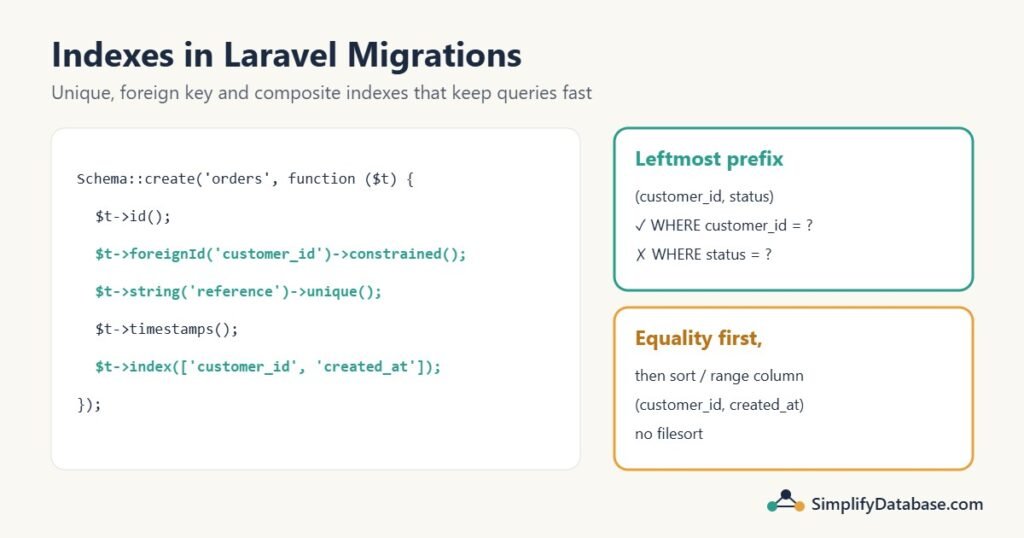
Table of Contents
A table with sensible indexes from day one
// database/migrations/2026_11_15_000000_create_orders_table.php
use Illuminate\Database\Migrations\Migration;
use Illuminate\Database\Schema\Blueprint;
use Illuminate\Support\Facades\Schema;

return new class extends Migration
{
    public function up(): void
    {
        Schema::create('orders', function (Blueprint $table) {
            $table->id();                                         // primary key
            $table->foreignId('customer_id')->constrained();      // FK + index
            $table->string('status', 20)->default('pending');
            $table->string('reference', 30)->unique();            // unique index
            $table->decimal('amount', 10, 2);
            $table->timestamps();

            $table->index(['customer_id', 'created_at']);         // composite index
            $table->index('status');
        });
    }

    public function down(): void
    {
        Schema::dropIfExists('orders');
    }
};
Run php artisan migrate --pretend to see the SQL Laravel will send without running it. It’s a good habit before any migration that touches a large table.
The four kinds of index in a migration
| Method | What it creates | Use it for |
|---|---|---|
$table->id() / ->primary() | Primary key | The row’s identity. Every table should have one. |
->unique() / $table->unique([...]) | Unique index | Values that must not repeat: email, invoice number, SKU |
$table->index([...]) | Normal index | Columns you filter, join or sort on often |
$table->fullText([...]) | Full-text index | Searching words inside long text (whereFullText) |
A unique index does two jobs: it speeds up lookups and it stops duplicates at the database level, even if two requests arrive at the same moment. Validation rules like unique:users,email in a form request are nice for error messages, but only the unique index actually guarantees it.
Laravel names indexes automatically as {table}_{columns}_{type}, for example orders_customer_id_created_at_index. You can pass your own name as a second argument: $table->index(['customer_id', 'created_at'], 'orders_customer_recent_idx').
Which columns deserve an index?
Look at the queries your application actually runs (Debugbar, Telescope or the MySQL slow query log will tell you; see How to Find and Fix Slow Queries in Laravel). Good candidates:
- Foreign keys used in relationships:
customer_id,order_id,user_id. Everywith('orders')and every join uses them. - Columns in frequent
whereclauses:status,email,reference,created_at. - Columns you sort or paginate by:
created_at,published_at,id.
Poor candidates:
- Columns with very few distinct values used alone, like a boolean
is_activewhere 95% of rows aretrue. MySQL will often ignore such an index. - Columns you never search by.
- Every column “just in case”. Each index makes inserts and updates a little slower and takes disk space.
Composite indexes: column order matters
A composite index on (customer_id, status) is sorted by customer_id first, then by status within each customer, like a phone book sorted by surname, then first name. That leads to the leftmost prefix rule: MySQL can use the index for queries that filter on the first column, or the first and second, but not on the second column alone.
We tested this on a 60,000-row orders table with an index on (customer_id, status):
EXPLAIN SELECT * FROM orders WHERE customer_id = 42;
-- type: ref   key: orders_customer_id_status_index   rows: 30

EXPLAIN SELECT * FROM orders WHERE status = 'paid' AND amount > 400;
-- type: ALL   key: NULL                              rows: 60144
Filtering by customer_id uses the index. Filtering by status alone can’t, so MySQL reads the whole table. Phone book again: easy to find every “Hassan”, impossible to find every “Ali” without reading the whole book.
How to choose the order:
- Columns compared with
=come first. - Then the column you sort by or use in a range (
>,<,between).
An index that also sorts
The most common Laravel list query is “this customer’s latest orders”:
Order::where('customer_id', $id)->latest()->take(10)->get();
// select * from orders where customer_id = ? order by created_at desc limit 10
With only the (customer_id, status) index, MySQL finds the customer’s rows, then sorts them (Using filesort in EXPLAIN). With an index on (customer_id, created_at), the rows are already stored in date order inside each customer, so MySQL reads the 10 newest and stops. In our test, EXPLAIN chose the new index and the Using filesort disappeared. For a customer with thousands of orders, that’s the difference between sorting thousands of rows and reading ten.
$table->index(['customer_id', 'created_at']);The deeper explanation of how indexes are used (and ignored) is in SQL Indexes Explained Simply and Index Seek vs Index Scan; the ideas are the same in MySQL and SQL Server.
Foreign keys and indexes
$table->foreignId('customer_id')->constrained()->cascadeOnDelete();This creates a customer_id column, a foreign key to customers.id, and (on MySQL with InnoDB) an index on customer_id, because InnoDB requires one for every foreign key. So you don’t need a separate $table->index('customer_id').
But watch for redundancy: if you also add a composite index starting with customer_id, such as (customer_id, created_at), MySQL can use it for the foreign key, and a single-column index on customer_id adds little. Redundant indexes cost write speed for no gain. MySQL’s sys schema can list them:
SELECT * FROM sys.schema_redundant_indexes WHERE table_schema = 'shop';
SELECT * FROM sys.schema_unused_indexes   WHERE object_schema = 'shop';
The unused-index view is based on activity since the server last started, so check it after the application has run for a while.
Choose the delete behaviour deliberately: cascadeOnDelete() deletes a customer’s orders with the customer, restrictOnDelete() refuses to delete a customer who has orders, and nullOnDelete() (with a nullable column) keeps the orders without a customer. For business data like orders and invoices, restrict is usually the safe choice. More in Primary Keys vs Foreign Keys.
Adding an index to an existing table
Create a new migration; never edit an old one that has already run in production:
php artisan make:migration add_status_created_at_index_to_orders_tablepublic function up(): void
{
Schema::table('orders', function (Blueprint $table) {
$table->index(['status', 'created_at']);
});
}
public function down(): void
{
Schema::table('orders', function (Blueprint $table) {
$table->dropIndex(['status', 'created_at']);
});
}Passing an array to dropIndex makes Laravel work out the conventional name (orders_status_created_at_index), so up and down stay in sync. Use dropUnique, dropPrimary, dropForeign and dropFullText for the other kinds; for a foreign key, drop the constraint before the column: $table->dropForeign(['customer_id']); then $table->dropColumn('customer_id');.
Big tables in production
On MySQL 5.6 and later with InnoDB, adding a normal index is an online operation: reads and writes continue while the index is built. It still takes time and extra I/O on a table with millions of rows, so:
- Run it at a quiet time, and test how long it takes on a copy of production data first.
- If you want MySQL to fail rather than lock the table, run the statement yourself with explicit options:
public function up(): void
{
    DB::statement('ALTER TABLE orders ADD INDEX orders_status_created_at_index (status, created_at), ALGORITHM=INPLACE, LOCK=NONE');
}- Changing a column’s type (for example
INTtoBIGINT) usually rebuilds the whole table and blocks writes. Those changes need more planning, sometimes with tools likept-online-schema-changeorgh-ost.
Changing columns without losing indexes
In recent Laravel versions you can change a column with ->change():
Schema::table('orders', function (Blueprint $table) {
    $table->string('status', 30)->default('pending')->change();
});
When changing a column, include every modifier you want to keep (length, default, nullable): anything you leave out is removed. Indexes on the column stay in place, but check with SHOW INDEX FROM orders; afterwards if you’re unsure.
Full-text indexes for search
where('title', 'like', '%laptop%') can’t use a normal index because of the leading %, so on a large table every search reads every row. For word searches in long text, a full-text index is the better tool:
$table->fullText(['title', 'description']);

// Then:
Product::whereFullText(['title', 'description'], 'wireless keyboard')->get();
MySQL’s full-text search matches whole words (with a minimum word length and a list of ignored common words), so test it with your real data. For complex search needs, tools like Meilisearch or Elasticsearch (via Laravel Scout) go further.
A checklist for every new table
- A primary key (
$table->id()). foreignId(...)->constrained()for every relationship, with a deliberate delete rule.unique()on every value that must not repeat.- A composite index for the main list query: equality columns first, then the sort column.
- Nothing else until a real query needs it.
php artisan migrate --pretendto review the SQL, andEXPLAINon the main queries after deployment.
Common mistakes
- Relying on validation instead of a unique index for things that must be unique.
- Composite index in the wrong order, such as
(created_at, customer_id)for queries filtering by customer. - Indexing every column, slowing every insert and update.
- Editing an old migration that has already run elsewhere, instead of adding a new one.
dropIndex('status')with a string when the index name isorders_status_index. Pass an array to let Laravel build the name.- Leaving out modifiers with
->change()and accidentally dropping a default or making a column non-nullable.
Practice exercises
Exercise 1. A query runs Invoice::where('company_id', $id)->where('status', 'unpaid')->orderBy('due_date')->get(). Write the migration line for the best index.
Exercise 2. A table has an index on (user_id) and another on (user_id, created_at). Which one is redundant, and why?
Exercise 3. Write the down() method for a migration whose up() added $table->unique('invoice_number'); to the invoices table.
Answers
Answer 1. Equality columns first, then the sort column:
$table->index(['company_id', 'status', 'due_date']);Answer 2. The single-column (user_id) index. The composite index starts with user_id, so MySQL can use it for any query filtering on user_id, including the foreign key. (Keep the single-column one only if user_id has a foreign key whose index you’d rather not depend on the composite, which is rare.)
Answer 3.
public function down(): void
{
    Schema::table('invoices', function (Blueprint $table) {
        $table->dropUnique(['invoice_number']);
    });
}
Summary
- Indexes belong in migrations, alongside the columns, so every environment gets the same structure.
- Use
unique()for values that must not repeat,foreignId()->constrained()for relationships (which also indexes the column on MySQL), and composite indexes for your main queries. - In a composite index, put equality columns first and the sort or range column last; MySQL can only use the index from the left.
- Add indexes in new migrations, drop them with array syntax, and plan big-table changes for quiet times.
- Check with
--pretend,SHOW INDEXandEXPLAIN, and remove redundant or unused indexes.
Related articles
- How to Find and Fix Slow Queries in Laravel: finding the queries that need an index.
- Laravel: Eloquent vs Query Builder vs Raw SQL: the queries these indexes serve.
- SQL Indexes Explained Simply: what an index is and how it works.
- SQL Constraints Explained Simply: UNIQUE, NOT NULL and other rules the database enforces.