
Getting a new customer is expensive. Getting them to come back is where most businesses make their money. So one of the most important questions an analyst can answer is: do customers come back, and is it getting better or worse?
Cohort analysis answers that question. You group customers by the month they first bought, then track what share of each group comes back in the following months. The result is the famous “retention triangle”, and you can build it with plain SQL. This guide does it step by step.
What is a cohort?
A cohort is a group of customers who started at the same time. Everyone who placed their first order in January 2026 is the January cohort. Everyone who started in February is the February cohort, and so on.
Retention is the share of a cohort that is still active after a number of months. If 4 customers started in January and 2 of them ordered again in February, January’s month-1 retention is 50%.
Why not just count active customers each month? Because a growing business can hide a problem. If you win 100 new customers a month, total activity goes up even if nobody ever buys a second time. Cohorts separate new customers from returning ones, so you see the real behavior.
The sample data
A small shop has 22 orders from 11 customers between January and April 2026:
CREATE TABLE sales (
    order_id     INT,
    customer_id  INT,
    order_date   DATE,
    amount       DECIMAL(10,2)
);

INSERT INTO sales VALUES
(1, 1, '2026-01-05', 50), (2, 2, '2026-01-12', 30), (3, 3, '2026-01-20', 45),
(4, 4, '2026-01-28', 20), (5, 1, '2026-02-10', 40), (6, 1, '2026-02-25', 25),
(7, 2, '2026-02-15', 35), (8, 5, '2026-02-02', 60), (9, 6, '2026-02-14', 30),
(10, 7, '2026-02-25', 25), (11, 1, '2026-03-03', 55), (12, 3, '2026-03-08', 40),
(13, 5, '2026-03-05', 50), (14, 6, '2026-03-20', 20), (15, 8, '2026-03-03', 70),
(16, 9, '2026-03-10', 35), (17, 10, '2026-03-22', 15), (18, 10, '2026-03-29', 30),
(19, 1, '2026-04-20', 45), (20, 5, '2026-04-09', 65), (21, 8, '2026-04-02', 40),
(22, 11, '2026-04-04', 50);
Step 1: find each customer’s first order
Every cohort query starts here. One row per customer with the date they first bought:
SELECT customer_id,
       MIN(order_date) AS first_order
FROM sales
GROUP BY customer_id;| customer_id | first_order |
|---|---|
| 1 | 2026-01-05 |
| 2 | 2026-01-12 |
| 3 | 2026-01-20 |
| 4 | 2026-01-28 |
| 5 | 2026-02-02 |
| … | … |
| 11 | 2026-04-04 |
Step 2: give each order a cohort and a month number
Next, attach the cohort (the month of the first order) to every order, and calculate how many months after the first month the order happened. Month 0 is the starting month, month 1 the next one, and so on.
-- SQL Server
WITH firsts AS (
    SELECT customer_id, MIN(order_date) AS first_order
    FROM sales
    GROUP BY customer_id
)
SELECT s.customer_id,
       s.order_date,
       DATEFROMPARTS(YEAR(f.first_order), MONTH(f.first_order), 1) AS cohort_month,
       DATEDIFF(MONTH, f.first_order, s.order_date)                 AS month_number
FROM sales AS s
JOIN firsts AS f ON f.customer_id = s.customer_id;| customer_id | order_date | cohort_month | month_number |
|---|---|---|---|
| 1 | 2026-01-05 | 2026-01-01 | 0 |
| 1 | 2026-02-10 | 2026-01-01 | 1 |
| 1 | 2026-02-25 | 2026-01-01 | 1 |
| 1 | 2026-03-03 | 2026-01-01 | 2 |
| … | … | … | … |
DATEFROMPARTS(year, month, 1) turns any date into the first day of its month. In SQL Server 2022 and later, DATETRUNC(MONTH, first_order) does the same.
In SQL Server, DATEDIFF(MONTH, ...) counts how many month boundaries are crossed, so January 28 to February 2 is 1 month. That’s exactly what cohorts need.
MySQL is different. TIMESTAMPDIFF(MONTH, ...) counts complete months, so January 28 to February 2 is 0. Move both dates to the first of the month first:
-- MySQL
WITH firsts AS (
    SELECT customer_id, MIN(order_date) AS first_order
    FROM sales
    GROUP BY customer_id
)
SELECT s.customer_id,
       s.order_date,
       DATE_FORMAT(f.first_order, '%Y-%m-01') AS cohort_month,
       TIMESTAMPDIFF(MONTH,
                     DATE_FORMAT(f.first_order, '%Y-%m-01'),
                     DATE_FORMAT(s.order_date,  '%Y-%m-01')) AS month_number
FROM sales AS s
JOIN firsts AS f ON f.customer_id = s.customer_id;
This difference is easy to miss and quietly shifts customers into the wrong month. More on date functions in SQL Date Functions Explained Simply.
Step 3: count active customers per cohort and month
Now count how many different customers from each cohort ordered in each month. Customer 1 ordered twice in February, but should only count once:
-- SQL Server
WITH firsts AS (
    SELECT customer_id, MIN(order_date) AS first_order
    FROM sales
    GROUP BY customer_id
),
activity AS (
    SELECT s.customer_id,
           DATEFROMPARTS(YEAR(f.first_order), MONTH(f.first_order), 1) AS cohort_month,
           DATEDIFF(MONTH, f.first_order, s.order_date)                 AS month_number
    FROM sales AS s
    JOIN firsts AS f ON f.customer_id = s.customer_id
)
SELECT cohort_month, month_number,
       COUNT(DISTINCT customer_id) AS customers
FROM activity
GROUP BY cohort_month, month_number
ORDER BY cohort_month, month_number;| cohort_month | month_number | customers |
|---|---|---|
| 2026-01-01 | 0 | 4 |
| 2026-01-01 | 1 | 2 |
| 2026-01-01 | 2 | 2 |
| 2026-01-01 | 3 | 1 |
| 2026-02-01 | 0 | 3 |
| 2026-02-01 | 1 | 2 |
| 2026-02-01 | 2 | 1 |
| 2026-03-01 | 0 | 3 |
| 2026-03-01 | 1 | 1 |
| 2026-04-01 | 0 | 1 |
Month 0 is always the cohort size: everyone in a cohort ordered in their first month, by definition.
Step 4: the cohort table
This long list is hard to read. Pivot it so each cohort is one row and each month is a column. MAX(CASE ...) moves values into columns:
WITH firsts AS ( ... ),
activity AS ( ... ),
counts AS (
    SELECT cohort_month, month_number,
           COUNT(DISTINCT customer_id) AS customers
    FROM activity
    GROUP BY cohort_month, month_number
)
SELECT cohort_month,
       MAX(CASE WHEN month_number = 0 THEN customers END) AS m0,
       MAX(CASE WHEN month_number = 1 THEN customers END) AS m1,
       MAX(CASE WHEN month_number = 2 THEN customers END) AS m2,
       MAX(CASE WHEN month_number = 3 THEN customers END) AS m3
FROM counts
GROUP BY cohort_month
ORDER BY cohort_month;| cohort_month | m0 | m1 | m2 | m3 |
|---|---|---|---|---|
| 2026-01-01 | 4 | 2 | 2 | 1 |
| 2026-02-01 | 3 | 2 | 1 | NULL |
| 2026-03-01 | 3 | 1 | NULL | NULL |
| 2026-04-01 | 1 | NULL | NULL | NULL |
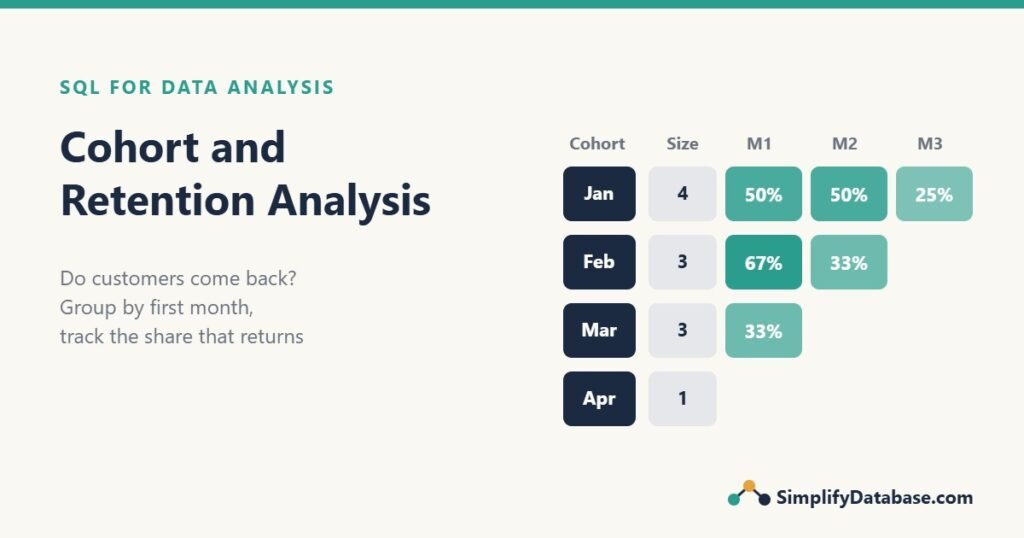
This is the retention triangle. The empty corner is the future: the April cohort hasn’t had a month 1 yet, because our data ends in April.
Be careful with NULLs here. A NULL in the triangle can mean “this month hasn’t happened yet” or “nobody came back”. If a past month has no returning customers, show it as 0 so readers don’t confuse the two. The same pivot technique is used in Aging Report in SQL Server.
Step 5: retention percentages
Counts are hard to compare between cohorts of different sizes. Divide each month by the cohort size (month 0):
WITH firsts AS ( ... ),
activity AS ( ... ),
counts AS ( ... ),
sized AS (
    SELECT cohort_month, month_number, customers,
           MAX(CASE WHEN month_number = 0 THEN customers END)
               OVER (PARTITION BY cohort_month) AS cohort_size
    FROM counts
)
SELECT cohort_month,
       cohort_size,
       ROUND(100.0 * MAX(CASE WHEN month_number = 1 THEN customers END) / cohort_size, 0) AS m1_pct,
       ROUND(100.0 * MAX(CASE WHEN month_number = 2 THEN customers END) / cohort_size, 0) AS m2_pct,
       ROUND(100.0 * MAX(CASE WHEN month_number = 3 THEN customers END) / cohort_size, 0) AS m3_pct
FROM sized
GROUP BY cohort_month, cohort_size
ORDER BY cohort_month;| cohort_month | cohort_size | m1_pct | m2_pct | m3_pct |
|---|---|---|---|---|
| 2026-01-01 | 4 | 50 | 50 | 25 |
| 2026-02-01 | 3 | 67 | 33 | NULL |
| 2026-03-01 | 3 | 33 | NULL | NULL |
| 2026-04-01 | 1 | NULL | NULL | NULL |
The window function MAX(...) OVER (PARTITION BY cohort_month) copies the cohort size onto every row of that cohort, so each month can be divided by it. See SQL Window Functions Explained Simply for how PARTITION BY works. As always in SQL Server, 100.0 * avoids integer division.
How to read a cohort table
- Read across a row to see how one cohort behaves over time. January: 50% came back in month 1, 50% in month 2, 25% in month 3.
- Read down a column to compare cohorts at the same age. Month-1 retention went from 50% (January) to 67% (February) to 33% (March). If March is the start of a trend, something changed: a price increase, a new marketing channel bringing in one-time buyers, or a delivery problem.
- Look at the diagonal to spot calendar effects. Numbers that drop on the same calendar month across all cohorts point to something that happened that month, such as a holiday or a website outage.
With only 11 customers, one person moves the numbers a lot. On real data, wait for cohorts of at least a few hundred customers before drawing conclusions, and keep the cohort size column in the report so readers can judge.
Other useful cohort questions
Repeat purchase rate
The simplest retention number: how many customers ordered more than once?
SELECT COUNT(*) AS customers,
       SUM(CASE WHEN orders > 1 THEN 1 ELSE 0 END) AS repeat_customers,
       ROUND(100.0 * SUM(CASE WHEN orders > 1 THEN 1 ELSE 0 END) / COUNT(*), 1) AS repeat_pct
FROM (
    SELECT customer_id, COUNT(*) AS orders
    FROM sales
    GROUP BY customer_id
) AS per_customer;
7 of 11 customers (63.6%) ordered more than once. It’s a good headline number, but it favors older customers, who have had more time to come back. Cohorts fix that.
Revenue per cohort
Retention counts people. Revenue per cohort shows how much each group is worth:
-- SQL Server
WITH firsts AS (
    SELECT customer_id, MIN(order_date) AS first_order
    FROM sales
    GROUP BY customer_id
)
SELECT FORMAT(f.first_order, 'yyyy-MM')          AS cohort,
       COUNT(DISTINCT s.customer_id)              AS customers,
       SUM(s.amount)                              AS revenue,
       SUM(s.amount) / COUNT(DISTINCT s.customer_id) AS revenue_per_customer
FROM sales AS s
JOIN firsts AS f ON f.customer_id = s.customer_id
GROUP BY FORMAT(f.first_order, 'yyyy-MM')
ORDER BY cohort;| cohort | customers | revenue | revenue_per_customer |
|---|---|---|---|
| 2026-01 | 4 | 385.00 | 96.25 |
| 2026-02 | 3 | 250.00 | 83.33 |
| 2026-03 | 3 | 190.00 | 63.33 |
| 2026-04 | 1 | 50.00 | 50.00 |
Older cohorts always look better here because they’ve had more months to spend. For a fair comparison, add WHERE month_number <= 2 (from the activity CTE) so every cohort is measured over the same 3 months. In MySQL, use DATE_FORMAT(f.first_order, '%Y-%m') instead of FORMAT.
Weekly cohorts and other ways to group
Months work for most shops. For apps with daily use, weekly cohorts are more common. The pattern is the same, only the date functions change:
- SQL Server:
DATEADD(WEEK, DATEDIFF(WEEK, 0, first_order), 0)for the week start,DATEDIFF(WEEK, first_order, order_date)for the week number. - MySQL:
YEARWEEK(first_order)to group, andFLOOR(DATEDIFF(order_date, first_order) / 7)for the week number.
You can also define cohorts by something other than time: the marketing channel that brought the customer, the first product they bought, or the country. Add that column to the firsts CTE and group by it instead of (or as well as) the month.
Performance on big tables
On a real sales table with millions of rows:
- An index on
(customer_id, order_date)makes theMIN(order_date)per customer fast. See SQL Indexes Explained Simply. - Store
first_order_dateon the customer table, or in a small summary table updated each night, instead of recalculating it every time. - Run cohort reports on a reporting copy or data warehouse, not on the live system, as explained in OLTP vs OLAP.
Common mistakes
- Counting orders instead of customers. Use
COUNT(DISTINCT customer_id). One loyal customer with five orders is still one retained customer. - Using TIMESTAMPDIFF in MySQL without moving dates to the first of the month. January 31 to February 1 becomes month 0 instead of month 1.
- Comparing cohorts of different ages. A 12-month-old cohort will always have more revenue than a 1-month-old one. Compare at the same month number.
- Reading NULL as zero (or the reverse). The future is NULL; a past month with no returning customers is 0.
- Including the current, unfinished month. A month that’s only half over will look like a drop in retention. Cut your data at the end of the last full month.
Practice exercises
Use the sales table above.
1. List the customers who never ordered again after their first month.
2. For the January cohort, how many orders (not customers) were placed in month 1?
3. Calculate month-1 retention for all cohorts combined (customers active in month 1 divided by customers in cohorts that have had a month 1).
Answers
1.
-- SQL Server
WITH firsts AS (
    SELECT customer_id, MIN(order_date) AS first_order
    FROM sales
    GROUP BY customer_id
)
SELECT f.customer_id
FROM firsts AS f
WHERE NOT EXISTS (
    SELECT 1
    FROM sales AS s
    WHERE s.customer_id = f.customer_id
      AND DATEDIFF(MONTH, f.first_order, s.order_date) >= 1
);
Customers 4, 7, 9, 10 and 11. Customer 10 ordered twice, but both orders were in March, so they never came back in a later month. Customer 11 started in April and hasn’t had a chance yet.
2.
-- SQL Server
WITH firsts AS (
    SELECT customer_id, MIN(order_date) AS first_order
    FROM sales
    GROUP BY customer_id
)
SELECT COUNT(*) AS orders
FROM sales AS s
JOIN firsts AS f ON f.customer_id = s.customer_id
WHERE f.first_order >= '2026-01-01' AND f.first_order < '2026-02-01'
  AND DATEDIFF(MONTH, f.first_order, s.order_date) = 1;
3 orders: two from customer 1 and one from customer 2. That’s why we use COUNT(DISTINCT customer_id) for retention.
3. Only the January, February and March cohorts have had a month 1 (10 customers). Of those, 2 + 2 + 1 = 5 were active in month 1, so overall month-1 retention is 50%. In SQL, filter the sized CTE to cohort_month < '2026-04-01' and divide SUM(customers) at month 1 by SUM(cohort_size) at month 0.
Summary
- A cohort is a group of customers who started in the same period. Retention is the share still active N periods later.
- Start with
MIN(order_date)per customer, give each order a cohort and a month number, then count distinct customers. - Pivot with
MAX(CASE ...)to get the retention triangle, and divide by month 0 for percentages. - In MySQL, move dates to the first of the month before using
TIMESTAMPDIFF(MONTH, ...). - Compare cohorts at the same age, keep the cohort size in the report, and leave out the unfinished current month.
This is part 4 of our SQL for Data Analysis series. Earlier parts: data cleaning, basic statistics and funnel analysis. Next: when to use SQL and when to use Python (pandas) for analysis.
Related articles
- Funnel Analysis in SQL: find where users drop off before their first purchase.
- SQL Date Functions Explained Simply: DATEDIFF, DATEADD and friends.
- Running Totals in SQL Server: cumulative revenue per cohort over time.
- Star Schema vs Snowflake Schema: how to model sales data for reports like this one.