
A student can take many courses. A course has many students. A product can belong to many categories, and an employee can work on many projects. These are many-to-many relationships, and they are one of the first places where beginners get stuck when designing tables.
The good news: there is one standard pattern for them, and once you know it you will use it in almost every database you build. It is called a junction table (you will also hear bridge table, link table or associative table; they all mean the same thing).
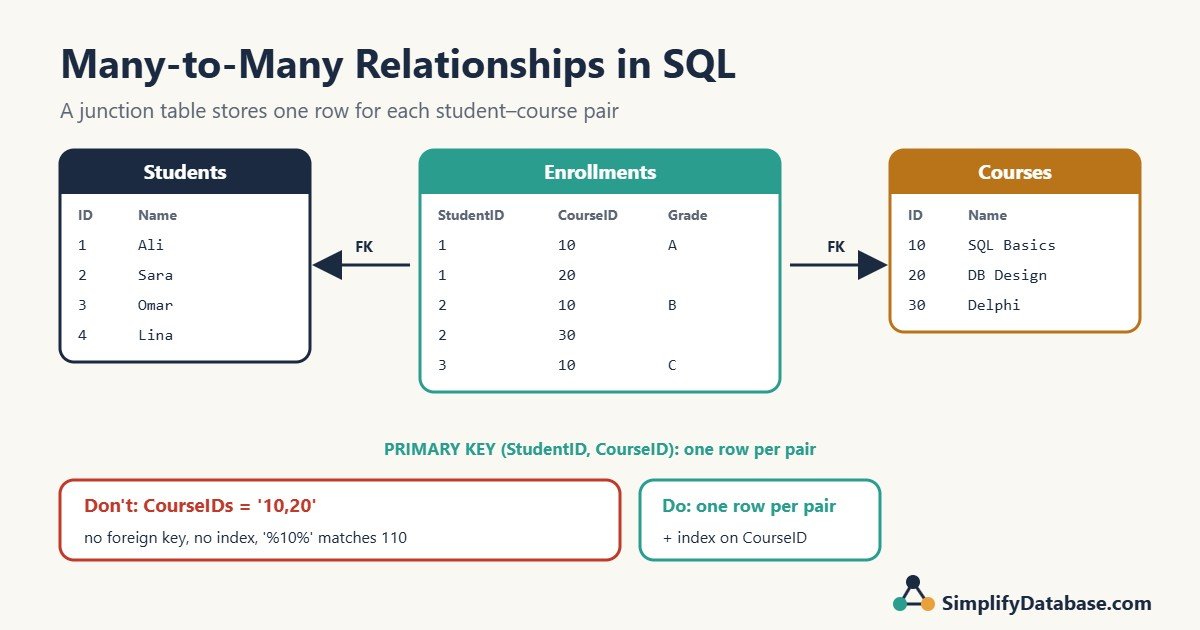
In this guide we will build one step by step, with SQL that works in SQL Server and MySQL.
What Is a Many-to-Many Relationship?
There are three kinds of relationships between two tables:
| Type | Example | How you store it |
|---|---|---|
| One-to-one | A user has one profile | Same primary key in both tables |
| One-to-many | A customer has many orders | A foreign key on the “many” side (Orders.CustomerID) |
| Many-to-many | Students and courses | A third table that holds the pairs |
One-to-many is easy: you put a foreign key on the “many” side. If you are not sure what that means, read Primary Keys vs Foreign Keys Explained for Beginners first.
Many-to-many is different, because neither side can hold the foreign key. If you add CourseID to the Students table, each student can only have one course. If you add StudentID to the Courses table, each course can only have one student. Neither is true.
The Wrong Way: A Comma List in One Column
The first idea most people have is to store a list:
| StudentID | StudentName | CourseIDs |
|---|---|---|
| 1 | Ali | 10,20 |
| 2 | Sara | 10,30 |
| 5 | Huda | 110,20 |
It looks simple, but it causes problems straight away. Try to find everyone taking course 10:
SELECT StudentName
FROM StudentsBad
WHERE CourseIDs LIKE '%10%';
This returns Ali, Sara and Huda, because “110” contains “10”. You can work around it (MySQL has FIND_IN_SET), but the list still has bigger problems:
- No foreign key. Nothing stops you from typing a course ID that doesn’t exist.
- No index. Searching inside a text column means reading every row.
- No room for details. Where would you store the date Ali enrolled, or his grade?
- Painful updates. Removing one course means editing a string.
- It breaks first normal form. One column should hold one value. See Database Normalization Explained Simply.
This mistake is so common that it has a name in the book SQL Antipatterns: “Jaywalking”.
The Right Way: A Junction Table
Instead of a list, you create a third table where each row is one pair: one student and one course.
CREATE TABLE Students (
    StudentID   INT PRIMARY KEY,
    StudentName VARCHAR(50) NOT NULL
);

CREATE TABLE Courses (
    CourseID   INT PRIMARY KEY,
    CourseName VARCHAR(50) NOT NULL
);

CREATE TABLE Enrollments (
    StudentID  INT NOT NULL,
    CourseID   INT NOT NULL,
    EnrolledOn DATE NOT NULL,
    Grade      CHAR(1) NULL,
    CONSTRAINT PK_Enrollments PRIMARY KEY (StudentID, CourseID),
    CONSTRAINT FK_Enrollments_Students
        FOREIGN KEY (StudentID) REFERENCES Students(StudentID),
    CONSTRAINT FK_Enrollments_Courses
        FOREIGN KEY (CourseID) REFERENCES Courses(CourseID)
);
This works the same way in SQL Server and MySQL. Let’s add some data:
INSERT INTO Students VALUES (1, 'Ali'), (2, 'Sara'), (3, 'Omar'), (4, 'Lina');
INSERT INTO Courses  VALUES (10, 'SQL Basics'), (20, 'Database Design'), (30, 'Delphi');

INSERT INTO Enrollments (StudentID, CourseID, EnrolledOn, Grade) VALUES
(1, 10, '2026-09-01', 'A'),
(1, 20, '2026-09-03', NULL),
(2, 10, '2026-09-02', 'B'),
(2, 30, '2026-09-05', NULL),
(3, 10, '2026-09-04', 'C');
Ali has two rows (two courses). SQL Basics appears in three rows (three students). Lina has no rows yet, and that’s fine.
Why each part matters
- Two foreign keys. Every pair must point to a real student and a real course. If you try to enroll student 9, who doesn’t exist, the database refuses: “Cannot add or update a child row: a foreign key constraint fails” (MySQL) or “The INSERT statement conflicted with the FOREIGN KEY constraint” (SQL Server).
- A composite primary key (StudentID, CourseID). The same pair can’t be stored twice. Running the insert for Ali and SQL Basics again gives “Duplicate entry ‘1-10’ for key ‘PRIMARY'” in MySQL, or a “Violation of PRIMARY KEY constraint” error in SQL Server.
- Extra columns.
EnrolledOnandGradedescribe the pair, not the student or the course. A junction table is the natural home for them. This is the part people forget: the link itself often has data.
For more on these rules, see SQL Constraints Explained Simply.
Querying a Many-to-Many Relationship
You read a many-to-many relationship with two joins: from one side, through the junction table, to the other side. If joins are new to you, start with SQL JOINs Explained Simply.
Which courses is Ali taking?
SELECT c.CourseName, e.EnrolledOn, e.Grade
FROM Enrollments AS e
JOIN Courses AS c ON c.CourseID = e.CourseID
WHERE e.StudentID = 1
ORDER BY c.CourseName;| CourseName | EnrolledOn | Grade |
|---|---|---|
| Database Design | 2026-09-03 | NULL |
| SQL Basics | 2026-09-01 | A |
Who is taking SQL Basics?
The same table answers the question from the other direction:
SELECT s.StudentName
FROM Enrollments AS e
JOIN Students AS s ON s.StudentID = e.StudentID
WHERE e.CourseID = 10
ORDER BY s.StudentName;
Result: Ali, Omar, Sara.
Every student with every course they take
SELECT s.StudentName, c.CourseName
FROM Students AS s
JOIN Enrollments AS e ON e.StudentID = s.StudentID
JOIN Courses AS c ON c.CourseID = e.CourseID
ORDER BY s.StudentName, c.CourseName;| StudentName | CourseName |
|---|---|
| Ali | Database Design |
| Ali | SQL Basics |
| Omar | SQL Basics |
| Sara | Delphi |
| Sara | SQL Basics |
Lina is missing because she has no enrollments. Use LEFT JOIN on both joins if you want to show her with an empty course.
How many students per course?
SELECT c.CourseName, COUNT(e.StudentID) AS Students
FROM Courses AS c
LEFT JOIN Enrollments AS e ON e.CourseID = c.CourseID
GROUP BY c.CourseID, c.CourseName
ORDER BY Students DESC, c.CourseName;| CourseName | Students |
|---|---|
| SQL Basics | 3 |
| Database Design | 1 |
| Delphi | 1 |
Note COUNT(e.StudentID) instead of COUNT(*): with a LEFT JOIN, a course with no students would otherwise be counted as 1. More on this in SQL GROUP BY and Aggregate Functions.
Students with no courses
SELECT s.StudentName
FROM Students AS s
WHERE NOT EXISTS (
    SELECT 1 FROM Enrollments AS e
    WHERE e.StudentID = s.StudentID
);
Result: Lina.
Indexes on a Junction Table
The primary key (StudentID, CourseID) creates an index that starts with StudentID. That makes “courses for one student” fast.
But “students in one course” searches by CourseID, which is the second column of that index, so the database can’t seek on it. Add a second index:
CREATE INDEX IX_Enrollments_CourseID ON Enrollments (CourseID);Rule of thumb: a junction table needs an index that starts with each foreign key. The primary key gives you one; you add the other. MySQL’s InnoDB creates an index for each foreign key automatically if none exists, but SQL Server does not, so on SQL Server this step is easy to forget. See SQL Indexes Explained Simply.
Composite Key or Its Own ID Column?
Some developers give the junction table its own ID:
CREATE TABLE Enrollments (
    EnrollmentID INT IDENTITY(1,1) PRIMARY KEY,  -- MySQL: INT AUTO_INCREMENT PRIMARY KEY
    StudentID    INT NOT NULL,
    CourseID     INT NOT NULL,
    EnrolledOn   DATE NOT NULL,
    Grade        CHAR(1) NULL,
    CONSTRAINT UQ_Enrollments UNIQUE (StudentID, CourseID),
    CONSTRAINT FK_Enrollments_Students FOREIGN KEY (StudentID) REFERENCES Students(StudentID),
    CONSTRAINT FK_Enrollments_Courses  FOREIGN KEY (CourseID)  REFERENCES Courses(CourseID)
);
Both designs are fine. Use this guide to choose:
| Use a composite primary key when… | Use an ID column when… |
|---|---|
| The table only links two things | Other tables need to point at the link (for example, Attendance rows for each enrollment) |
| You want the smallest, simplest table | Your ORM or framework expects a single id column |
| A pair can appear only once | The same pair can appear more than once (a student retaking a course) |
The important part: if you add an ID column and a pair should still be unique, keep a UNIQUE (StudentID, CourseID) constraint. Without it, nothing stops duplicate pairs, and your counts will quietly be wrong.
Real Examples You’ll Meet
Once you recognise the pattern, you see it everywhere:
| Left table | Junction table | Right table | Extra columns on the link |
|---|---|---|---|
| Products | ProductCategories | Categories | DisplayOrder |
| Employees | ProjectAssignments | Projects | Role, HoursPerWeek |
| Users | UserRoles | Roles | GrantedOn, GrantedBy |
| Invoices | InvoiceLines | Products | Quantity, UnitPrice |
| Orphans | Sponsorships | Sponsors | StartDate, MonthlyAmount |
The invoice example is worth a second look. Invoice lines are a many-to-many between invoices and products, with so much extra data (quantity, price, discount) that we usually think of them as a table of their own. That is a sign the link has become a real thing in your business, and that’s normal.
Common Mistakes
- Storing a comma-separated list instead of a junction table. Covered above: no foreign keys, no indexes, wrong search results.
- Forgetting the unique rule. No composite primary key and no
UNIQUEconstraint means duplicate pairs. - Only one index. Queries from the “second” side scan the whole table.
- Putting link data in the wrong table. A grade belongs to the enrollment, not the student or the course.
- Adding columns like Course1, Course2, Course3. You will always need one more column, and searching across them is painful. Use rows, not columns.
- Deleting a student without thinking about their enrollments. The foreign key blocks the delete. Decide on purpose: delete the enrollments first, or use
ON DELETE CASCADEif removing the links is always correct.
Practice Exercises
Use the Students, Courses and Enrollments tables from this article.
1. Find students taking both SQL Basics (10) and Database Design (20).
SELECT s.StudentName
FROM Students AS s
JOIN Enrollments AS e ON e.StudentID = s.StudentID
WHERE e.CourseID IN (10, 20)
GROUP BY s.StudentID, s.StudentName
HAVING COUNT(*) = 2;
Result: Ali. HAVING COUNT(*) = 2 works because the primary key makes each pair unique.
2. For each student, count the courses that don’t have a grade yet.
SELECT s.StudentName, COUNT(*) AS Ungraded
FROM Students AS s
JOIN Enrollments AS e ON e.StudentID = s.StudentID
WHERE e.Grade IS NULL
GROUP BY s.StudentID, s.StudentName
ORDER BY s.StudentName;
Result: Ali 1, Sara 1.
3. Add a new course, Laravel (40), then list courses with no students.
INSERT INTO Courses VALUES (40, 'Laravel');

SELECT c.CourseName
FROM Courses AS c
LEFT JOIN Enrollments AS e ON e.CourseID = c.CourseID
WHERE e.CourseID IS NULL;
Result: Laravel.
Summary
- A many-to-many relationship needs a third table: the junction table.
- Each row in it is one pair, with a foreign key to each side.
- Make the pair unique with a composite primary key or a
UNIQUEconstraint. - Add an index for the second foreign key, so both directions are fast.
- Put data that describes the link (dates, grades, quantities) on the junction table.
- Never store IDs as a comma-separated list.
This is the first article in a short series on database design patterns. Next we will look at how to store status values: lookup tables, ENUM and CHECK constraints.
Related articles
- Primary Keys vs Foreign Keys Explained for Beginners: the two keys every junction table is built from.
- SQL SELF JOIN Explained Simply: what to do when a table relates to itself, like employees and managers.
- SQL DISTINCT and Column Aliases Explained Simply: why you shouldn’t use DISTINCT to hide duplicate rows from a join.
- 5 Best Database Design Books: go deeper into table design.