
When you start with Delphi, it’s tempting to put all your code inside button click events. That works for ten lines. At a hundred lines it turns into a mess: the same calculation is copied into three buttons, and fixing a bug means fixing it three times.
The cure is to split your code into procedures and functions, and to group them into units. This article shows you how, with small examples you can run in a console app.
It’s part 3 of the Learn Delphi series. If you’re new, start with What Is Delphi? and Delphi basics.
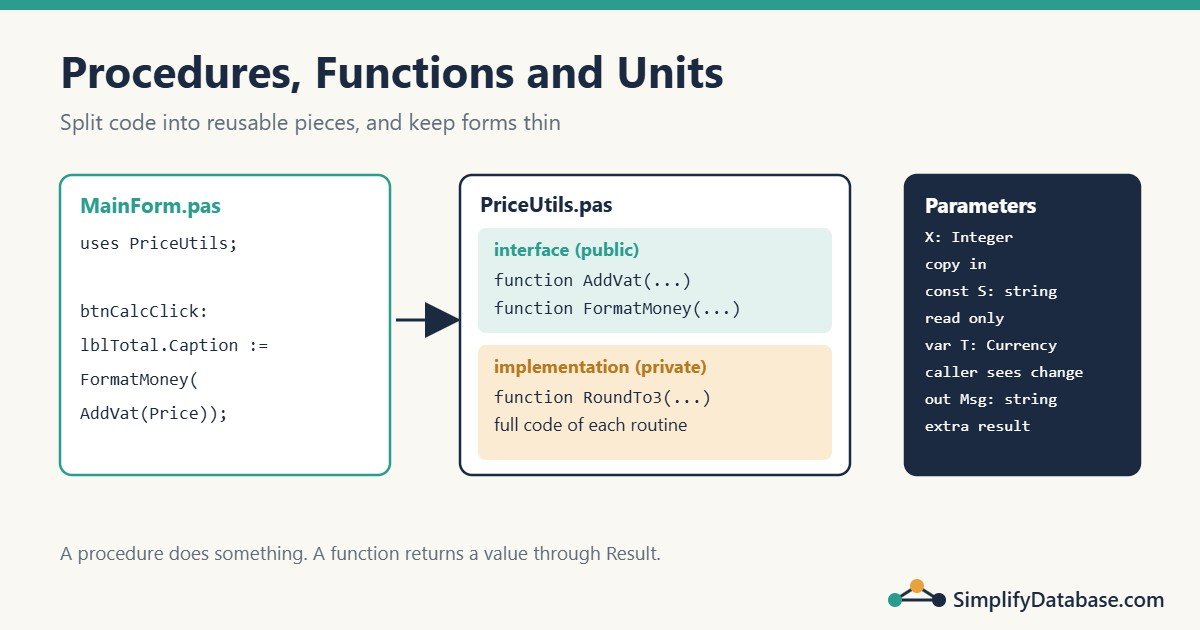
Procedure vs Function
Both are named blocks of code you can call from anywhere. The difference is simple:
| Procedure | Function | |
|---|---|---|
| Returns a value? | No | Yes |
| Use it for | Doing something: show, save, print, update | Calculating something: a total, a check, a formatted text |
| Called like | PrintInvoice(42); | Total := CalcTotal(Price, Qty); |
A Procedure
procedure PrintLine(const Text: string);
begin
  WriteLn('| ', Text);
end;
Call it with PrintLine('Hello');
A Function
function AddVat(Amount: Currency): Currency;
begin
  Result := Amount * 1.10;
end;
Call it with PriceWithVat := AddVat(100);
Inside a function, Result is a special variable that holds the return value. You can set it, read it and change it as many times as you like. Whatever it holds when the function ends is returned.
You may also see old code that assigns to the function name (AddVat := Amount * 1.10;). It works, but Result is clearer and is the modern style.
Use Exit to leave early. Since Delphi 2009 you can also pass the result to it:
function SafeDivide(A, B: Double): Double;
begin
  if B = 0 then
    Exit(0);        // same as: Result := 0; Exit;
  Result := A / B;
end;
Where Do They Go?
In a console program, you declare procedures and functions before the main begin ... end. block:
program Shop;

{$APPTYPE CONSOLE}

uses
  System.SysUtils;

function AddVat(Amount: Currency): Currency;
begin
  Result := Amount * 1.10;
end;

procedure PrintPrice(const Name: string; Price: Currency);
begin
  WriteLn(Format('%-10s %8.2f', [Name, AddVat(Price)]));
end;

begin
  PrintPrice('Keyboard', 25);
  PrintPrice('Monitor', 180);
  ReadLn;
end.
Output:
Keyboard      27.50
Monitor      198.00
The rule: a routine must be declared before it’s used. PrintPrice can call AddVat because AddVat is above it.
Local Variables
A routine can have its own var section. Those variables exist only while the routine runs:
function SumTo(N: Integer): Integer;
var
  I: Integer;
begin
  Result := 0;
  for I := 1 to N do
    Result := Result + I;
end;
Prefer local variables over global ones. Global variables can be changed from anywhere, which makes bugs hard to find.
Parameters: Value, const, var and out
This is the part that confuses beginners most, and it matters. Delphi has four ways to pass a parameter:
| Kind | Syntax | Can the routine change it? | Does the caller see the change? | Use it for |
|---|---|---|---|---|
| Value | X: Integer | Yes, its own copy | No | Small inputs |
const | const S: string | No | Not applicable | Inputs you won’t change, especially strings, records and arrays |
var | var Total: Currency | Yes | Yes | Updating a value the caller owns |
out | out Msg: string | Yes | Yes | Returning extra values; the input value is ignored |
See them side by side:
procedure ByValue(X: Integer);
begin
  X := X * 2;            // changes only the local copy
end;

procedure ByVar(var X: Integer);
begin
  X := X * 2;            // changes the caller's variable
end;

var
  N: Integer;
begin
  N := 5;
  ByValue(N);
  WriteLn(N);            // 5
  ByVar(N);
  WriteLn(N);            // 10
end.
When to Use const
Mark string, record and array parameters as const when the routine only reads them:
function Initials(const FullName: string): string;It tells the reader “this input won’t change”, the compiler stops you from changing it by accident, and it avoids some extra work when passing strings and records.
Returning Several Values with out
A function returns one value. When you need more, use out parameters, often with a Boolean result that says whether it worked:
function TryParseQty(const Text: string; out Qty: Integer;
  out ErrorMsg: string): Boolean;
begin
  ErrorMsg := '';
  Result := TryStrToInt(Text, Qty);
  if not Result then
    ErrorMsg := '"' + Text + '" is not a number'
  else if Qty <= 0 then
  begin
    ErrorMsg := 'Quantity must be greater than zero';
    Result := False;
  end;
end;
if TryParseQty(edtQty.Text, Qty, Msg) then
AddToCart(Qty)
else
ShowMessage(Msg);This Try... pattern is used throughout Delphi itself: TryStrToInt, TryStrToDate, TryStrToFloat.
Default Parameters
Give a parameter a default value, and the caller can leave it out. Default parameters must come last:
function FormatMoney(Amount: Currency; const Symbol: string = 'BHD';
  Decimals: Integer = 3): string;
begin
  Result := Format('%s %.*f', [Symbol, Decimals, Amount]);
end;

begin
  WriteLn(FormatMoney(12.5));               // BHD 12.500
  WriteLn(FormatMoney(12.5, 'USD', 2));     // USD 12.50
end.
Overloading: Same Name, Different Parameters
Mark routines with overload to give them the same name but different parameter lists:
function Area(Side: Double): Double; overload;
begin
  Result := Side * Side;
end;

function Area(Width, Height: Double): Double; overload;
begin
  Result := Width * Height;
end;

begin
  WriteLn(Area(3):0:1);       // 9.0
  WriteLn(Area(3, 4):0:1);    // 12.0
end.
Delphi picks the version that matches the arguments. (:0:1 in WriteLn formats a number with 1 decimal place.)
Units: Organising Code in Files
A unit is a .pas file that groups related routines, types and constants. You already have one for each form. You can create your own: File > New > Unit – Delphi.
Every unit has the same shape:
unit PriceUtils;

interface

// Public: other units can use what's declared here
const
  VatRate = 0.10;

function AddVat(Amount: Currency): Currency;
function FormatMoney(Amount: Currency; const Symbol: string = 'BHD'): string;

implementation

uses
  System.SysUtils;   // only needed inside this unit

// Private helper: not listed in interface, so other units can't see it
function RoundTo3(Value: Currency): Currency;
begin
  Result := Round(Value * 1000) / 1000;
end;

function AddVat(Amount: Currency): Currency;
begin
  Result := RoundTo3(Amount * (1 + VatRate));
end;

function FormatMoney(Amount: Currency; const Symbol: string): string;
begin
  Result := Format('%s %.3f', [Symbol, Amount]);
end;

end.
Notice:
interfaceis the public part. Only the declaration (the first line) of each routine goes here.implementationholds the full code, plus any private helpers likeRoundTo3.- Default values only need to be written in the
interfacedeclaration. - A unit ends with
end.(with a full stop).
To use the unit from a form, add it to the uses clause:
implementation

uses
  PriceUtils;

procedure TForm1.btnCalcClick(Sender: TObject);
begin
  lblTotal.Caption := FormatMoney(AddVat(StrToCurr(edtPrice.Text)));
end;
Interface uses or Implementation uses?
- Put a unit in the interface
usesonly if the interface part needs it (for example, a type used in a public declaration). - Otherwise put it in the implementation
uses.
This keeps units loosely connected and avoids the “circular unit reference” error you get when two units list each other in their interface sections.
Good Units to Create
| Unit | What goes in it |
|---|---|
PriceUtils.pas | Money, VAT and discount calculations |
DateUtilsEx.pas | Your own date helpers (month-end, fiscal year) |
Validation.pas | TryParse... and IsValid... checks |
DataModule.pas | The database connection and shared queries |
A rule of thumb: forms handle the screen, units handle the logic. A click handler should be a few lines that call routines from your units. Then you can reuse and test the logic without the form.
Nested Routines
Delphi lets you declare a small routine inside another one. The inner routine can see the outer one’s parameters and local variables:
procedure PrintReport(const Title: string);

  procedure Line;
  begin
    WriteLn(StringOfChar('-', Length(Title)));
  end;

begin
  Line;
  WriteLn(Title);
  Line;
end;
Use this for small helpers that only make sense inside one routine.
Common Beginner Mistakes
- Calling a routine before it’s declared. Move it higher, or declare it in the unit’s interface.
- Forgetting
varwhen the caller should see the change. Withoutvar, the routine only changes its own copy. - Not setting
Resulton every path. If oneifbranch forgets, the function returns garbage. The compiler warns: “Return value of function might be undefined”. Read the warnings. - Copy-pasting logic into several click events. Move it into a function in a unit and call it.
- Putting everything in the interface
uses. Use the implementationusesunless the interface needs it.
Practice Exercises
Exercise 1. Write a function IsLeapYear(Year: Integer): Boolean. A year is a leap year if it’s divisible by 4, except years divisible by 100, unless they’re also divisible by 400.
Exercise 2. Write a procedure Swap(var A, B: Integer) that swaps two values.
Exercise 3. Write a function Initials(const FullName: string): string that returns 'SA' for 'Sara Ali'.
Answers
Exercise 1:
function IsLeapYear(Year: Integer): Boolean;
begin
  Result := ((Year mod 4 = 0) and (Year mod 100 <> 0)) or (Year mod 400 = 0);
end;
// IsLeapYear(2024) = True, IsLeapYear(1900) = False, IsLeapYear(2000) = True
(Delphi also has a built-in IsLeapYear in System.SysUtils. Writing your own is good practice.)
Exercise 2:
procedure Swap(var A, B: Integer);
var
  Temp: Integer;
begin
  Temp := A;
  A := B;
  B := Temp;
end;
Exercise 3:
function Initials(const FullName: string): string;
var
  I: Integer;
  S: string;
begin
  Result := '';
  S := Trim(FullName);
  for I := 1 to Length(S) do
    if (I = 1) or (S[I - 1] = ' ') then
      if S[I] <> ' ' then
        Result := Result + UpperCase(S[I]);
end;
Summary
- A procedure does something; a function returns a value through
Result. - Parameters are passed by value by default. Use
constfor inputs you won’t change,varto update the caller’s variable, andoutfor extra return values. - Default parameters go last, and
overloadlets routines share a name. - A unit has a public
interfaceand a privateimplementation. Keep logic in units and keep forms thin.
Next in the series: classes and objects, Delphi’s way of grouping data and the code that works on it. All parts are in the Delphi category.
Related articles
- Delphi Basics: Variables, Data Types, If, Case and Loops: part 2 of this series.
- How to Connect Delphi to SQL Server with FireDAC: put your connection code in its own data module unit.
- SQL Stored Procedures Explained Simply: the SQL Server version of reusable routines.