
An accountant should post journal entries. A sales clerk should create invoices but not see the general ledger. A manager should see reports but not change prices. Every ERP needs a login and permissions, and they’re one of the first things auditors ask about.
This is part 10, the last part of the Delphi for ERP series. It shows a simple, solid design: users belong to roles, roles have permissions, and the Delphi app shows only what each user may use. It also explains the part many tutorials skip: hiding a button is not security, and what to do about it.
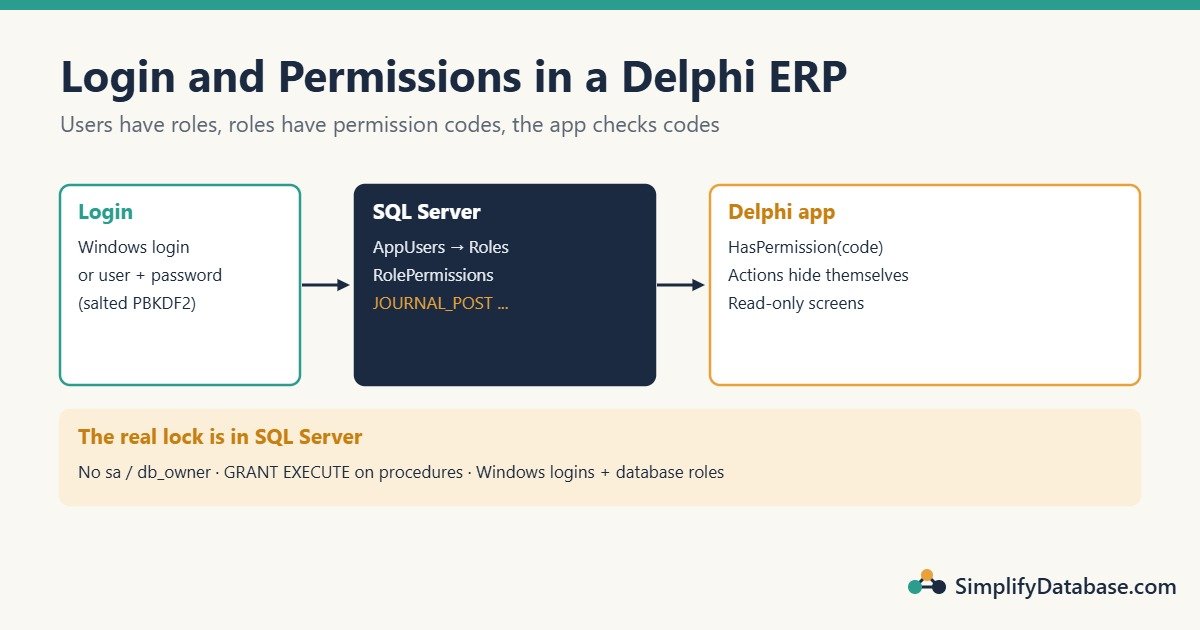
Table of Contents
Step 1: The Tables
CREATE TABLE dbo.Roles (
    RoleID   INT IDENTITY(1,1) NOT NULL PRIMARY KEY,
    RoleName NVARCHAR(50) NOT NULL UNIQUE
);

CREATE TABLE dbo.Permissions (
    PermissionCode VARCHAR(50)   NOT NULL PRIMARY KEY,
    Description    NVARCHAR(200) NOT NULL
);

CREATE TABLE dbo.RolePermissions (
    RoleID         INT         NOT NULL REFERENCES dbo.Roles (RoleID),
    PermissionCode VARCHAR(50) NOT NULL REFERENCES dbo.Permissions (PermissionCode),
    PRIMARY KEY (RoleID, PermissionCode)
);

CREATE TABLE dbo.AppUsers (
    UserID       INT IDENTITY(1,1) NOT NULL PRIMARY KEY,
    UserName     NVARCHAR(100) NOT NULL UNIQUE,
    FullName     NVARCHAR(100) NOT NULL,
    RoleID       INT           NOT NULL REFERENCES dbo.Roles (RoleID),
    PasswordHash VARCHAR(100)  NULL,     -- NULL when the user signs in with Windows
    PasswordSalt VARCHAR(50)   NULL,
    HashIterations INT         NULL,
    FailedLogins INT           NOT NULL DEFAULT 0,
    IsActive     BIT           NOT NULL DEFAULT 1
);

INSERT INTO dbo.Permissions (PermissionCode, Description) VALUES
('CUSTOMERS_VIEW',  N'Open the customer list'),
('CUSTOMERS_EDIT',  N'Add and change customers'),
('INVOICES_CREATE', N'Create sales invoices'),
('RECEIPTS_POST',   N'Post customer receipts'),
('JOURNAL_POST',    N'Post journal entries'),
('REPORTS_VIEW',    N'Print and export reports'),
('USERS_ADMIN',     N'Manage users and roles');

INSERT INTO dbo.Roles (RoleName) VALUES (N'Administrator'), (N'Accountant'), (N'Sales clerk');

-- Accountant: everything except user admin
INSERT INTO dbo.RolePermissions (RoleID, PermissionCode)
SELECT r.RoleID, p.PermissionCode
FROM dbo.Roles AS r CROSS JOIN dbo.Permissions AS p
WHERE r.RoleName = N'Accountant' AND p.PermissionCode <> 'USERS_ADMIN';
Permissions are codes, not role names. The program asks “may this user post journals?” (JOURNAL_POST), never “is this user an accountant?”. That way you can create new roles later without changing any code.
Step 2: Who Is the User? Two Options
Option A: Windows login (recommended inside a company)
If the PCs are in a Windows domain, let Windows do the login. Connect to SQL Server with Windows authentication (in FireDAC, OSAuthent=Yes in the connection parameters), then ask SQL Server who connected:
SELECT u.UserID, u.FullName, u.RoleID
FROM dbo.AppUsers AS u
WHERE u.UserName = SUSER_SNAME() AND u.IsActive = 1;
SUSER_SNAME() returns the Windows account, like COMPANY\sara. Store that in AppUsers.UserName. The benefits: no passwords in your database at all, password rules and lockouts are handled by Windows, and leaving staff are disabled in one place.
Option B: Your own user names and passwords
If you can’t use Windows accounts, store passwords only as salted, slow hashes, never as plain text and never encrypted. A hash can’t be turned back into the password; at login you hash what the user typed and compare.
Delphi’s System.Hash unit has HMAC-SHA256, which is all you need to build PBKDF2, a standard password hashing method:
uses
  System.SysUtils, System.Hash, System.NetEncoding;

function Pbkdf2Sha256(const Password: string; const Salt: TBytes;
  const Iterations: Integer): TBytes;
var
  Key, Block, U: TBytes;
  I, J: Integer;
begin
  Key := TEncoding.UTF8.GetBytes(Password);

  // First block input: the salt followed by the block number 1 (4 bytes, big-endian)
  SetLength(Block, Length(Salt) + 4);   // new bytes start as 0
  if Length(Salt) > 0 then
    Move(Salt[0], Block[0], Length(Salt));
  Block[High(Block)] := 1;

  U := THashSHA2.GetHMACAsBytes(Block, Key, TSHA2Version.SHA256);
  Result := Copy(U);
  for I := 2 to Iterations do
  begin
    U := THashSHA2.GetHMACAsBytes(U, Key, TSHA2Version.SHA256);
    for J := 0 to High(Result) do
      Result[J] := Result[J] xor U[J];
  end;
end;
We checked these exact steps against a standard PBKDF2-HMAC-SHA256 implementation, and the results match.
Creating or changing a password:
const
  HashIterations = 100000;

procedure SetUserPassword(const UserID: Integer; const NewPassword: string);
var
  Salt: TBytes;
begin
  Salt := TGUID.NewGuid.ToByteArray;   // 16 random bytes, different for every user
  DM.Conn.ExecSQL(
    'UPDATE dbo.AppUsers SET PasswordHash = :Hash, PasswordSalt = :Salt, ' +
    'HashIterations = :It, FailedLogins = 0 WHERE UserID = :ID',
    [TNetEncoding.Base64.EncodeBytesToString(Pbkdf2Sha256(NewPassword, Salt, HashIterations)),
     TNetEncoding.Base64.EncodeBytesToString(Salt),
     HashIterations, UserID]);
end;- The salt makes the same password produce a different hash for each user, so a leaked table can’t be cracked with ready-made lists.
- The iterations make each guess slow for an attacker. Pick the highest number that keeps login under about half a second on your PCs (current OWASP guidance for this algorithm is 600,000). Storing the count per user lets you raise it later.
Step 3: The Login Check
Put the session in the data module, so every form can ask about the current user:
type
  TDM = class(TDataModule)
    Conn: TFDConnection;
  private
    FUserID: Integer;
    FUserName: string;
    FPermissions: TStringList;
    procedure LoadPermissions(const RoleID: Integer);
  public
    function Login(const UserName, Password: string): Boolean;
    function HasPermission(const Code: string): Boolean;
    property UserID: Integer read FUserID;
    property UserName: string read FUserName;
  end;
Create FPermissions in the data module’s OnCreate (with Sorted := True) and free it in OnDestroy. Then:
function TDM.Login(const UserName, Password: string): Boolean;
var
  Q: TFDQuery;
  Hash: string;
begin
  Result := False;
  Q := TFDQuery.Create(nil);
  try
    Q.Connection := Conn;
    Q.SQL.Text :=
      'SELECT UserID, RoleID, PasswordHash, PasswordSalt, HashIterations, FailedLogins ' +
      'FROM dbo.AppUsers WHERE UserName = :UserName AND IsActive = 1';
    Q.ParamByName('UserName').AsString := UserName;
    Q.Open;

    if Q.IsEmpty or Q.FieldByName('PasswordHash').IsNull then
      Exit;   // unknown user: same answer as a wrong password
    if Q.FieldByName('FailedLogins').AsInteger >= 5 then
      raise Exception.Create('This account is locked. Ask an administrator to reset it.');

    Hash := TNetEncoding.Base64.EncodeBytesToString(Pbkdf2Sha256(Password,
      TNetEncoding.Base64.DecodeStringToBytes(Q.FieldByName('PasswordSalt').AsString),
      Q.FieldByName('HashIterations').AsInteger));

    if Hash = Q.FieldByName('PasswordHash').AsString then
    begin
      FUserID := Q.FieldByName('UserID').AsInteger;
      FUserName := UserName;
      LoadPermissions(Q.FieldByName('RoleID').AsInteger);
      Conn.ExecSQL('UPDATE dbo.AppUsers SET FailedLogins = 0 WHERE UserID = :ID', [FUserID]);
      Result := True;
    end
    else
      Conn.ExecSQL('UPDATE dbo.AppUsers SET FailedLogins = FailedLogins + 1 WHERE UserID = :ID',
        [Q.FieldByName('UserID').AsInteger]);
  finally
    Q.Free;
  end;
end;

procedure TDM.LoadPermissions(const RoleID: Integer);
var
  Q: TFDQuery;
begin
  FPermissions.Clear;
  Q := TFDQuery.Create(nil);
  try
    Q.Connection := Conn;
    Q.SQL.Text := 'SELECT PermissionCode FROM dbo.RolePermissions WHERE RoleID = :RoleID';
    Q.ParamByName('RoleID').AsInteger := RoleID;
    Q.Open;
    while not Q.Eof do
    begin
      FPermissions.Add(Q.Fields[0].AsString);
      Q.Next;
    end;
  finally
    Q.Free;
  end;
end;

function TDM.HasPermission(const Code: string): Boolean;
begin
  Result := FPermissions.IndexOf(Code) >= 0;
end;
Notice that an unknown user name and a wrong password give the same result. Telling an attacker “this user exists” helps them.
The login form simply calls DM.Login(edtUser.Text, edtPassword.Text), shows “Wrong user name or password” when it returns False, and closes with mrOk on success. In the project file, show it before the main form and stop the app if it’s cancelled.
Step 4: Show Only What the User May Use
If your menus and buttons use a TActionList (a good habit in any ERP), there’s a neat trick: write the permission code into each action’s spare HelpKeyword property in the Object Inspector (actNewInvoice.HelpKeyword = INVOICES_CREATE). Then one loop applies all permissions when the main form opens:
procedure TfrmMain.ApplyPermissions;
var
  I: Integer;
  A: TCustomAction;
begin
  for I := 0 to ActionList1.ActionCount - 1 do
  begin
    A := ActionList1.Actions[I] as TCustomAction;
    if A.HelpKeyword <> '' then
      A.Visible := DM.HasPermission(A.HelpKeyword);
  end;
end;
Every menu item and toolbar button linked to an action hides itself. Adding a new screen only means filling in one property.
Inside screens, check the finer permissions too:
// customer form: view-only for users without CUSTOMERS_EDIT
qryCustomers.UpdateOptions.ReadOnly := not DM.HasPermission('CUSTOMERS_EDIT');
DBNavigator1.Visible := DM.HasPermission('CUSTOMERS_EDIT');
Step 5: The Real Lock Is in SQL Server
Everything above controls the screens. But a user who knows the database password could open SSMS or Excel and change tables directly, and every check in Delphi is skipped. Real security has to be in SQL Server too. From simplest to strongest:
- Don’t use
sa, and don’t give the app logindb_owner. Create a login for the app with only the rights it needs. - Grant
EXECUTEon stored procedures instead of table rights for critical actions like posting, as in part 7. Then nobody can write a journal line except through the procedure’s rules. - With Windows logins (Option A), map ERP roles to SQL Server roles. Each user connects as themselves, so SQL Server itself enforces what they can read and change, and the app’s permission checks become a convenience on top.
Also log who did what: add CreatedBy and CreatedAt columns to important tables, filled with DM.UserName (or SUSER_SNAME() on the server). Auditors will ask.
Common Mistakes
- Storing plain-text passwords (or ones encrypted with a key inside the app). Use salted PBKDF2 hashes, or Windows login.
- A fast hash like a single SHA-256. Attackers can test billions per second. Use many iterations.
- Checking role names in code (
if Role = 'Accountant'). Check permission codes. - Only hiding buttons. Lock the database too, with limited logins,
EXECUTErights and roles. - Telling users whether the user name exists. Give one message for both mistakes.
- No lockout. Without a limit on failed attempts, passwords can be guessed.
Practice Exercises
- Show “Signed in as Sara (Accountant)” in the main form’s status bar.
- Force users to change their password at the first login.
- Make
dbo.PostCustomerReceipt(from part 7) record which user posted each receipt.
Answers
1. Return FullName and the role name from the login query (join dbo.Roles), keep them in the data module, then in the main form: StatusBar1.SimpleText := Format('Signed in as %s (%s)', [DM.FullName, DM.RoleName]);
2. Add a column MustChangePassword BIT NOT NULL DEFAULT 1. When it’s 1 after a successful login, show a change-password form, call SetUserPassword, and set the column to 0 in the same UPDATE.
3. Add the column and a parameter, and pass the user from Delphi:
ALTER TABLE dbo.CustomerReceipts ADD CreatedBy NVARCHAR(100) NULL;
-- in the procedure: a new parameter @CreatedBy NVARCHAR(100),
-- and CreatedBy = @CreatedBy in the INSERT INTO dbo.CustomerReceipts
spPostReceipt.ParamByName('@CreatedBy').AsString := DM.UserName;With Windows logins, the procedure can use SUSER_SNAME() instead, which the user can’t fake.
Summary
- Users have roles; roles have permission codes; the app checks codes.
- Prefer Windows login inside a company; otherwise store salted PBKDF2 hashes, never passwords.
- Load the user’s permissions once at login and hide actions with one loop using
HelpKeyword. - Hiding screens is convenience; real security is limited SQL Server rights,
EXECUTEon procedures and roles.
The End of the Delphi for ERP Series
Over ten parts you’ve built the core of a small ERP in Delphi: customer and item screens, lookups, an invoice with lines, balanced journal entries in transactions, stored procedures for posting and statements, printed invoices, exports to Excel, CSV and PDF, and now logins and permissions. That’s the same set of patterns used in real accounting, inventory and fixed asset systems, just with more tables.
Find every part, plus the beginner Learn Delphi series, in the Delphi category.
Delphi for ERP series
All parts in order. New parts appear here as they go live.
-
Why Delphi Is Still a Great Choice for ERP and Business Apps in 2026
-
Delphi vs C# vs Web Apps for Business Software: Which Should You Use?
-
Build a Customer Screen in Delphi in 30 Minutes (SQL Server Step by Step)
-
Lookup Combo Boxes in Delphi: Choose a Customer or Item From a List
-
Master-Detail Forms in Delphi: Invoice Header and Invoice Lines (FireDAC)
-
Delphi Transactions with FireDAC: Save a Balanced Journal Entry (All or Nothing)
-
Call SQL Server Stored Procedures from Delphi with FireDAC (TFDStoredProc)
-
Print Invoices and Reports in Delphi with FastReport (Step by Step)
-
Export Data from Delphi to Excel, CSV and PDF (With Ready-to-Use Code)
-
User Login and Permissions in a Delphi ERP App (Roles, Hashed Passwords, SQL Server)
New to Delphi? Start with What Is Delphi? Build Your First App.
Related articles
- Export Data from Delphi to Excel, CSV and PDF: part 9 of this series.
- Why Delphi Is Still a Great Choice for ERP and Business Apps: part 1, where the series started.
- SQL Injection Explained Simply: the other security basic every login screen needs.
- Call SQL Server Stored Procedures from Delphi: lock critical actions behind procedures.