
An online shop gets 10,000 visitors a month, but only 300 of them buy something. Where do the other 9,700 go? Do they leave on the home page, after looking at a product, or at the checkout?
Funnel analysis answers that question. You list the steps a user should go through, count how many users reach each step, and see where the biggest drop happens. That’s where you focus your effort. This guide builds a funnel in SQL step by step, from a simple count to a strict, time-limited funnel split by device.
The sample data: an events table
Most websites and apps log what users do in an events table: one row per action, with who did it and when.
CREATE TABLE events (
    user_id     INT,
    event_name  VARCHAR(20),
    event_time  DATETIME
);

CREATE TABLE users (
    user_id  INT,
    device   VARCHAR(10)
);
Our shop has 10 users and five funnel steps:
visit: the user opens the siteview_product: opens a product pageadd_to_cartcheckout: starts the checkoutpurchase: completes the payment
Here’s a short summary of what each user did (the full INSERT script is at the end of the article):
| user_id | device | events, in order |
|---|---|---|
| 1 | desktop | visit, view, cart, checkout, purchase |
| 2 | mobile | visit, view, cart, checkout, purchase |
| 3 | mobile | visit, view, cart |
| 4 | desktop | visit, view |
| 5 | mobile | visit |
| 6 | mobile | visit, view, cart, checkout |
| 7 | desktop | visit, view, view, cart, checkout, purchase |
| 8 | mobile | visit, view |
| 9 | mobile | visit, view, purchase (no cart, no checkout) |
| 10 | desktop | visit, view, cart on Oct 1, then checkout and purchase on Oct 15 |
Users 7, 9 and 10 are there on purpose. User 7 viewed a product twice, user 9 skipped steps, and user 10 came back two weeks later. Real data always has cases like these.
Step 1: the simple funnel
The quickest funnel counts how many different users did each event:
SELECT event_name,
       COUNT(DISTINCT user_id) AS users
FROM events
GROUP BY event_name
ORDER BY users DESC;| event_name | users |
|---|---|
| visit | 10 |
| view_product | 9 |
| add_to_cart | 6 |
| checkout | 5 |
| purchase | 5 |
COUNT(DISTINCT user_id) is important. User 7 viewed two products, but we count people, not clicks.
This is a good first look, but it has a problem: it says 5 users purchased, yet one of those buyers (user 9) never added anything to a cart or started a checkout. The simple funnel counts each step on its own, so it doesn’t check that users actually went through the steps in order.
Step 2: the time each user first reached each step
To build a proper funnel, first get one row per user with the first time they did each step. This is a pivot with MIN and CASE:
SELECT user_id,
       MIN(CASE WHEN event_name = 'visit'        THEN event_time END) AS t_visit,
       MIN(CASE WHEN event_name = 'view_product' THEN event_time END) AS t_view,
       MIN(CASE WHEN event_name = 'add_to_cart'  THEN event_time END) AS t_cart,
       MIN(CASE WHEN event_name = 'checkout'     THEN event_time END) AS t_checkout,
       MIN(CASE WHEN event_name = 'purchase'     THEN event_time END) AS t_purchase
FROM events
GROUP BY user_id;| user_id | t_visit | t_view | t_cart | t_checkout | t_purchase |
|---|---|---|---|---|---|
| 1 | 10-01 09:00 | 09:02 | 09:05 | 09:08 | 09:10 |
| 3 | 10-01 11:00 | 11:03 | 11:06 | NULL | NULL |
| 9 | 10-03 09:00 | 09:01 | NULL | NULL | 09:02 |
| … |
CASE returns the time only for matching rows and NULL for the rest, and MIN ignores NULLs, so each column holds the first time that step happened. The same SUM(CASE ...) and MIN(CASE ...) trick appears in The SQL CASE Expression Explained Simply.
Step 3: a strict funnel (steps in order)
Now mark whether each user reached each step after the previous one. A user only counts at step 3 if they also passed steps 1 and 2, in that order:
WITH first_times AS (
    SELECT user_id,
           MIN(CASE WHEN event_name = 'visit'        THEN event_time END) AS t_visit,
           MIN(CASE WHEN event_name = 'view_product' THEN event_time END) AS t_view,
           MIN(CASE WHEN event_name = 'add_to_cart'  THEN event_time END) AS t_cart,
           MIN(CASE WHEN event_name = 'checkout'     THEN event_time END) AS t_checkout,
           MIN(CASE WHEN event_name = 'purchase'     THEN event_time END) AS t_purchase
    FROM events
    GROUP BY user_id
),
steps AS (
    SELECT user_id,
           CASE WHEN t_visit IS NOT NULL THEN 1 ELSE 0 END AS s1,
           CASE WHEN t_view >= t_visit THEN 1 ELSE 0 END AS s2,
           CASE WHEN t_view >= t_visit AND t_cart >= t_view THEN 1 ELSE 0 END AS s3,
           CASE WHEN t_view >= t_visit AND t_cart >= t_view
                 AND t_checkout >= t_cart THEN 1 ELSE 0 END AS s4,
           CASE WHEN t_view >= t_visit AND t_cart >= t_view
                 AND t_checkout >= t_cart AND t_purchase >= t_checkout THEN 1 ELSE 0 END AS s5
    FROM first_times
)
SELECT SUM(s1) AS visit,
       SUM(s2) AS view_product,
       SUM(s3) AS add_to_cart,
       SUM(s4) AS checkout,
       SUM(s5) AS purchase
FROM steps;| visit | view_product | add_to_cart | checkout | purchase |
|---|---|---|---|---|
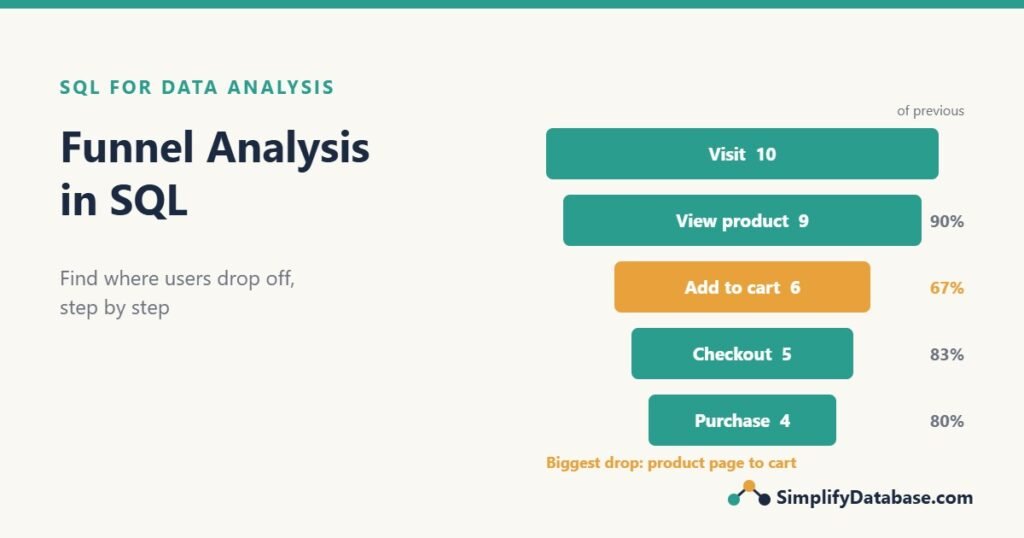
| 10 | 9 | 6 | 5 | 4 |
Purchases dropped from 5 to 4: user 9 bought without going through the cart, so they don’t count as completing this funnel. That isn’t an error in their data. It may be a “Buy now” button, and that’s worth its own analysis. A strict funnel shows you how many users followed the path you designed.
Any comparison with NULL is not true, so a missing step automatically gives 0 for that step and every step after it. See NULL in SQL Explained Simply if that’s new.
Step 4: conversion rates and drop-off
Raw counts are hard to compare. Turn them into percentages: the conversion from the previous step, and from the start of the funnel. Put each step on its own row, then use LAG and FIRST_VALUE:
WITH first_times AS ( ... same as above ... ),
steps AS ( ... same as above ... ),
totals AS (
    SELECT SUM(s1) AS n1, SUM(s2) AS n2, SUM(s3) AS n3, SUM(s4) AS n4, SUM(s5) AS n5
    FROM steps
),
funnel AS (
    SELECT 1 AS step_no, 'Visit' AS step, n1 AS users FROM totals
    UNION ALL SELECT 2, 'View product', n2 FROM totals
    UNION ALL SELECT 3, 'Add to cart',  n3 FROM totals
    UNION ALL SELECT 4, 'Checkout',     n4 FROM totals
    UNION ALL SELECT 5, 'Purchase',     n5 FROM totals
)
SELECT step_no, step, users,
       LAG(users) OVER (ORDER BY step_no) - users AS dropped,
       ROUND(100.0 * users / LAG(users) OVER (ORDER BY step_no), 1) AS pct_of_previous,
       ROUND(100.0 * users / FIRST_VALUE(users) OVER (ORDER BY step_no), 1) AS pct_of_start
FROM funnel
ORDER BY step_no;| step_no | step | users | dropped | pct_of_previous | pct_of_start |
|---|---|---|---|---|---|
| 1 | Visit | 10 | NULL | NULL | 100.0 |
| 2 | View product | 9 | 1 | 90.0 | 90.0 |
| 3 | Add to cart | 6 | 3 | 66.7 | 60.0 |
| 4 | Checkout | 5 | 1 | 83.3 | 50.0 |
| 5 | Purchase | 4 | 1 | 80.0 | 40.0 |
Now the story is clear:
- Overall conversion is 40%: 4 of 10 visitors bought.
- The biggest leak is product page → cart: 3 of 9 users (33%) looked at a product and didn’t add it. That’s where to look first: price, photos, delivery cost, stock messages.
100.0 *matters. In SQL Server,users / LAG(users)with two integers would give 0 (see SQL Data Types Explained Simply).
LAG reads the value from the previous row, and FIRST_VALUE from the first row. Both are covered in SQL Window Functions Explained Simply. The UNION ALL turns one wide row into five rows; in SQL Server you could also use CROSS APPLY (VALUES ...) or UNPIVOT.
Step 5: add a time limit (conversion window)
User 10 added to cart on October 1 and bought on October 15. Should that count as a conversion of the October 1 visit? Most teams say no: they use a conversion window, such as 7 days from the first visit.
Add the limit to each step:
-- SQL Server
CASE WHEN t_view >= t_visit AND t_cart >= t_view
      AND t_checkout >= t_cart
      AND t_checkout < DATEADD(DAY, 7, t_visit) THEN 1 ELSE 0 END AS s4,

-- MySQL
CASE WHEN t_view >= t_visit AND t_cart >= t_view
      AND t_checkout >= t_cart
      AND t_checkout < t_visit + INTERVAL 7 DAY THEN 1 ELSE 0 END AS s4,
Apply the same < DATEADD(DAY, 7, t_visit) condition to steps 2, 3 and 5. The result:
| visit | view_product | add_to_cart | checkout | purchase |
|---|---|---|---|---|
| 10 | 9 | 6 | 4 | 3 |
With a 7-day window, user 10 no longer counts as a checkout or a purchase, and conversion falls to 30%. Always state your window in the report (“purchases within 7 days of the first visit”), because different windows give different numbers. Date arithmetic is explained in SQL Date Functions Explained Simply.
Step 6: compare segments (mobile vs desktop)
A total funnel can hide big differences. Join the users table and group by device:
WITH first_times AS ( ... ),
steps AS ( ... )
SELECT u.device,
       SUM(s.s1) AS visit,
       SUM(s.s2) AS view_product,
       SUM(s.s3) AS add_to_cart,
       SUM(s.s4) AS checkout,
       SUM(s.s5) AS purchase,
       ROUND(100.0 * SUM(s.s5) / SUM(s.s1), 1) AS conversion_pct
FROM steps AS s
JOIN users AS u ON u.user_id = s.user_id
GROUP BY u.device;| device | visit | view_product | add_to_cart | checkout | purchase | conversion_pct |
|---|---|---|---|---|---|---|
| desktop | 4 | 4 | 3 | 3 | 3 | 75.0 |
| mobile | 6 | 5 | 3 | 2 | 1 | 16.7 |
Desktop converts at 75%, mobile at 16.7%. Mobile users get to the cart but rarely finish. That points at the mobile checkout page, which is a much more useful finding than “conversion is 40%”. You can split the funnel the same way by country, traffic source, new vs returning user, or month.
Step 7: who dropped off?
Percentages tell you where; a list of users tells you who. For example, users who added to cart but never bought (the classic “abandoned cart” list for a reminder email):
WITH first_times AS (
    SELECT user_id,
           MIN(CASE WHEN event_name = 'add_to_cart' THEN event_time END) AS t_cart,
           MIN(CASE WHEN event_name = 'purchase'    THEN event_time END) AS t_purchase
    FROM events
    GROUP BY user_id
)
SELECT user_id, t_cart
FROM first_times
WHERE t_cart IS NOT NULL
AND (t_purchase IS NULL OR t_purchase < t_cart);| user_id | t_cart |
|---|---|
| 3 | 2026-10-01 11:06 |
| 6 | 2026-10-02 09:03 |
Step 8: how long does each step take?
Time between steps is another useful signal. A checkout that takes 20 minutes may be confusing:
-- SQL Server
SELECT user_id,
       DATEDIFF(MINUTE, t_cart, t_purchase) AS minutes_cart_to_purchase
FROM first_times
WHERE t_purchase >= t_cart;

-- MySQL
SELECT user_id,
       TIMESTAMPDIFF(MINUTE, t_cart, t_purchase) AS minutes_cart_to_purchase
FROM first_times
WHERE t_purchase >= t_cart;| user_id | minutes_cart_to_purchase |
|---|---|
| 1 | 5 |
| 2 | 18 |
| 7 | 5 |
| 10 | 20459 |
Most buyers finish within minutes, and user 10 took two weeks. With times like these, the median is a better summary than the average (see Basic Statistics in SQL).
Common mistakes
- Counting events instead of users. Use
COUNT(DISTINCT user_id), or one row per user as in step 2. A user who refreshes the cart page 5 times is still one user. - Ignoring the order of steps. The simple funnel can show more purchases than checkouts. Use first-time columns and
>=checks. - No conversion window. Without a time limit, last year’s visitors keep “converting” today, and the funnel never settles.
- Integer division. In SQL Server,
5 / 10is 0. Multiply by100.0first. - Looking only at the total. Split by device, country or traffic source. The interesting problems are usually in one segment.
- Mixing users who started in different periods. When comparing months, assign each user to the month of their first visit, not the month of each event.
Practice exercises
Use the events and users tables (the script is below).
1. Using the simple method, how many distinct users reached checkout on mobile?
2. Write a query that finds users who viewed a product but never added anything to the cart.
3. Calculate the strict conversion rate from add_to_cart to purchase (users who did both, in order, divided by users who added to cart).
Answers
1.
SELECT COUNT(DISTINCT e.user_id) AS mobile_checkouts
FROM events AS e
JOIN users AS u ON u.user_id = e.user_id
WHERE e.event_name = 'checkout'
  AND u.device = 'mobile';
Result: 2 (users 2 and 6).
2.
SELECT DISTINCT e.user_id
FROM events AS e
WHERE e.event_name = 'view_product'
  AND NOT EXISTS (SELECT 1
                  FROM events AS c
                  WHERE c.user_id = e.user_id
                    AND c.event_name = 'add_to_cart');
Users 4, 8 and 9. NOT EXISTS is explained in EXISTS vs IN vs JOIN in SQL.
3.
WITH ft AS (
    SELECT user_id,
           MIN(CASE WHEN event_name = 'add_to_cart' THEN event_time END) AS t_cart,
           MIN(CASE WHEN event_name = 'purchase'    THEN event_time END) AS t_purchase
    FROM events
    GROUP BY user_id
)
SELECT ROUND(100.0 * SUM(CASE WHEN t_purchase >= t_cart THEN 1 ELSE 0 END)
             / SUM(CASE WHEN t_cart IS NOT NULL THEN 1 ELSE 0 END), 1) AS cart_to_purchase_pct
FROM ft;
4 of the 6 users who added to cart later bought (users 1, 2, 7 and 10), so the rate is 66.7%.
The sample data script
INSERT INTO users VALUES
(1,'desktop'),(2,'mobile'),(3,'mobile'),(4,'desktop'),(5,'mobile'),
(6,'mobile'),(7,'desktop'),(8,'mobile'),(9,'mobile'),(10,'desktop');

INSERT INTO events VALUES
(1,'visit','2026-10-01 09:00'),(1,'view_product','2026-10-01 09:02'),
(1,'add_to_cart','2026-10-01 09:05'),(1,'checkout','2026-10-01 09:08'),
(1,'purchase','2026-10-01 09:10'),
(2,'visit','2026-10-01 10:00'),(2,'view_product','2026-10-01 10:01'),
(2,'add_to_cart','2026-10-01 10:04'),(2,'checkout','2026-10-01 10:20'),
(2,'purchase','2026-10-01 10:22'),
(3,'visit','2026-10-01 11:00'),(3,'view_product','2026-10-01 11:03'),
(3,'add_to_cart','2026-10-01 11:06'),
(4,'visit','2026-10-01 12:00'),(4,'view_product','2026-10-01 12:01'),
(5,'visit','2026-10-01 13:00'),
(6,'visit','2026-10-02 09:00'),(6,'view_product','2026-10-02 09:01'),
(6,'add_to_cart','2026-10-02 09:03'),(6,'checkout','2026-10-02 09:05'),
(7,'visit','2026-10-02 10:00'),(7,'view_product','2026-10-02 10:02'),
(7,'view_product','2026-10-02 10:04'),(7,'add_to_cart','2026-10-02 10:06'),
(7,'checkout','2026-10-02 10:09'),(7,'purchase','2026-10-02 10:11'),
(8,'visit','2026-10-02 11:00'),(8,'view_product','2026-10-02 11:05'),
(9,'visit','2026-10-03 09:00'),(9,'view_product','2026-10-03 09:01'),
(9,'purchase','2026-10-03 09:02'),
(10,'visit','2026-10-01 15:00'),(10,'view_product','2026-10-01 15:02'),
(10,'add_to_cart','2026-10-01 15:04'),(10,'checkout','2026-10-15 20:00'),
(10,'purchase','2026-10-15 20:03');
Summary
- A funnel counts how many users reach each step of a process, so you can see where they drop off.
- Start simple with
COUNT(DISTINCT user_id)per event, then build a strict funnel from each user’s first time at each step. LAGandFIRST_VALUEturn counts into step-to-step and overall conversion rates.- Add a conversion window and state it in your report.
- Split the funnel by segment (device, country, source). That’s where the useful findings usually are.
- Turn drop-off into action with lists of users, like abandoned carts.
This is part 3 of our SQL for Data Analysis series. Next: cohort and retention analysis, to see whether customers come back.
Related articles
- Basic Statistics in SQL: averages, medians and percentiles for the numbers your funnel produces.
- Data Cleaning in SQL: clean event names and timestamps before you count anything.
- SQL Window Functions Explained Simply: LAG, FIRST_VALUE and OVER in more detail.
- OLTP vs OLAP Explained Simply: why big event tables usually live in a reporting database.