
If you’re learning data analysis, you’ll hear two answers to “what should I learn?”: SQL and Python. More specifically, Python’s pandas library, the tool most analysts use to work with tables in Python.
They overlap a lot. Both can filter rows, group and sum, join tables and sort. So which one should you use, and when? This guide puts them side by side with the same examples, explains where each one is stronger, and shows how most analysts use both together.
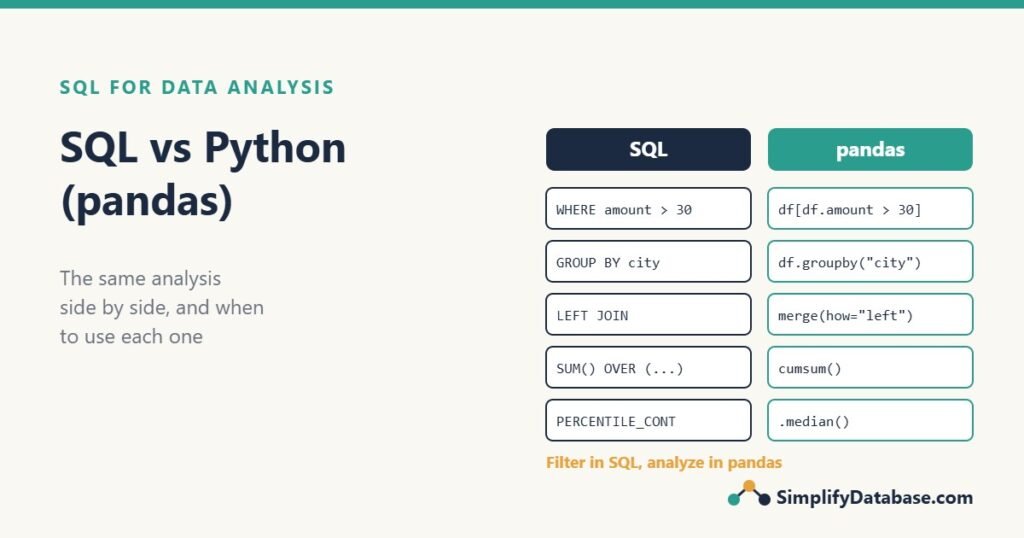
What are SQL and pandas?
SQL is the language you use to ask a database for data. The work happens inside the database server, next to the data, and only the result travels back to you. If SQL is new to you, start with How to Learn SQL: A Step-by-Step Roadmap.
pandas is a Python library for working with tables (called DataFrames) in your computer’s memory. You load data into it from a CSV file, an Excel sheet, an API or a database, and then process it with Python code.
That one difference, where the work happens, explains most of the pros and cons below.
The same data in both
We’ll use the 12 orders from Basic Statistics in SQL. In SQL, it’s a table:
CREATE TABLE orders (
    order_id  INT,
    city      VARCHAR(20),
    amount    DECIMAL(10,2),
    items     INT
);
In pandas, it’s a DataFrame. Here we build it by hand; normally you’d load it from a file or a database:
import pandas as pd

orders = pd.DataFrame({
    "order_id": range(1, 13),
    "city":   ["Manama"] * 5 + ["Riffa"] * 3 + ["Muharraq"] * 3 + ["Riffa"],
    "amount": [20, 25, 25, 30, 35, 15, 40, 45, 20, 25, 950, None],
    "items":  [1, 2, 1, 2, 3, 1, 2, 2, 1, 2, 40, 1],
})
Side by side: the same questions
Filter rows (WHERE)
-- SQL
SELECT order_id, city, amount
FROM orders
WHERE amount > 30;
# pandas
orders[orders["amount"] > 30][["order_id", "city", "amount"]]Both return orders 5, 7, 8 and 11. In pandas, the inner part orders["amount"] > 30 builds a True/False list, and the outer brackets keep the True rows.
Group and summarize (GROUP BY)
-- SQL
SELECT city,
       COUNT(amount) AS orders,
       SUM(amount)   AS total,
       AVG(amount)   AS average
FROM orders
GROUP BY city
ORDER BY total DESC;
# pandas
(orders.groupby("city")
.agg(orders=("amount", "count"),
total=("amount", "sum"),
average=("amount", "mean"),
median=("amount", "median"))
.reset_index()
.sort_values("total", ascending=False))| city | orders | total | average | median |
|---|---|---|---|---|
| Muharraq | 3 | 995.0 | 331.67 | 25.0 |
| Manama | 5 | 135.0 | 27.00 | 25.0 |
| Riffa | 3 | 100.0 | 33.33 | 40.0 |
Notice the median column. In pandas it’s one word. In SQL Server you need PERCENTILE_CONT with OVER, and MySQL has no median function at all. Statistics is one area where pandas is simply easier.
Join tables (JOIN)
-- SQL
SELECT c.region, SUM(o.amount) AS total
FROM orders AS o
LEFT JOIN cities AS c ON c.city = o.city
GROUP BY c.region;
# pandas
cities = pd.DataFrame({
"city": ["Manama", "Riffa", "Muharraq"],
"region": ["Capital", "Southern", "Muharraq"],
})
(orders.merge(cities, on="city", how="left")
.groupby("region")["amount"].sum())merge with how="left" is a LEFT JOIN. You’ll also see how="inner", "right" and "outer", which match the SQL join types in SQL JOINs Explained Simply.
Running totals (window functions)
-- SQL
SELECT order_id, city, amount,
       SUM(amount) OVER (PARTITION BY city ORDER BY order_id
                         ROWS UNBOUNDED PRECEDING) AS running_total
FROM orders;
# pandas
orders = orders.sort_values("order_id")
orders["running_total"] = orders.groupby("city")["amount"].cumsum()PARTITION BY city becomes groupby("city"), and the running sum is cumsum(). More on the SQL version in Running Totals in SQL Server.
Pivot tables
# pandas
orders.pivot_table(index="city", columns="items",
values="amount", aggfunc="count", fill_value=0)| city | 1 | 2 | 3 | 40 |
|---|---|---|---|---|
| Manama | 2 | 2 | 1 | 0 |
| Muharraq | 1 | 1 | 0 | 1 |
| Riffa | 1 | 2 | 0 | 0 |
In SQL, you have to name every output column (SUM(CASE WHEN items = 1 THEN 1 ELSE 0 END), and so on, or PIVOT in SQL Server). pandas creates the columns from whatever values exist. That’s handy when you don’t know them in advance.
Quick summary of a column
# pandas
orders["amount"].describe()
One line gives count, mean, standard deviation, min, quartiles and max: the same numbers that took several SQL queries in Basic Statistics in SQL.
The cheat sheet
| Task | SQL | pandas |
|---|---|---|
| Choose columns | SELECT a, b | df[["a", "b"]] |
| Filter rows | WHERE amount > 30 | df[df["amount"] > 30] |
| Sort | ORDER BY total DESC | df.sort_values("total", ascending=False) |
| First N rows | TOP (10) / LIMIT 10 | df.head(10) |
| Group and sum | GROUP BY city + SUM() | df.groupby("city")["amount"].sum() |
| Count distinct | COUNT(DISTINCT city) | df["city"].nunique() |
| Join | LEFT JOIN ... ON | df.merge(other, on="key", how="left") |
| Stack rows | UNION ALL | pd.concat([df1, df2]) |
| Missing values | IS NULL, COALESCE | isna(), fillna() |
| Remove duplicates | ROW_NUMBER() and keep 1 | df.drop_duplicates() |
| Running total | SUM() OVER (...) | groupby().cumsum() |
| Median | PERCENTILE_CONT(0.5) | df["amount"].median() |
Where SQL is stronger
1. Big data. pandas loads everything into your computer’s memory. A laptop with 16 GB of RAM struggles with a few tens of millions of rows. A database handles hundreds of millions on disk, with indexes, and sends back only the 20-row summary you asked for.
2. The data is already there. Most business data lives in databases. With SQL you ask the question where the data sits. With pandas you first copy the data out, which is slow for big tables and leaves you with a copy that goes stale.
3. Speed through indexes. A database can use an index to jump straight to the rows it needs (see SQL Indexes Explained Simply). pandas reads every row every time.
4. Shared and reusable. A SQL view or stored procedure can be used by a report, an app, Excel and Power BI at the same time. A pandas script mostly lives on one person’s machine.
5. Every data job asks for it. SQL appears in almost every data analyst, data engineer and BI job description, often before Python. It’s also easier to learn first.
Where pandas is stronger
1. Statistics and maths. Medians, percentiles, correlations, moving averages and describe() are one-liners. Add the NumPy and SciPy libraries and you have a full statistics toolkit.
2. Charts. One line (df.plot()) draws a chart from a DataFrame. SQL has no charts; you’d export the result to Excel or a BI tool.
3. Messy files and other sources. pandas reads CSV, Excel, JSON, web APIs and HTML tables directly. Cleaning a one-off CSV is often faster in pandas than loading it into a database first.
4. Step-by-step exploration. In a Jupyter notebook you run one step, look at the result, and try the next. That’s a comfortable way to explore data you don’t know yet.
5. Machine learning. Prediction and classification (scikit-learn, for example) work on pandas DataFrames. This is where analysis turns into data science.
Small differences that catch people out
- NULL vs NaN. SQL has
NULL; pandas usually shows missing values asNaN. Both skip missing values in averages:AVG(amount)andorders["amount"].mean()both give 111.82. To treat missing as zero, useCOALESCE(amount, 0)in SQL orfillna(0)in pandas (both give 102.50). - Integer averages. SQL Server’s
AVGon anINTcolumn drops the decimals (4 instead of 4.83). pandas always returns 4.83. - Comparing with NULL. In SQL,
WHERE amount <> 30skips NULL rows. In pandas,df["amount"] != 30is True for NaN, so the missing row is kept. Same-looking code, different result. - Row order. A SQL result has no guaranteed order without
ORDER BY. A DataFrame keeps the order its rows are in, so sort it on purpose too. - Case and spaces. Both treat
"Manama"and"manama "as different values, though many SQL Server databases compare text case-insensitively. Clean first; see Data Cleaning in SQL.
The best answer: use both
Most analysts don’t choose one. They use each for what it does best:
- SQL filters, joins and summarizes the big tables inside the database.
- pandas takes the small result for statistics, charts and anything else that’s easier in Python.
The bridge between them is pd.read_sql, which runs a SQL query and returns a DataFrame:
import pandas as pd
from sqlalchemy import create_engine

# SQL Server (needs the pyodbc package and an ODBC driver)
engine = create_engine(
    "mssql+pyodbc://user:password@myserver/ShopDB"
    "?driver=ODBC+Driver+18+for+SQL+Server"
)

# MySQL (needs the pymysql package)
# engine = create_engine("mysql+pymysql://user:password@localhost/shop")

query = """
    SELECT city, CAST(order_date AS DATE) AS order_day,
           COUNT(*) AS orders, SUM(amount) AS revenue
    FROM orders
    WHERE order_date >= '2026-01-01'
    GROUP BY city, CAST(order_date AS DATE)
"""

daily = pd.read_sql(query, engine)
daily.pivot_table(index="order_day", columns="city", values="revenue").plot()
The database does the heavy work on millions of rows and returns maybe a few hundred. pandas turns those into a chart in one line.
The common mistake is the opposite: SELECT * FROM orders with no WHERE, then filtering and grouping in pandas. That copies the whole table over the network into memory, and it gets slower every month as the table grows. Filter and group in SQL, then analyze in pandas.
Don’t put passwords in your script. Read them from an environment variable or a config file that isn’t shared. And always pass user input as parameters (pd.read_sql(query, engine, params=...)), never by gluing strings together; see SQL Injection Explained Simply.
So which should you learn first?
If you’re starting out in data analysis, learn SQL first:
- It’s smaller and quicker to learn. You can be useful in a few weeks.
- The data you’ll work with at almost any company is in a database.
- Interviews for analyst roles test SQL more than anything else (try our 25 SQL Interview Questions).
- Once you know SQL, pandas makes more sense, because most of its ideas (filter, group, join) are the same.
Add pandas when you need statistics, charts, files from different sources, or machine learning. Many analysts spend most of their day in SQL and open Python for the last step.
| You want to… | Use |
|---|---|
| Summarize millions of rows in a database | SQL |
| Build a view or report other people will reuse | SQL |
| Clean a one-off CSV or Excel file | pandas |
| Calculate medians, correlations, distributions | pandas (or SQL for simple cases) |
| Make charts | pandas (or a BI tool) |
| Train a prediction model | pandas + scikit-learn |
| Get data out of a database into Python | SQL inside pd.read_sql |
Practice exercises
1. Rewrite this pandas code as SQL:
orders[orders["city"] == "Riffa"]["amount"].sum()2. Rewrite this SQL as pandas:
SELECT city, MAX(amount) AS largest
FROM orders
GROUP BY city;
3. In the orders data, order 12 has no amount. What do COUNT(*) and COUNT(amount) return in SQL, and what are the pandas equivalents?
Answers
1.
SELECT SUM(amount) AS riffa_total
FROM orders
WHERE city = 'Riffa';
Both return 100 (15 + 40 + 45; the NULL is skipped).
2.
orders.groupby("city")["amount"].max()Muharraq 950, Manama 35, Riffa 45. Add .reset_index() to get a normal table with a city column.
3. COUNT(*) returns 12 and COUNT(amount) returns 11. In pandas, len(orders) gives 12 and orders["amount"].count() gives 11. pandas’ count() skips missing values, just like COUNT(column) in SQL.
Summary
- SQL works inside the database; pandas works in your computer’s memory. Most differences come from that.
- For filtering, grouping and joining, they do the same job with different syntax. The cheat sheet above maps one to the other.
- SQL is stronger for big data, data that already lives in a database, and logic other people reuse.
- pandas is stronger for statistics, charts, messy files and machine learning.
- Use both: filter and summarize in SQL, then analyze the small result in pandas with
pd.read_sql. - If you’re starting out, learn SQL first.
This is part 5 of our SQL for Data Analysis series. The full path, from cleaning to cohorts, is in the SQL for Data Analysis roadmap, coming next.
Related articles
- SQL vs Excel: What’s the Difference?: the other common comparison for new analysts.
- Basic Statistics in SQL: the SQL side of medians, percentiles and standard deviation.
- Cohort and Retention Analysis in SQL: a full analysis done entirely in SQL.
- A Beginner’s Guide to the Data Science Lifecycle: where SQL and Python fit in a data science project.