
Every import job eventually needs the same thing: if the row already exists, update it; if it doesn’t, insert it. That’s called an upsert (update + insert). A supplier sends a new price list, and you need to change the prices of products you already have and add the new ones.
It sounds like one simple statement, and in MySQL it almost is. In SQL Server there’s a MERGE statement that does it, but it comes with traps. This guide shows the safe ways to upsert in both, for one row at a time and for a whole table, plus the race condition that breaks the “obvious” solution.
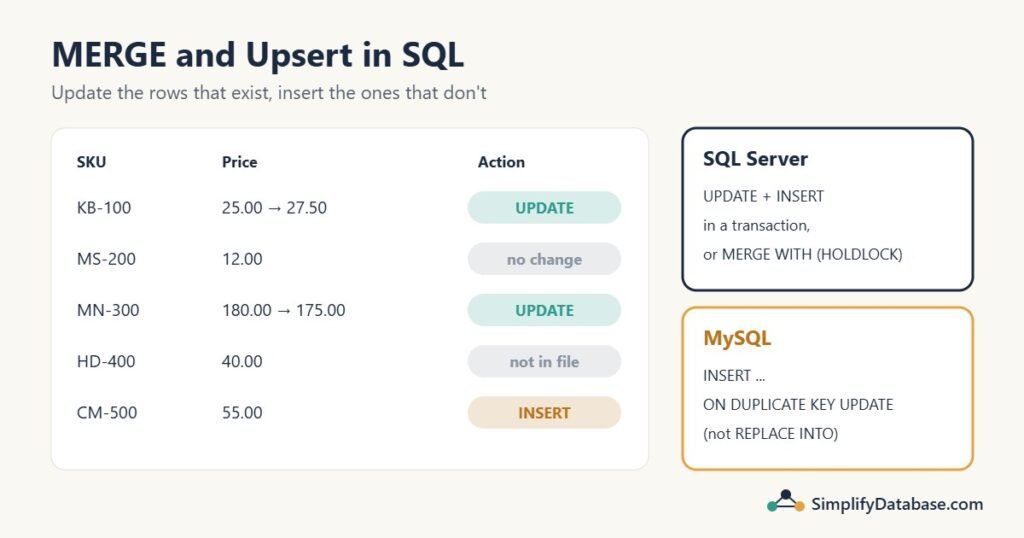
Table of Contents
The sample data
A Products table with a unique SKU, and a staging table PriceImport with the supplier’s new list:
CREATE TABLE Products (
    ProductID INT IDENTITY(1,1) PRIMARY KEY,   -- MySQL: INT AUTO_INCREMENT PRIMARY KEY
    SKU       VARCHAR(20) NOT NULL UNIQUE,
    Name      VARCHAR(50),
    Price     DECIMAL(10,2)
);

INSERT INTO Products (SKU, Name, Price) VALUES
('KB-100', 'Keyboard', 25.00),
('MS-200', 'Mouse',    12.00),
('MN-300', 'Monitor', 180.00),
('HD-400', 'Headset',  40.00);

CREATE TABLE PriceImport (SKU VARCHAR(20), Name VARCHAR(50), Price DECIMAL(10,2));

INSERT INTO PriceImport VALUES
('KB-100', 'Keyboard', 27.50),   -- price changed
('MS-200', 'Mouse',    12.00),   -- unchanged
('MN-300', 'Monitor', 175.00),   -- price changed
('CM-500', 'Webcam',   55.00);   -- new product
The goal: Keyboard and Monitor get new prices, Mouse stays as it is, Webcam is added, and Headset (not in the file) is left alone.
The UNIQUE constraint on SKU matters. Every upsert method depends on some way of saying “this is the same product”, and only a unique key makes that reliable. More in SQL Constraints Explained Simply.
The obvious way, and its hidden race condition
Most people first write this:
IF EXISTS (SELECT 1 FROM dbo.Products WHERE SKU = @SKU)
    UPDATE dbo.Products SET Name = @Name, Price = @Price WHERE SKU = @SKU;
ELSE
    INSERT INTO dbo.Products (SKU, Name, Price) VALUES (@SKU, @Name, @Price);
It works perfectly when one user runs it. Now imagine two sessions saving the same new SKU at the same moment:
- Session A checks:
CM-500doesn’t exist. - Session B checks:
CM-500doesn’t exist. - Session A inserts it.
- Session B inserts it too, and gets a duplicate key error (or, without a unique constraint, you now have the product twice).
The check and the insert are two separate steps, and nothing stops another session from slipping in between. It happens rarely, which makes it a nasty bug: it shows up under load, in production, and never on your machine.
The safe single-row upsert in SQL Server
Update first, insert only if nothing was updated, and use locking hints so the gap can’t be exploited:
BEGIN TRANSACTION;

UPDATE dbo.Products WITH (UPDLOCK, SERIALIZABLE)
SET Name = @Name, Price = @Price
WHERE SKU = @SKU;

IF @@ROWCOUNT = 0
    INSERT INTO dbo.Products (SKU, Name, Price)
    VALUES (@SKU, @Name, @Price);

COMMIT;
What the hints do:
SERIALIZABLE(the same asHOLDLOCK) locks the key range where@SKUwould be, even if the row doesn’t exist yet. Another session can’t insert that SKU until this transaction ends.UPDLOCKtakes an update lock instead of a shared one, so two sessions don’t both get through and then deadlock when they try to write.
The second session now simply waits until the first commits, then finds the row and updates it. No error, no duplicate. Without the transaction and hints, this pattern has the same race condition as IF EXISTS. (Why locks behave this way is covered in SQL Server Blocking and SQL Server Deadlocks.)
It also does less work when the row exists: one statement instead of a check plus an update.
Upserting a whole table: UPDATE, then INSERT
For an import, don’t loop row by row. Two set-based statements handle the whole file:
BEGIN TRANSACTION;

-- 1. Update products that exist and have changed
UPDATE p
SET p.Name = i.Name,
    p.Price = i.Price
FROM dbo.Products AS p
JOIN dbo.PriceImport AS i ON i.SKU = p.SKU
WHERE p.Price <> i.Price OR p.Name <> i.Name;      -- 2 rows: Keyboard, Monitor

-- 2. Insert products that don't exist yet
INSERT INTO dbo.Products (SKU, Name, Price)
SELECT i.SKU, i.Name, i.Price
FROM dbo.PriceImport AS i
WHERE NOT EXISTS (SELECT 1 FROM dbo.Products AS p WHERE p.SKU = i.SKU);   -- 1 row: Webcam

COMMIT;
The result:
| ProductID | SKU | Name | Price |
|---|---|---|---|
| 1 | KB-100 | Keyboard | 27.50 |
| 2 | MS-200 | Mouse | 12.00 |
| 3 | MN-300 | Monitor | 175.00 |
| 4 | HD-400 | Headset | 40.00 |
| 5 | CM-500 | Webcam | 55.00 |
Two details worth copying:
WHERE p.Price <> i.Price OR p.Name <> i.Nameskips rows that haven’t changed. Mouse isn’t touched at all, so there’s no pointless write, no trigger fired, and no “last modified” date changed for nothing. (If those columns can beNULL, compare with care:NULL <> 25is not true. See NULL in SQL Explained Simply.)- Update before insert. If you insert first, the update would then run over the rows you just inserted too.
In MySQL the update uses its own join syntax: UPDATE Products p JOIN PriceImport i ON i.SKU = p.SKU SET p.Price = i.Price, .... The INSERT ... WHERE NOT EXISTS is the same. This is also the core of the incremental load in ETL vs ELT.
MERGE in SQL Server
MERGE does the same job in one statement:
MERGE dbo.Products WITH (HOLDLOCK) AS t
USING dbo.PriceImport AS s
    ON t.SKU = s.SKU
WHEN MATCHED AND (t.Price <> s.Price OR t.Name <> s.Name) THEN
    UPDATE SET t.Name = s.Name, t.Price = s.Price
WHEN NOT MATCHED BY TARGET THEN
    INSERT (SKU, Name, Price) VALUES (s.SKU, s.Name, s.Price)
OUTPUT $action, inserted.SKU, inserted.Price;
Read it as: match the target (t, the real table) with the source (s, the import) on SKU. When a match exists and something changed, update it. When the source has a row the target doesn’t, insert it. The OUTPUT clause lists what happened:
| $action | SKU | Price |
|---|---|---|
| UPDATE | KB-100 | 27.50 |
| UPDATE | MN-300 | 175.00 |
| INSERT | CM-500 | 55.00 |
(The order of the output rows isn’t guaranteed.)
It’s compact, and OUTPUT $action is handy for logging an import. But MERGE has some sharp edges:
- It must end with a semicolon. Leaving it off gives an error.
- It isn’t safe from race conditions on its own. Two sessions merging the same new key can both decide “not matched” and both insert. That’s why the example uses
WITH (HOLDLOCK)on the target. Use it whenever other sessions may write at the same time. - Duplicate keys in the source cause an error. If the import file has
KB-100twice, SQL Server stops with “The MERGE statement attempted to UPDATE or DELETE the same row more than once”. Remove duplicates from the source first, for example withROW_NUMBER()(see Top N per Group). WHEN NOT MATCHED BY SOURCE THEN DELETEdeletes everything not in the source. That’s useful for a full sync. But if the supplier sends only some products, it deletes all the others. Only use it when the source really is the complete list.- It has a history of bugs. Over the years,
MERGEhas had a number of reported problems, especially combined with triggers, filtered indexes, indexed views and foreign keys. Many experienced SQL Server developers avoid it in busy systems and use the separateUPDATE+INSERTpattern instead.
A reasonable rule: MERGE is fine for batch jobs like a nightly import where nothing else writes to the table at the same time. For busy tables with concurrent writes, the separate statements in a transaction are easier to reason about.
Upsert in MySQL: INSERT … ON DUPLICATE KEY UPDATE
MySQL has a true one-statement upsert. Try to insert; if that would break a PRIMARY KEY or UNIQUE constraint, update the existing row instead:
INSERT INTO Products (SKU, Name, Price)
VALUES ('MS-200', 'Mouse', 13.00)
ON DUPLICATE KEY UPDATE
    Name  = VALUES(Name),
    Price = VALUES(Price);
VALUES(Price) means “the value I tried to insert”. In MySQL 8.0.20 and later, VALUES() here is deprecated in favour of a row alias:
INSERT INTO Products (SKU, Name, Price)
VALUES ('MS-200', 'Mouse', 13.00) AS new
ON DUPLICATE KEY UPDATE
    Name  = new.Name,
    Price = new.Price;
(MariaDB still uses the VALUES() form.) It works for many rows at once too: INSERT INTO Products (...) SELECT SKU, Name, Price FROM PriceImport ON DUPLICATE KEY UPDATE ....
The “rows affected” count tells you what happened: 1 means a new row was inserted, 2 means an existing row was updated, and 0 means the row existed and nothing changed. Running the Mouse example above twice gives 2, then 0.
Things to know:
- It reacts to any unique key, not just the one you’re thinking of. If the table has two unique columns, a clash on either one triggers the update. Be sure the table’s unique keys match what “same row” means.
- It can use up
AUTO_INCREMENTvalues. With InnoDB’s default settings, an attempted insert that turns into an update still consumes an ID. In our test, after a few upserts, the next new product got ID 8 instead of 6. Gaps in IDs are harmless, but don’t be surprised by them.
Don’t use REPLACE INTO for upserts
REPLACE INTO looks like an upsert but isn’t: when the key exists, MySQL deletes the old row and inserts a new one. In our test, replacing KB-100 turned the Keyboard from ProductID 1 into ProductID 9. Anything that pointed at ID 1 (order lines, for example) now points at nothing, ON DELETE foreign key actions fire, and any column you didn’t list goes back to its default. Use ON DUPLICATE KEY UPDATE instead.
INSERT IGNORE is a different tool: it skips rows that would clash and updates nothing. It also turns some other errors into warnings, so use it carefully.
PostgreSQL and Laravel
- PostgreSQL:
INSERT INTO products (sku, name, price) VALUES (...) ON CONFLICT (sku) DO UPDATE SET name = EXCLUDED.name, price = EXCLUDED.price;.EXCLUDEDis the row you tried to insert. PostgreSQL 15 and later also supportMERGE. - Laravel:
Product::upsert($rows, ['sku'], ['name', 'price']);builds the right upsert for MySQL, PostgreSQL, SQLite or SQL Server in one query. Like other bulk queries, it skips model events. See Laravel: Eloquent vs Query Builder vs Raw SQL.
Which method should you use?
| Situation | SQL Server | MySQL |
|---|---|---|
| One row, many users at once | UPDATE with UPDLOCK, SERIALIZABLE, then INSERT if @@ROWCOUNT = 0, in a transaction | INSERT ... ON DUPLICATE KEY UPDATE |
| Import a whole table | UPDATE join + INSERT ... WHERE NOT EXISTS in a transaction | INSERT ... SELECT ... ON DUPLICATE KEY UPDATE |
| Nightly sync with logging, including deletes | MERGE ... WITH (HOLDLOCK) with OUTPUT $action | Separate UPDATE, INSERT and DELETE |
| Avoid | IF EXISTS without locks | REPLACE INTO |
Common mistakes
IF EXISTS ... ELSE INSERTwithout a transaction and locking hints. Works in testing, fails under load.- No unique constraint on the matching column. Then nothing stops duplicates, and
ON DUPLICATE KEY UPDATEnever triggers. - Updating rows that haven’t changed. Add a “has anything changed?” condition.
- Duplicate keys in the import file. Clean the source first, or
MERGEwill fail. WHEN NOT MATCHED BY SOURCE THEN DELETEwith a partial source file.- Forgetting the semicolon after
MERGE. - Using
REPLACE INTOand losing IDs and related rows.
Practice exercises
Exercise 1. Why can two sessions running IF NOT EXISTS (...) INSERT ... at the same time still insert the same SKU twice (or hit a duplicate key error)?
Exercise 2. Write a MySQL statement that inserts the product ('HD-400', 'Headset', 45.00), or updates its name and price if the SKU already exists.
Exercise 3. A colleague’s MERGE import fails with “attempted to UPDATE or DELETE the same row more than once”. What’s the likely cause, and how do you fix it?
Answers
Answer 1. The check and the insert are separate steps. Both sessions can run the check before either one inserts, so both see “doesn’t exist”. Fix it with a transaction and UPDLOCK, SERIALIZABLE (or HOLDLOCK) hints, so the second session waits for the first.
Answer 2.
INSERT INTO Products (SKU, Name, Price)
VALUES ('HD-400', 'Headset', 45.00) AS new
ON DUPLICATE KEY UPDATE Name = new.Name, Price = new.Price;
-- MariaDB / MySQL before 8.0.19: ... UPDATE Name = VALUES(Name), Price = VALUES(Price);
It affects 2 rows, because Headset already exists and its price changes.
Answer 3. The source has the same key more than once (for example KB-100 twice in the import file), so two source rows match one target row. Remove the duplicates before merging, for example by keeping only the latest row per SKU with ROW_NUMBER() OVER (PARTITION BY SKU ORDER BY ...) in a CTE, and use that CTE as the USING source.
Summary
- An upsert updates a row if it exists and inserts it if it doesn’t. It needs a unique key to define “the same row”.
IF EXISTS ... ELSE INSERThas a race condition. In SQL Server, useUPDATEwithUPDLOCK, SERIALIZABLE, thenINSERTif nothing was updated, inside a transaction.- For whole tables,
UPDATEjoin +INSERT ... WHERE NOT EXISTSis simple, fast and predictable. MERGEis compact and hasOUTPUT $action, but needsHOLDLOCK, a duplicate-free source, a closing semicolon, and care withNOT MATCHED BY SOURCE.- In MySQL, use
INSERT ... ON DUPLICATE KEY UPDATE, neverREPLACE INTO.
Related articles
- SQL INSERT, UPDATE and DELETE Explained Simply: the basics behind every upsert.
- SQL Transactions and ACID Explained Simply: why the safe patterns run inside a transaction.
- ETL vs ELT Explained Simply: where upserts fit in loading a data warehouse.
- SQL Server Deadlocks: How to Capture and Fix Them: what happens when locking goes wrong.