
“Show me the customers who have placed an order.” In SQL you can write that at least three ways: with IN, with EXISTS, or with a JOIN. They often return the same rows, so which one should you use?
The short answer: use EXISTS (or IN) when you only want to check that a match exists, and use JOIN when you need columns from the other table. The opposite question, “customers with no orders”, has a trap that catches almost everyone, and this article shows how to avoid it.
Every result below comes from running the queries on the sample data.
The Sample Data
CREATE TABLE Customers (
    CustomerID   INT         NOT NULL PRIMARY KEY,
    CustomerName VARCHAR(50) NOT NULL,
    City         VARCHAR(30) NULL
);

CREATE TABLE Orders (
    OrderID    INT           NOT NULL PRIMARY KEY,
    CustomerID INT           NULL,     -- NULL = walk-in cash sale, no customer
    OrderDate  DATE          NOT NULL,
    Amount     DECIMAL(10,3) NOT NULL
);

INSERT INTO Customers VALUES
(1, 'Ali', 'Manama'), (2, 'Sara', 'Riffa'), (3, 'Omar', 'Manama'),
(4, 'Lina', 'Muharraq'), (5, 'Noor', 'Riffa');

INSERT INTO Orders VALUES
(101, 1,    '2026-10-01', 120.000),
(102, 1,    '2026-10-05',  80.000),
(103, 2,    '2026-10-07', 300.000),
(104, 3,    '2026-09-15',  45.000),
(105, 1,    '2026-10-12',  60.000),
(106, NULL, '2026-10-12',  25.000);   -- a cash sale with no customer
Ali has three orders, Sara and Omar one each, and Lina and Noor none. Order 106 has no customer at all. That one row will matter later.
Question 1: Customers Who Have Orders
With IN
SELECT CustomerName
FROM Customers
WHERE CustomerID IN (SELECT CustomerID FROM Orders);
Result: Ali, Omar, Sara. Read it as “customers whose ID appears in the list of order customer IDs”.
With EXISTS
SELECT c.CustomerName
FROM Customers AS c
WHERE EXISTS (
    SELECT 1
    FROM Orders AS o
    WHERE o.CustomerID = c.CustomerID
);
Result: Ali, Omar, Sara. Read it as “customers for whom at least one matching order exists”. The subquery is correlated: it refers to c.CustomerID from the outer query. EXISTS only cares whether a row is found, so SELECT 1 is the usual convention; what you select doesn’t matter.
With JOIN
SELECT c.CustomerName
FROM Customers AS c
JOIN Orders AS o ON o.CustomerID = c.CustomerID;
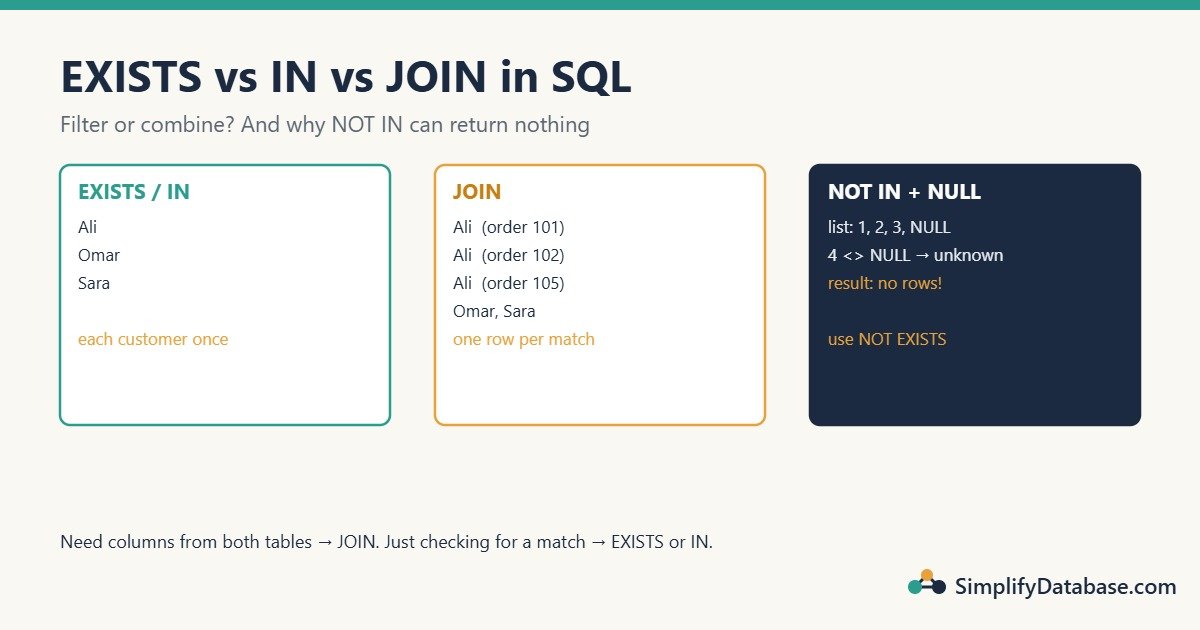
Result: Ali, Ali, Ali, Omar, Sara. Five rows, not three.
A join returns one row per matching pair. Ali has three orders, so he appears three times. IN and EXISTS are filters: each customer appears once, no matter how many orders match.
You can hide the duplicates with SELECT DISTINCT, which gives Ali, Omar, Sara again. But that’s extra work for the database, and on wider queries DISTINCT can also merge rows you wanted to keep. If you only want to filter, EXISTS or IN says what you mean. (More on this in SQL DISTINCT and Column Aliases.)
When JOIN is the right answer
Use a join when you need data from both tables, like each customer’s order count and total:
SELECT c.CustomerName, COUNT(*) AS Orders, SUM(o.Amount) AS Total
FROM Customers AS c
JOIN Orders AS o ON o.CustomerID = c.CustomerID
GROUP BY c.CustomerName;| CustomerName | Orders | Total |
|---|---|---|
| Ali | 3 | 260.000 |
| Omar | 1 | 45.000 |
| Sara | 1 | 300.000 |
Here the “duplicate” rows are exactly what you want: they’re the orders being counted and summed. (See SQL JOINs Explained Simply.)
Question 2: Customers With No Orders (the NULL Trap)
The natural way to flip the question is NOT IN:
SELECT CustomerName
FROM Customers
WHERE CustomerID NOT IN (SELECT CustomerID FROM Orders);
Result: no rows at all. Lina and Noor have no orders, so why aren’t they there?
Because the subquery’s list contains a NULL (order 106). For Lina, SQL checks:
4 <> 1 AND 4 <> 2 AND 4 <> 3 AND 4 <> NULL
4 <> NULL isn’t true or false. It’s unknown, because SQL can’t know whether an unknown value equals 4. Combined with AND, the whole condition becomes unknown, and WHERE only keeps rows where the condition is true. So every customer is filtered out. One NULL in the list makes NOT IN return nothing. (The full story is in NULL in SQL Explained Simply.)
This bug is especially nasty because the query works fine for months, then returns nothing the day someone records the first cash sale.
Fix 1: NOT EXISTS (recommended)
SELECT c.CustomerName
FROM Customers AS c
WHERE NOT EXISTS (
    SELECT 1
    FROM Orders AS o
    WHERE o.CustomerID = c.CustomerID
);
Result: Lina, Noor. NOT EXISTS asks “is there a matching row?”, and a NULL customer ID never matches anybody, so it can’t break the logic.
Fix 2: LEFT JOIN … IS NULL
SELECT c.CustomerName
FROM Customers AS c
LEFT JOIN Orders AS o ON o.CustomerID = c.CustomerID
WHERE o.OrderID IS NULL;
Result: Lina, Noor. The LEFT JOIN keeps every customer; customers without orders get NULL in all order columns, and the WHERE keeps only those. Check a column that can’t be NULL in a real order (like the primary key OrderID).
Fix 3: NOT IN, filtered
SELECT CustomerName
FROM Customers
WHERE CustomerID NOT IN (SELECT CustomerID FROM Orders WHERE CustomerID IS NOT NULL);
Result: Lina, Noor. It works, but you must remember the extra filter every time. NOT EXISTS is safer by default.
Which Is Faster?
Less difference than most people think:
INvsEXISTS: modern SQL Server, PostgreSQL and MySQL 8 usually turn both into the same plan (a semi join: stop at the first match). Pick the one that reads more clearly. (Very old MySQL versions, before 5.6, were known for slowIN (subquery), which is where much of the “never use IN” advice comes from.)NOT EXISTSvsNOT IN: when the subquery column can beNULL, SQL Server has to add extra work toNOT INto handle theNULLcase correctly.NOT EXISTSdoesn’t need it, so it’s often faster as well as correct.LEFT JOIN ... IS NULL: usually similar toNOT EXISTS, sometimes a little slower because it builds the joined rows before filtering them.JOIN+DISTINCT: often the slowest way to answer “does a match exist?”, because it creates the duplicates and then removes them.
The thing that matters far more than the syntax is an index on the column you match on, here Orders(CustomerID). Without it, every version scans the whole orders table. To see what SQL Server actually does, compare the plans: How to Read a SQL Server Execution Plan.
IN With a Fixed List Is Fine
Everything above is about IN with a subquery. IN with a short list of values is simply a neat way to write several OR conditions, and there’s nothing to worry about:
SELECT CustomerName FROM Customers WHERE City IN ('Riffa', 'Muharraq');Result: Lina, Noor, Sara. (Covered in SQL LIKE, IN and BETWEEN Explained Simply.)
EXISTS Can Check More Than One Column
EXISTS makes it easy to add more conditions to the match. Customers with at least one order in October 2026:
SELECT c.CustomerName
FROM Customers AS c
WHERE EXISTS (
    SELECT 1
    FROM Orders AS o
    WHERE o.CustomerID = c.CustomerID
      AND o.OrderDate >= '2026-10-01'
      AND o.OrderDate <  '2026-11-01'
);
Result: Ali, Sara. Omar’s only order was in September. Writing this with IN works too, but as conditions grow (match on two columns, compare dates), EXISTS stays readable.
Quick Guide
| You want… | Use |
|---|---|
| Rows that have a match, no columns from the other table | EXISTS or IN |
| Rows that have no match | NOT EXISTS (or LEFT JOIN ... IS NULL) |
| Columns or totals from both tables | JOIN |
| A match on several columns or extra conditions | EXISTS |
| A short list of fixed values | IN ('a', 'b', 'c') |
| Avoid | NOT IN (subquery) on a column that allows NULL; JOIN + DISTINCT just to filter |
Common Mistakes
NOT INwith a subquery that can returnNULL. It silently returns no rows. UseNOT EXISTS.- Joining to filter. A join multiplies rows; sums and counts on the outer table come out too big.
- Adding
DISTINCTto hide join duplicates instead of fixing the query. UseEXISTS. - Forgetting the correlation in
EXISTS. WithoutWHERE o.CustomerID = c.CustomerID, the subquery is true for every customer as soon as any order exists. - Worrying about syntax but not indexes. An index on the matching column makes far more difference than
INvsEXISTS.
Practice Exercises
- List customers who have at least one order over 100.000.
- List customers who ordered in September 2026 but not in October 2026.
- List the cities where no customer has ever placed an order.
Answers
1. Result: Ali, Sara.
SELECT c.CustomerName
FROM Customers AS c
WHERE EXISTS (SELECT 1 FROM Orders AS o
              WHERE o.CustomerID = c.CustomerID AND o.Amount > 100);
2. Combine EXISTS and NOT EXISTS. Result: Omar.
SELECT c.CustomerName
FROM Customers AS c
WHERE EXISTS (SELECT 1 FROM Orders AS o
              WHERE o.CustomerID = c.CustomerID
                AND o.OrderDate >= '2026-09-01' AND o.OrderDate < '2026-10-01')
  AND NOT EXISTS (SELECT 1 FROM Orders AS o
                  WHERE o.CustomerID = c.CustomerID
                    AND o.OrderDate >= '2026-10-01' AND o.OrderDate < '2026-11-01');
3. For each city, check that no customer from that city has an order. Result: Muharraq.
SELECT DISTINCT c.City
FROM Customers AS c
WHERE NOT EXISTS (
    SELECT 1
    FROM Customers AS c2
    JOIN Orders AS o ON o.CustomerID = c2.CustomerID
    WHERE c2.City = c.City
);
Summary
INandEXISTSfilter: each row appears once.JOINcombines: one row per match.- Use
JOINwhen you need columns from both tables; useEXISTS/INwhen you only need to know that a match exists. NOT INreturns nothing if the subquery contains aNULL. UseNOT EXISTSinstead.- Modern optimizers treat
INandEXISTSmuch the same; indexes matter more than syntax.
Related articles
- SQL Subqueries vs CTEs Explained Simply: the subqueries used by IN and EXISTS.
- SQL SELF JOIN Explained Simply: another join pattern, with rows that have no match.
- NULL in SQL Explained Simply: why NULL breaks NOT IN.
- Aging Report in SQL Server: LEFT JOIN and aggregation in a real finance report.