
Sooner or later every Delphi developer writes a line like this:
qry.SQL.Text := 'SELECT * FROM Customers WHERE City = ''' + edtCity.Text + '''';It works on your PC. Then a user types O'Brien and the app crashes. Or worse, someone types something clever and your query does things you never wrote.
The fix is parameters. This article shows how to use them in Delphi with FireDAC (and ADO), for SELECT, INSERT, UPDATE, dates, NULLs and LIKE searches.
It’s part of the Delphi + SQL Server track of the Learn Delphi series. You’ll need a working connection first: see How to Connect Delphi to SQL Server with FireDAC.
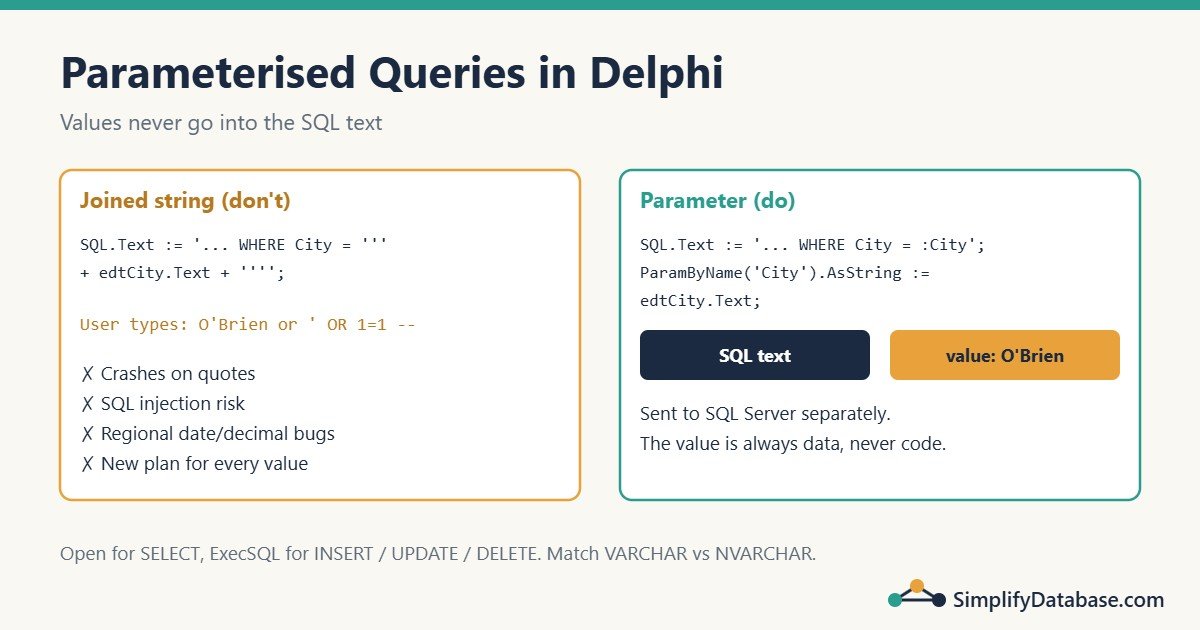
Table of Contents
What’s Wrong with Joining Strings?
When you build SQL by joining text, the user’s input becomes part of the SQL code:
| Problem | Example |
|---|---|
| Crashes on quotes | O'Brien breaks the string: WHERE Name = 'O'Brien' |
| SQL injection | Typing ' OR 1=1 -- returns every row; worse inputs can change or delete data |
| Wrong dates and decimals | '12/10/2026' and '3,5' mean different things on different regional settings |
| Slower SQL Server | Every different value creates a new query text, so SQL Server compiles a new plan each time and fills its plan cache |
Read SQL Injection Explained Simply for the full picture. The short version: values never go into the SQL text. They go into parameters.
Your First Parameterised Query
In FireDAC, a parameter is a name that starts with a colon inside the SQL:
qryCustomers.SQL.Text :=
  'SELECT CustomerID, CustomerName, City ' +
  'FROM dbo.Customers ' +
  'WHERE City = :City ' +
  'ORDER BY CustomerName';
qryCustomers.ParamByName('City').AsString := edtCity.Text;
qryCustomers.Open;
What happens:
- FireDAC sees
:Cityand creates a parameter calledCity. - You set its value with
ParamByName('City').AsString. - FireDAC sends the SQL text and the value separately to SQL Server. SQL Server treats the value as data, never as code.
O'Brienjust works.
FireDAC also has a short form that sets the SQL, the parameter values and opens the query in one call:
qryCustomers.Open(
  'SELECT CustomerID, CustomerName FROM dbo.Customers WHERE City = :City',
  [edtCity.Text]);
The values in the array are matched to the parameters in order. It’s handy for short queries; ParamByName is clearer when there are many parameters.
Setting the Right Data Type
Use the As... property that matches the column type:
| Column type in SQL Server | Delphi property | Example |
|---|---|---|
INT, BIGINT | AsInteger, AsLargeInt | ParamByName('ID').AsInteger := 42; |
NVARCHAR | AsWideString or AsString | ParamByName('Name').AsString := 'Sara'; |
VARCHAR | AsAnsiString | ParamByName('Code').AsAnsiString := 'X1'; |
DECIMAL, MONEY | AsCurrency or AsBCD | ParamByName('Price').AsCurrency := 19.99; |
DATE | AsDate | ParamByName('From').AsDate := EncodeDate(2026, 1, 1); |
DATETIME2 | AsDateTime or AsSQLTimeStamp | ParamByName('At').AsDateTime := Now; |
BIT | AsBoolean | ParamByName('Active').AsBoolean := True; |
Watch the VARCHAR vs NVARCHAR Match
This one causes real performance problems. If a column is VARCHAR and you send an NVARCHAR (Unicode) parameter, SQL Server must convert the column on every row to compare it. That can turn an index seek into a full scan.
- For
NVARCHARcolumns, useAsWideString(orAsString). - For
VARCHARcolumns, set the parameter’sDataTypetoftStringor useAsAnsiString.
If an indexed lookup is slow only from Delphi, check this first. The article Index Seek vs Index Scan explains implicit conversion in more detail.
Dates Without Regional Headaches
With parameters, you never format dates as text:
qryOrders.SQL.Text :=
  'SELECT OrderID, OrderDate, Total FROM dbo.Orders ' +
  'WHERE OrderDate >= :FromDate AND OrderDate < :ToDate';
qryOrders.ParamByName('FromDate').AsDate := dtpFrom.Date;
qryOrders.ParamByName('ToDate').AsDate := dtpTo.Date + 1;   // up to the end of that day
qryOrders.Open;
Notice >= From and < To + 1 instead of BETWEEN. If OrderDate contains a time, BETWEEN '2026-10-01' AND '2026-10-31' misses everything after midnight on the 31st. The LIKE, IN and BETWEEN article shows this trap.
Sending NULL
To send NULL, clear the parameter, but tell FireDAC its type first:
qry.ParamByName('City').DataType := ftWideString;
if Trim(edtCity.Text) = '' then
  qry.ParamByName('City').Clear        // sends NULL
else
  qry.ParamByName('City').AsString := Trim(edtCity.Text);
Remember that WHERE City = NULL never matches in SQL. To search “all cities when the box is empty”, write it into the SQL:
WHERE (:City IS NULL OR City = :City)This “optional filter” pattern is easy, but on big tables it can produce a poor plan. If it gets slow, build the WHERE clause in Delphi with only the filters the user filled in, and still use parameters for every value. See SQL Server Parameter Sniffing for why.
LIKE Searches
The % wildcards go in the value, not the SQL:
qry.SQL.Text :=
  'SELECT CustomerID, CustomerName FROM dbo.Customers ' +
  'WHERE CustomerName LIKE :Search';
qry.ParamByName('Search').AsString := '%' + Trim(edtSearch.Text) + '%';
qry.Open;
A leading % can’t use an index, so on large tables prefer “starts with” (Trim(edtSearch.Text) + '%') when it fits the screen.
INSERT, UPDATE and DELETE
For statements that don’t return rows, use ExecSQL instead of Open:
qryExec.SQL.Text :=
  'INSERT INTO dbo.Customers (CustomerName, City) VALUES (:Name, :City)';
qryExec.ParamByName('Name').AsString := Trim(edtName.Text);
qryExec.ParamByName('City').AsString := Trim(edtCity.Text);
qryExec.ExecSQL;
RowsAffected tells you how many rows changed:
qryExec.SQL.Text :=
  'UPDATE dbo.Customers SET City = :City WHERE CustomerID = :ID';
qryExec.ParamByName('City').AsString := 'Manama';
qryExec.ParamByName('ID').AsInteger := 7;
qryExec.ExecSQL;

if qryExec.RowsAffected = 0 then
  ShowMessage('Customer not found.');
FireDAC’s TFDConnection.ExecSQL is a shortcut for one-off statements:
conShop.ExecSQL('DELETE FROM dbo.Customers WHERE CustomerID = :ID', [7]);Getting the New ID After an INSERT
Ask SQL Server to return it with OUTPUT and use Open:
qryExec.SQL.Text :=
  'INSERT INTO dbo.Customers (CustomerName, City) ' +
  'OUTPUT INSERTED.CustomerID ' +
  'VALUES (:Name, :City)';
qryExec.ParamByName('Name').AsString := 'Lina Saeed';
qryExec.ParamByName('City').AsString := 'Muharraq';
qryExec.Open;
NewID := qryExec.Fields[0].AsInteger;
qryExec.Close;
If the table has triggers, OUTPUT needs OUTPUT ... INTO a table variable instead. For simple tables the version above is the cleanest.
Running the Same Query Many Times
When you run one statement in a loop, prepare it once and only change the values:
qryExec.SQL.Text :=
  'INSERT INTO dbo.Payments (CustomerID, Amount) VALUES (:CustID, :Amount)';
qryExec.Prepare;
for I := 0 to High(Payments) do
begin
  qryExec.ParamByName('CustID').AsInteger := Payments[I].CustomerID;
  qryExec.ParamByName('Amount').AsCurrency := Payments[I].Amount;
  qryExec.ExecSQL;
end;
For thousands of rows, FireDAC’s Array DML sends many rows in one round trip, which is much faster. The CSV import article in this series uses it.
Things That Can’t Be Parameters
Parameters replace values only. You can’t use them for table names, column names, ORDER BY columns or keywords:
// Does NOT work:
qry.SQL.Text := 'SELECT * FROM :TableName ORDER BY :SortColumn';
When the user picks a sort column, map their choice to a fixed list in your code:
case cbSort.ItemIndex of
  0: SortSQL := 'CustomerName';
  1: SortSQL := 'City, CustomerName';
else
  SortSQL := 'CustomerID';
end;
qry.SQL.Text := 'SELECT CustomerID, CustomerName, City FROM dbo.Customers ' +
                'ORDER BY ' + SortSQL;
The user never types SQL; they only choose from options you wrote.
The Same Thing with ADO (dbGo)
If you use TADOQuery, the syntax is almost the same. ADO uses the Parameters property:
adoQry.SQL.Text :=
  'SELECT CustomerID, CustomerName FROM dbo.Customers WHERE City = :City';
adoQry.Parameters.ParamByName('City').Value := edtCity.Text;
adoQry.Open;
Set adoQry.ParamCheck := True (the default) so the :City name is recognised.
Common Mistakes
- Putting quotes around parameters.
WHERE City = ':City'searches for the text “:City”. WriteWHERE City = :City. - A parameter name that isn’t in the SQL.
ParamByNameraises “Parameter [X] not found”. Check spelling. - Setting values before the SQL. Setting
SQL.Textrebuilds the parameter list, and until the SQL is set there’s no parameter to fill. Always set the SQL first, then the values. - Sending NVARCHAR to a VARCHAR column. It works, but can be slow. Match the type.
- Using
Openfor INSERT/UPDATE/DELETE. UseExecSQL, unless the statement returns rows (likeOUTPUT). - Escaping quotes yourself with
QuotedStrand thinking that’s safe enough. Use parameters.
Practice Exercises
Exercise 1. Write the code that loads all orders of one customer (CustomerID from edtCustID) for the current year, newest first.
Exercise 2. Write an UPDATE that sets IsActive = 0 for a customer and shows “Customer not found” if no row changed.
Exercise 3. This code has two problems. Find and fix them.
qry.ParamByName('Name').AsString := edtName.Text;
qry.SQL.Text := 'SELECT * FROM dbo.Customers WHERE CustomerName = '':Name''';
qry.Open;
Answers
Exercise 1:
qry.SQL.Text :=
  'SELECT OrderID, OrderDate, Total FROM dbo.Orders ' +
  'WHERE CustomerID = :CustID AND OrderDate >= :YearStart ' +
  'ORDER BY OrderDate DESC';
qry.ParamByName('CustID').AsInteger := StrToInt(edtCustID.Text);
qry.ParamByName('YearStart').AsDate := StartOfTheYear(Date);   // System.DateUtils
qry.Open;
Exercise 2:
qryExec.SQL.Text := 'UPDATE dbo.Customers SET IsActive = 0 WHERE CustomerID = :ID';
qryExec.ParamByName('ID').AsInteger := CustomerID;
qryExec.ExecSQL;
if qryExec.RowsAffected = 0 then
  ShowMessage('Customer not found');
Exercise 3: the value is set before the SQL, so there’s no Name parameter yet and ParamByName raises an error. And :Name is inside quotes, so FireDAC treats it as plain text, not a parameter. Fixed:
qry.SQL.Text := 'SELECT * FROM dbo.Customers WHERE CustomerName = :Name';
qry.ParamByName('Name').AsString := edtName.Text;
qry.Open;
Summary
- Write
:Nameplaceholders in the SQL and set values withParamByName(...).As.... - Parameters fix quotes, stop SQL injection, avoid date format problems and let SQL Server reuse plans.
- Match the parameter type to the column, especially
VARCHARvsNVARCHAR. - Use
Openfor queries that return rows andExecSQLfor the rest.RowsAffectedtells you how many rows changed. - Table and column names can’t be parameters. Map user choices to fixed SQL in code.
Next in the series: classes and objects in Delphi. All parts are in the Delphi category.
Learn Delphi series
All parts in order. New parts appear here as they go live.
-
What Is Delphi? Install Delphi Community Edition and Build Your First App
-
Delphi Basics: Variables, Data Types, If, Case and Loops Explained Simply
-
How to Connect Delphi to SQL Server with FireDAC (Step by Step)
-
Parameterised Queries in Delphi (FireDAC and ADO) Explained Simply
-
Delphi Exception Handling: try..except, try..finally and raise Explained Simply
-
How to Show SQL Server Data in a Delphi DBGrid (FireDAC Step by Step)
Next step: the Delphi for ERP series builds a small business app with these skills.
Related articles
- How to Connect Delphi to SQL Server with FireDAC: set up the connection used in this article.
- SQL Injection Explained Simply: what parameters protect you from.
- SQL Server Parameter Sniffing: why the same parameterised query can be fast for one value and slow for another.
- How to Fix Query Timeout and Performance Issues in Delphi Applications: the next step when a query is slow.