
In part 6, Delphi saved a journal entry with a transaction. That works, but the accounting rules (which accounts to use, debit = credit, what to check) live inside the Delphi program. If a web portal or another tool needs to post the same kind of entry, it has to copy those rules, and copies drift apart.
The common ERP answer is to put the important rules in stored procedures in SQL Server. Every program then calls the same procedure and gets the same result. This is part 7 of the Delphi for ERP series, and it shows how Delphi calls stored procedures with FireDAC, using two real examples:
- An action procedure: post a customer receipt and get the new receipt number back through an
OUTPUTparameter. - A query procedure: return a customer statement with a running balance, shown in a grid.
New to stored procedures? Start with SQL Stored Procedures Explained Simply.
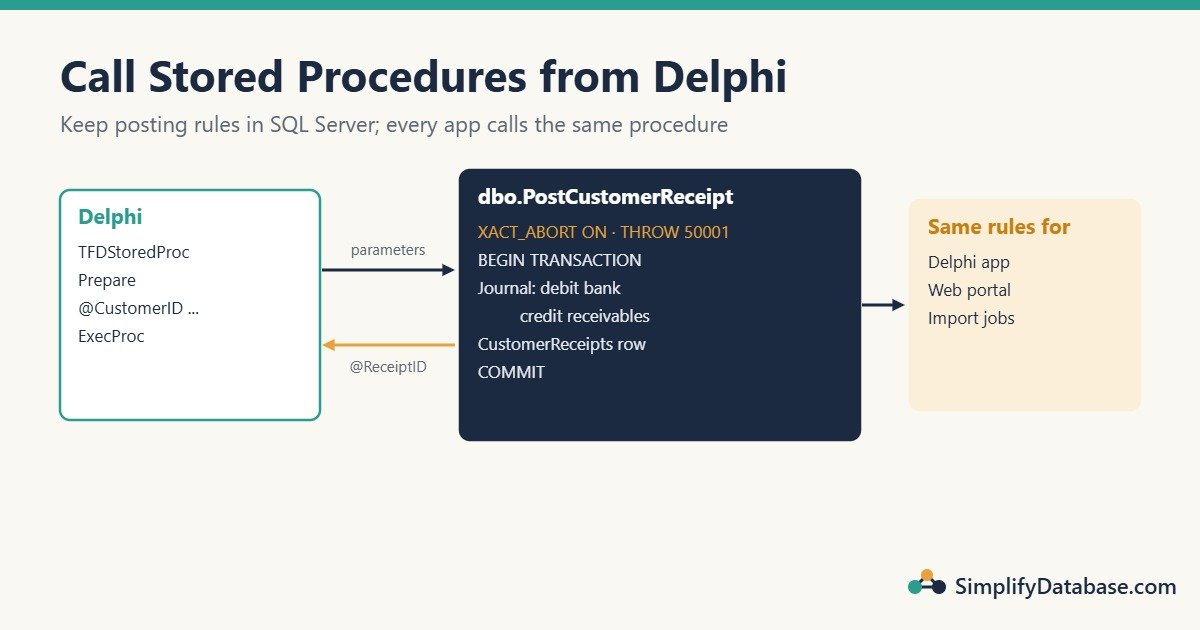
Table of Contents
Why ERP Systems Use Stored Procedures
- One set of rules. The Delphi app, a Laravel portal and an import job all call
dbo.PostCustomerReceipt, so a receipt is always posted the same way. - Fewer round trips. One call does several inserts on the server, instead of the app sending each one over the network.
- Atomic by design. The procedure owns its transaction, so a half-saved document is impossible.
- Security. Users can be allowed to execute the procedure without being allowed to insert into the tables directly.
Setup: Receipts Table and Accounts
This builds on the tables from parts 3 to 6 (Customers, Invoices, Accounts, JournalEntries, JournalLines).
INSERT INTO dbo.Accounts (AccountCode, AccountName)
VALUES ('1200', N'Accounts receivable');

IF OBJECT_ID('dbo.JournalNoSeq', 'SO') IS NULL
    CREATE SEQUENCE dbo.JournalNoSeq START WITH 1 INCREMENT BY 1;

CREATE TABLE dbo.CustomerReceipts (
    ReceiptID   INT IDENTITY(1,1) NOT NULL PRIMARY KEY,
    CustomerID  INT           NOT NULL REFERENCES dbo.Customers (CustomerID),
    ReceiptDate DATE          NOT NULL,
    Amount      DECIMAL(14,3) NOT NULL CHECK (Amount > 0),
    JournalID   INT           NOT NULL REFERENCES dbo.JournalEntries (JournalID)
);
Procedure 1: Post a Customer Receipt
When a customer pays, the accounting entry is always the same: debit the bank, credit accounts receivable. The procedure does it all in one transaction:
CREATE OR ALTER PROCEDURE dbo.PostCustomerReceipt
    @CustomerID    INT,
    @ReceiptDate   DATE,
    @Amount        DECIMAL(14,3),
    @BankAccountID INT,
    @ReceiptID     INT OUTPUT
AS
BEGIN
    SET NOCOUNT ON;
    SET XACT_ABORT ON;   -- any error rolls back the whole transaction

    IF @Amount IS NULL OR @Amount <= 0
        THROW 50001, 'The amount must be greater than zero.', 1;

    DECLARE @ARAccountID INT =
        (SELECT AccountID FROM dbo.Accounts WHERE AccountCode = '1200');
    IF @ARAccountID IS NULL
        THROW 50002, 'Account 1200 (Accounts receivable) is missing.', 1;

    DECLARE @JournalID INT;

    BEGIN TRANSACTION;

    DECLARE @Seq BIGINT = NEXT VALUE FOR dbo.JournalNoSeq;

    INSERT INTO dbo.JournalEntries (JournalNo, JournalDate, Description)
    VALUES (CONCAT('RV-', @Seq), @ReceiptDate,
            CONCAT(N'Receipt from customer ', @CustomerID));
    SET @JournalID = SCOPE_IDENTITY();

    INSERT INTO dbo.JournalLines (JournalID, AccountID, Debit, Credit)
    VALUES (@JournalID, @BankAccountID, @Amount, 0),   -- debit bank
           (@JournalID, @ARAccountID,   0, @Amount);   -- credit receivables

    INSERT INTO dbo.CustomerReceipts (CustomerID, ReceiptDate, Amount, JournalID)
    VALUES (@CustomerID, @ReceiptDate, @Amount, @JournalID);
    SET @ReceiptID = SCOPE_IDENTITY();

    COMMIT TRANSACTION;
END;
Key points:
THROW 50001, ...raises a business error with our own number (50000 and up are free for you to use). Delphi receives it as an exception.SET XACT_ABORT ONmakes SQL Server roll back everything if any statement fails, for example a wrong@CustomerIDbreaking the foreign key.@ReceiptID INT OUTPUTsends the new receipt number back to the caller.
Calling It from Delphi with TFDStoredProc
On a receipt form, drop a TFDStoredProc named spPostReceipt with Connection = DM.Conn and StoredProcName = dbo.PostCustomerReceipt. Add a customer lookup combo (cbCustomer, list only, as in part 4), a bank account combo (cbBank), a date picker and an amount edit.
procedure TfrmReceipt.btnSaveClick(Sender: TObject);
var
  Amount: Currency;
begin
  if VarIsNull(cbCustomer.KeyValue) or VarIsNull(cbBank.KeyValue) then
    raise Exception.Create('Choose the customer and the bank account.');
  if not TryStrToCurr(edtAmount.Text, Amount) then
    raise Exception.Create('Enter a valid amount.');

  spPostReceipt.Prepare;   // FireDAC reads the parameter list from SQL Server
  spPostReceipt.ParamByName('@CustomerID').AsInteger := cbCustomer.KeyValue;
  spPostReceipt.ParamByName('@ReceiptDate').AsDate := dtpDate.Date;
  spPostReceipt.ParamByName('@Amount').AsCurrency := Amount;
  spPostReceipt.ParamByName('@BankAccountID').AsInteger := cbBank.KeyValue;
  spPostReceipt.ExecProc;

  ShowMessage(Format('Receipt %d saved.',
    [spPostReceipt.ParamByName('@ReceiptID').AsInteger]));
end;
What’s happening:
Prepareasks SQL Server for the procedure’s parameters, so you don’t define them by hand. FireDAC also adds a@RETURN_VALUEparameter for the procedure’s return code.- With SQL Server, the parameter names keep their
@. If you preferParamByName('CustomerID'), setResourceOptions.UnifyParams := Trueon the connection or the component. ExecProcis for procedures that don’t return rows. After it runs,OUTPUTparameters hold their values.- No
StartTransactionin Delphi: the procedure manages its own transaction.
Handling the Procedure’s Errors
When the procedure runs THROW 50001, FireDAC raises an EFDDBEngineException. Its Errors list holds the SQL Server error number, so you can react to specific business errors (add FireDAC.Stan.Error to uses):
  try
    spPostReceipt.ExecProc;
  except
    on E: EFDDBEngineException do
    begin
      if (E.ErrorCount > 0) and (E.Errors[0].ErrorCode = 50001) then
      begin
        edtAmount.SetFocus;
        ShowMessage('The amount must be greater than zero.');
      end
      else
        raise;   // anything else: show the full error
    end;
  end;
Procedure 2: A Customer Statement (Returns Rows)
A statement lists a customer’s invoices (debits) and receipts (credits) with a running balance:
CREATE OR ALTER PROCEDURE dbo.GetCustomerStatement
    @CustomerID INT,
    @FromDate   DATE,
    @ToDate     DATE
AS
BEGIN
    SET NOCOUNT ON;

    WITH Moves AS (
        SELECT InvoiceDate AS MoveDate, InvoiceNo AS RefNo, N'Invoice' AS MoveType,
               TotalAmount AS Debit, CAST(0 AS DECIMAL(14,3)) AS Credit
        FROM dbo.Invoices
        WHERE CustomerID = @CustomerID
        UNION ALL
        SELECT ReceiptDate, CONCAT('RC-', ReceiptID), N'Receipt',
               CAST(0 AS DECIMAL(14,3)), Amount
        FROM dbo.CustomerReceipts
        WHERE CustomerID = @CustomerID
    ),
    WithBalance AS (
        SELECT MoveDate, RefNo, MoveType, Debit, Credit,
               SUM(Debit - Credit) OVER (ORDER BY MoveDate, RefNo
                                         ROWS UNBOUNDED PRECEDING) AS Balance
        FROM Moves
    )
    SELECT MoveDate, RefNo, MoveType, Debit, Credit, Balance
    FROM WithBalance
    WHERE MoveDate BETWEEN @FromDate AND @ToDate
    ORDER BY MoveDate, RefNo;
END;
The running balance is calculated over all moves first, and the date filter comes after. That way the first row in the period already includes everything owed before it (the opening balance). If you filtered first, the balance would wrongly start at zero. (More on this pattern in Running Totals in SQL Server.)
In Delphi, a procedure that returns rows is opened, not executed, just like a query:
procedure TfrmStatement.btnShowClick(Sender: TObject);
begin
  spStatement.Close;
  spStatement.Prepare;
  spStatement.ParamByName('@CustomerID').AsInteger := cbCustomer.KeyValue;
  spStatement.ParamByName('@FromDate').AsDate := dtpFrom.Date;
  spStatement.ParamByName('@ToDate').AsDate := dtpTo.Date;
  spStatement.Open;   // the result set appears in the DBGrid through dsStatement
end;
Connect dsStatement and a TDBGrid to spStatement and set DisplayFormat on the money fields. If you call ExecProc on a procedure that returns rows, FireDAC raises an error, and Open on one that returns none raises an error too. Pick the method that matches the procedure.
Other Ways to Call a Procedure
| Way | When to use it |
|---|---|
TFDStoredProc + ExecProc / Open | The clearest way; parameters come from SQL Server |
TFDQuery with EXEC dbo.GetCustomerStatement :CustomerID, :FromDate, :ToDate | Quick calls, or when you already have a query on the form |
DM.Conn.ExecSQL('EXEC dbo.SomeProc :A', [Value]) | One-line calls with no output |
TADOStoredProc (ADO) | Community/Professional editions; same idea, Parameters.ParamByName('@CustomerID').Value |
Common Mistakes
ExecProcon a procedure that returns rows (orOpenon one that doesn’t). UseOpenfor result sets andExecProcfor actions.- Forgetting the
@in parameter names (or not knowingUnifyParamsremoves it). - No
SET NOCOUNT ON. The “1 row affected” messages can confuse client libraries and waste round trips. - No
SET XACT_ABORT ONwith a transaction. Some errors then leave the transaction open. - Hiding all errors. Catch the business errors you expect (by number) and re-raise everything else.
- Same procedure fast in SSMS but slow from Delphi? That’s usually parameter sniffing, explained in this guide.
Practice Exercises
- Call
dbo.PostCustomerReceiptwith aTFDQueryinstead ofTFDStoredProc, and still read@ReceiptID. - Make the procedure refuse a receipt larger than what the customer owes, with error 50003.
- Let ERP users run the two procedures without giving them
INSERTrights on the tables.
Answers
1. Use EXEC with an output parameter, and set that parameter’s type to output:
qryExec.SQL.Text :=
  'EXEC dbo.PostCustomerReceipt :CustomerID, :ReceiptDate, :Amount, :BankAccountID, :ReceiptID OUTPUT';
qryExec.ParamByName('ReceiptID').ParamType := ptOutput;
qryExec.ParamByName('ReceiptID').DataType := ftInteger;
// ... set the four input parameters ...
qryExec.ExecSQL;
ShowMessage(IntToStr(qryExec.ParamByName('ReceiptID').AsInteger));
2. Before BEGIN TRANSACTION, calculate the open balance and compare:
DECLARE @Owed DECIMAL(14,3) =
      (SELECT COALESCE(SUM(TotalAmount), 0) FROM dbo.Invoices WHERE CustomerID = @CustomerID)
    - (SELECT COALESCE(SUM(Amount), 0) FROM dbo.CustomerReceipts WHERE CustomerID = @CustomerID);

IF @Amount > @Owed
    THROW 50003, 'The receipt is larger than the amount the customer owes.', 1;
3. Create a database role, grant EXECUTE on the procedures, and add the users (or the app’s login) to the role:
CREATE ROLE ErpUsers;
GRANT EXECUTE ON dbo.PostCustomerReceipt TO ErpUsers;
GRANT EXECUTE ON dbo.GetCustomerStatement TO ErpUsers;
ALTER ROLE ErpUsers ADD MEMBER [YourAppUser];
Because the procedures and tables have the same owner (dbo), SQL Server lets the procedure write to the tables even though the user can’t write to them directly.
Summary
- Put critical business rules (like posting a receipt) in stored procedures so every app follows them.
TFDStoredProc: setStoredProcName,Prepare, fill parameters, thenExecProc(actions) orOpen(result sets).- Read
OUTPUTparameters afterExecProc; useTHROWwith numbers 50000+ for business errors and catch them by number in Delphi. - Use
SET NOCOUNT ONandSET XACT_ABORT ONin procedures that change data. - Grant
EXECUTEon procedures instead of table rights.
Next in the series: printing invoices and reports with FastReport.
Delphi for ERP series
All parts in order. New parts appear here as they go live.
-
Why Delphi Is Still a Great Choice for ERP and Business Apps in 2026
-
Delphi vs C# vs Web Apps for Business Software: Which Should You Use?
-
Build a Customer Screen in Delphi in 30 Minutes (SQL Server Step by Step)
-
Lookup Combo Boxes in Delphi: Choose a Customer or Item From a List
-
Master-Detail Forms in Delphi: Invoice Header and Invoice Lines (FireDAC)
-
Delphi Transactions with FireDAC: Save a Balanced Journal Entry (All or Nothing)
-
Call SQL Server Stored Procedures from Delphi with FireDAC (TFDStoredProc)
New to Delphi? Start with What Is Delphi? Build Your First App.
Related articles
- Delphi Transactions with FireDAC: Save a Balanced Journal Entry: part 6 of this series.
- SQL Stored Procedures Explained Simply: stored procedure basics.
- Running Totals in SQL Server: the running balance technique in depth.
- SQL Server Parameter Sniffing: when a procedure is fast in SSMS but slow in the app.