
You need to keep an intermediate result for a moment: the totals per customer, the list of invoices to process, the rows you’re about to update. SQL Server gives you three ways to do it:
- a temp table (
#CustomerTotals) - a table variable (
@CustomerTotals) - a CTE (
WITH CustomerTotals AS (...))
They look interchangeable, and for 50 rows it barely matters which one you pick. For 50,000 rows it can be the difference between one second and one minute. This guide explains how each one really works, where each one goes wrong, and gives you a simple rule for choosing.
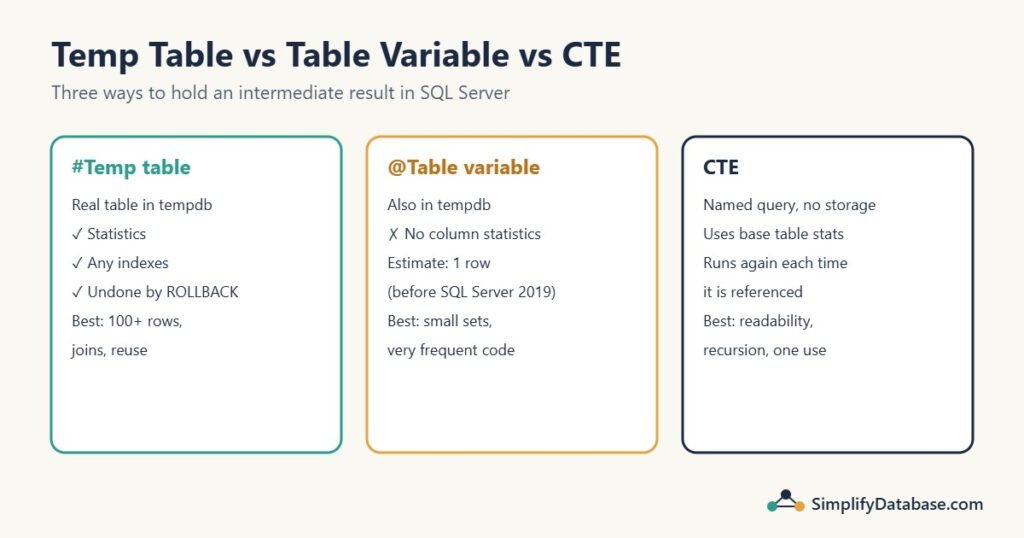
Table of Contents
The short answer
Temp table #t | Table variable @t | CTE | |
|---|---|---|---|
| Stores data? | Yes, in tempdb | Yes, in tempdb | No, it’s a named query |
| Statistics | Yes | No column statistics | Uses the base tables’ statistics |
| Row estimate | Based on real statistics | 1 row before SQL Server 2019 | Same as the inline query |
| Indexes | Any, any time | Only inline (primary key, unique, INDEX) | None of its own |
| Lives for | The session or procedure | The batch or procedure | One statement |
| Undone by ROLLBACK | Yes | No | Not applicable |
| Good for | Medium and large intermediate results | Small sets, under ~100 rows | Readability, recursion, one-time use |
If you only remember one line: small and simple, table variable; large or joined, temp table; used once in one query, CTE.
The rest of this article explains why.
The CTE: a name for a query, not a table
A CTE (common table expression) doesn’t store anything. It’s a way to give a subquery a name so the main query is easier to read:
WITH CustomerTotals AS (
    SELECT CustomerID, SUM(Amount) AS Total
    FROM dbo.Orders
    GROUP BY CustomerID
)
SELECT CustomerID, Total
FROM CustomerTotals
WHERE Total > (SELECT AVG(Total) FROM CustomerTotals)
ORDER BY Total DESC;
With a small sample (10 orders from 5 customers, average customer total 960), the result is:
| CustomerID | Total |
|---|---|
| 104 | 2200.00 |
| 102 | 1200.00 |
| 101 | 1000.00 |
That’s clean and readable. But notice that CustomerTotals is used twice: once in FROM and once in the AVG subquery. SQL Server doesn’t save the CTE’s result and reuse it. It expands the CTE into the query wherever it’s mentioned, so the GROUP BY over Orders runs twice. On 10 rows, nobody notices. On 20 million rows, you pay for it twice.
Things to know about CTEs:
- A CTE only exists for the one statement right after it. The next statement can’t see it.
- It uses the statistics of the real tables underneath, so its row estimates are as good as a normal query’s.
- It’s the only one of the three that can be recursive, for trees like org charts or categories. See the recursive example in SQL SELF JOIN Explained Simply.
- It’s not faster than a subquery. It’s the same thing with a name. More in SQL Subqueries vs CTEs Explained Simply.
Use a CTE when you want readable SQL and the result is used once.
The temp table: a real table in tempdb
A temp table is a real table, created in the tempdb database, that disappears when your session ends (or when the stored procedure that created it finishes):
SELECT CustomerID, SUM(Amount) AS Total
INTO #CustomerTotals
FROM dbo.Orders
GROUP BY CustomerID;

-- Add an index if later queries filter or join on it
CREATE CLUSTERED INDEX IX_CustomerTotals ON #CustomerTotals (CustomerID);

SELECT CustomerID, Total
FROM #CustomerTotals
WHERE Total > (SELECT AVG(Total) FROM #CustomerTotals);

DROP TABLE IF EXISTS #CustomerTotals;   -- optional: it's dropped automatically
Now the expensive GROUP BY runs once, and every later query reads the small saved result.
What makes temp tables strong:
- They have statistics. SQL Server builds statistics on temp table columns just like on normal tables, so it knows whether
#CustomerTotalshas 50 rows or 500,000, and how the values are spread. That means good plans when you join it to other tables. (Why that matters so much is explained in SQL Server Statistics: Why Outdated Stats Slow Your Queries.) - You can index them any way you like, at any time.
- They’re visible to nested procedures. If procedure A creates
#Workand calls procedure B, B can read and fill#Work. - They follow transactions. A
ROLLBACKundoes changes to a temp table, just like a normal table.
The costs: creating them and building statistics takes a little time, and when the data in them changes a lot, queries that use them may recompile. For a procedure that runs thousands of times per second with a handful of rows, that overhead adds up.
Use a temp table when the intermediate result is more than about 100 rows, when you’ll join or filter on it, or when you’ll use it in several statements.
The table variable: a table without statistics
A table variable is declared like a variable, but holds rows:
DECLARE @CustomerTotals TABLE (
    CustomerID INT PRIMARY KEY,
    Total      DECIMAL(12,2)
);

INSERT INTO @CustomerTotals (CustomerID, Total)
SELECT CustomerID, SUM(Amount)
FROM dbo.Orders
GROUP BY CustomerID;

SELECT CustomerID, Total
FROM @CustomerTotals
WHERE Total > (SELECT AVG(Total) FROM @CustomerTotals);
A common myth is that table variables live in memory and temp tables on disk. Both live in tempdb, and both stay in memory as long as they’re small. The real differences are elsewhere.
The big one: no statistics
Table variables have no column statistics. And before SQL Server 2019, SQL Server also didn’t know how many rows were in one when it built the plan, so it assumed 1 row, always.
Here’s what that does. A simplified, made-up example, but a very typical one:
DECLARE @Ids TABLE (OrderID INT PRIMARY KEY);

INSERT INTO @Ids (OrderID)
SELECT OrderID
FROM dbo.Orders
WHERE OrderDate >= '2026-10-01';      -- say this returns 60,000 rows

SELECT l.OrderID, l.ProductID, l.Quantity
FROM @Ids AS i
JOIN dbo.OrderLines AS l ON l.OrderID = i.OrderID;
In the actual execution plan, the table variable shows Estimated Number of Rows: 1 and Actual Number of Rows: 60,000. For 1 row, SQL Server picks a nested loops join with a seek into OrderLines. That’s perfect for 1 row, and slow when the loop actually runs 60,000 times. Replace @Ids with #Ids and SQL Server sees 60,000 rows and can choose a hash or merge join instead.
SQL Server 2019 and later (compatibility level 150+) improve this with table variable deferred compilation: the statement is compiled when it first runs, using the real row count. That fixes the “always 1 row” problem. But there are still no column statistics, so SQL Server knows how many rows there are, not what values they contain. For filters and joins on skewed data, a temp table is still the safer choice.
Other table variable rules
- Indexes only inline, in the
DECLARE:PRIMARY KEY,UNIQUE, and since SQL Server 2014INDEX IX_Name (Column). You can’tCREATE INDEXon it afterwards. - Scope is the batch or procedure. It’s gone after
GO, and a nested procedure can’t see it (unless you pass it as a table-valued parameter). - No parallelism for changes. Inserting into a table variable always runs on a single thread. Reading from it can still be parallel.
- ROLLBACK doesn’t undo it. That surprises people, and it can be useful:
DECLARE @Log TABLE (Msg VARCHAR(100));
CREATE TABLE #Log (Msg VARCHAR(100));

BEGIN TRANSACTION;
    INSERT INTO @Log VALUES ('step 1 done');
    INSERT INTO #Log VALUES ('step 1 done');
ROLLBACK;

SELECT COUNT(*) FROM @Log;   -- 1: the row survived the rollback
SELECT COUNT(*) FROM #Log;   -- 0: the rollback removed it
That’s why table variables are handy for keeping an error log inside a transaction: you can roll back the work, then still save what happened.
Use a table variable for small sets (a list of IDs from the screen, a few dozen rows), in code that runs very often, or when you need its rollback behaviour.
A worked comparison
Same task three ways: find the orders of the top 100 customers by total spend this year, then show their order lines.
CTE: fine if you need the result once:
WITH TopCustomers AS (
    SELECT TOP (100) CustomerID
    FROM dbo.Orders
    WHERE OrderDate >= '2026-01-01'
    GROUP BY CustomerID
    ORDER BY SUM(Amount) DESC
)
SELECT o.OrderID, l.ProductID, l.Quantity
FROM TopCustomers AS t
JOIN dbo.Orders     AS o ON o.CustomerID = t.CustomerID
JOIN dbo.OrderLines AS l ON l.OrderID = o.OrderID;
Table variable: fine, because it holds exactly 100 rows and the primary key gives it an index:
DECLARE @TopCustomers TABLE (CustomerID INT PRIMARY KEY);

INSERT INTO @TopCustomers (CustomerID)
SELECT TOP (100) CustomerID
FROM dbo.Orders
WHERE OrderDate >= '2026-01-01'
GROUP BY CustomerID
ORDER BY SUM(Amount) DESC;
Temp table: the better choice if you change it to the top 10,000 customers, or use the list in three later reports:
SELECT TOP (10000) CustomerID, SUM(Amount) AS Total
INTO #TopCustomers
FROM dbo.Orders
WHERE OrderDate >= '2026-01-01'
GROUP BY CustomerID
ORDER BY SUM(Amount) DESC;

CREATE CLUSTERED INDEX IX_TopCustomers ON #TopCustomers (CustomerID);
How to tell which one is hurting you
If a procedure that uses a table variable or temp table is slow:
- Run it with the actual execution plan (Ctrl+M in SSMS). See How to Read a SQL Server Execution Plan if plans are new to you.
- Find the operator that reads the table variable. If Estimated rows = 1 and Actual rows is in the thousands, you’ve found the problem. Switch to a temp table, or add
OPTION (RECOMPILE)to that one statement so SQL Server sees the real row count. - If a CTE is used more than once and its query is expensive, look for the same expensive operators appearing twice in the plan. Save the result in a temp table instead.
- If a temp table is used in code that runs constantly and you see lots of recompiles, consider a table variable for small sets.
What about MySQL and PostgreSQL?
- MySQL has temporary tables (
CREATE TEMPORARY TABLE ...), visible only to your connection, and CTEs since version 8.0. It has no table variables. MySQL’s optimizer may save (materialize) a CTE that’s used more than once, so the double-work problem is less common there. - PostgreSQL has temporary tables and CTEs, but no table variables. Since PostgreSQL 12, a CTE used once is inlined like a subquery, and you can control it with
MATERIALIZED/NOT MATERIALIZED. RunANALYZEon a temporary table after filling it, because autovacuum doesn’t analyze temp tables.
Common mistakes
- Using a table variable for tens of thousands of rows and wondering why the plan is slow. Check the estimated rows.
- Referencing an expensive CTE several times and expecting it to run once.
- Believing table variables are “in memory” and temp tables are “on disk”. Both are in tempdb.
- Putting a CTE before a statement that isn’t the next one. A CTE only works for the statement immediately after it. Also end the previous statement with a semicolon, or you’ll get a syntax error at
WITH. - Creating a temp table, then never indexing it before joining it to big tables a dozen times.
- Forgetting that
ROLLBACKdoesn’t touch table variables, and ending up with “half-done” data in one.
Practice exercises
Exercise 1. A procedure loads about 40 IDs from a screen selection and joins them to Orders. It runs 500 times a minute. Temp table, table variable or CTE? Why?
Exercise 2. On SQL Server 2017, a query joins a table variable holding 80,000 rows to OrderLines, and it’s slow. Name two fixes.
Exercise 3. Rewrite this so the expensive aggregate runs only once:
WITH Totals AS (
    SELECT CustomerID, SUM(Amount) AS Total
    FROM dbo.Orders
    GROUP BY CustomerID
)
SELECT t1.CustomerID, t1.Total,
       t1.Total * 100.0 / (SELECT SUM(Total) FROM Totals) AS PctOfAll
FROM Totals AS t1;
Answers
Answer 1. A table variable. Only 40 rows, so missing statistics don’t matter much, and it avoids the temp table’s recompile overhead in code that runs constantly. Give it a PRIMARY KEY on the ID.
Answer 2. Replace it with a temp table (statistics and a correct row count), or add OPTION (RECOMPILE) to the slow statement so SQL Server sees the real row count. Upgrading to compatibility level 150 (SQL Server 2019+) also fixes the row count, but that’s a bigger change.
Answer 3. Save the totals in a temp table, then read it twice:
SELECT CustomerID, SUM(Amount) AS Total
INTO #Totals
FROM dbo.Orders
GROUP BY CustomerID;

SELECT CustomerID, Total,
       Total * 100.0 / (SELECT SUM(Total) FROM #Totals) AS PctOfAll
FROM #Totals;
A window function does it in one pass too, with no temp table at all: Total * 100.0 / SUM(Total) OVER (). See SQL Window Functions Explained Simply.
Summary
- A CTE is a named query. It stores nothing, works for one statement, and runs again each time it’s referenced.
- A temp table is a real table in tempdb with statistics and indexes. Best for anything more than a small set, or anything you join to.
- A table variable lives in tempdb too, but has no column statistics, and before SQL Server 2019 it’s always estimated at 1 row. Best for small sets and very frequent code.
- Check estimated vs actual rows in the plan to see which choice is hurting you.
Part of a series: this article is one step in my SQL Server Performance Troubleshooting: A Practical Step-by-Step Guide, which walks through the whole process of finding and fixing a slow query.
Related articles
- SQL Server Statistics: why row estimates decide the plan, and why table variables suffer without them.
- SQL Server Parameter Sniffing: another reason SQL Server builds a plan for the wrong number of rows.
- SQL Subqueries vs CTEs Explained Simply: the basics of CTEs.
- Index Seek vs Index Scan: what the plan does once it knows the row count.