
Ask five developers which database to use and you may hear five different names: SQL Server, MongoDB, Redis, Neo4j, Cassandra. It can sound as if they’re all competing to do the same job. They aren’t. Each type of database was built to be very good at one kind of problem.
In this guide we’ll look at the main types in plain language. To keep things concrete, we’ll store the same small piece of data, a customer of a stationery shop and her purchases, in several of them, so you can see the difference instead of just reading about it. (If you haven’t read What Is a Database? yet, start there. It introduces the same shop.)
Quick answer: what are the main types of databases?
Relational (SQL Server, MySQL, PostgreSQL): tables linked by keys, queried with SQL. The most common type and the best place to start.
NoSQL types, each built for one job: document (MongoDB), key-value (Redis), wide-column (Cassandra) and graph (Neo4j).
Specialised types: time-series for readings over time, and vector databases for AI search.
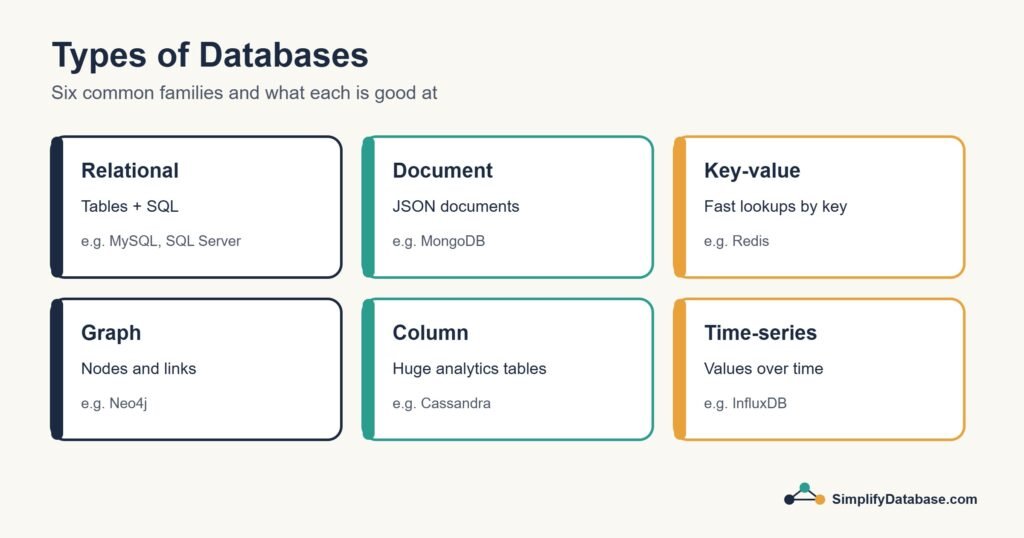
Table of Contents
Why Are There Different Types?
Think about vehicles. A family car, a delivery truck and a motorbike all move things from A to B, but you wouldn’t deliver furniture on a motorbike. Databases are the same. Some are built for accuracy, some for raw speed, some for huge volumes of data, some for following connections. Choosing a type is really choosing which of those matters most for your data.
1. Relational Databases (SQL)
This is the type you’ll meet first and use most. A relational database stores data in tables of rows and columns, and connects the tables with keys. Here’s our customer, split across two tables the relational way:
customers
| customer_id | name | phone | city |
|---|---|---|---|
| 1 | Sara Ahmed | 3300 1111 | Manama |
sales
| sale_id | sale_date | customer_id | product | amount |
|---|---|---|---|---|
| 101 | 2026-11-02 | 1 | Notebook | 2.500 |
| 103 | 2026-11-05 | 1 | Backpack | 18.000 |
Each fact is stored once, and the tables are linked by customer_id. You ask questions in SQL, and you can combine tables with JOINs. Relational databases are also very strict: a price column only accepts numbers, and a sale can’t point to a customer who doesn’t exist. They support transactions, so a payment is either saved completely or not at all.
Good for: business data where accuracy matters: sales, accounting, stock, banking, HR, bookings. Most business software runs on a relational database.
Well-known examples: Microsoft SQL Server, MySQL, PostgreSQL, Oracle, SQLite.
2. Document Databases
A document database stores each record as a document, usually in a format called JSON. Related data can live inside the same document. Here’s the same customer as one document:
{
  "customer_id": 1,
  "name": "Sara Ahmed",
  "phone": "3300 1111",
  "city": "Manama",
  "sales": [
    { "sale_id": 101, "date": "2026-11-02", "product": "Notebook", "amount": 2.500 },
    { "sale_id": 103, "date": "2026-11-05", "product": "Backpack", "amount": 18.000 }
  ]
}
Everything about Sara is in one place, so reading her whole profile is one quick lookup. And documents don’t all need the same fields: another customer could have two phone numbers and a delivery address, and nobody has to change a table first.
The trade-off: if the same product name or price is copied into thousands of documents, changing it means updating them all, and the database gives you fewer built-in rules to keep everything consistent.
Good for: data whose shape varies or changes often: user profiles, product catalogues with different attributes, content, app settings.
Well-known examples: MongoDB, Couchbase, Google Firestore.
3. Key-Value Databases
The simplest type of all. You store a value under a key, and later you give the key and get the value back. It works like a coat check: hand in your ticket, get your coat. There’s no searching inside the values.
cart:customer:1   ->  { "Notebook": 2, "Pen set": 1 }
session:8f3a2c    ->  { "customer_id": 1, "logged_in_at": "09:14" }
Because the database only ever looks things up by key, it can be astonishingly fast, especially when it keeps everything in memory (RAM) instead of on disk. That’s why websites put a key-value store in front of their main database to remember results they need again and again.
Good for: shopping carts, login sessions, caching, rate limits, live counters.
Well-known examples: Redis, Valkey, Amazon DynamoDB, Memcached.
4. Wide-Column Databases
Wide-column (or column-family) databases are built for enormous amounts of data spread across many servers. Each row can have a different set of columns, and the data is organised so that writing millions of new records per second stays fast, even when a server fails.
For a single shop they would be overkill. For a mobile network logging every call, or a company collecting readings from millions of devices, they’re exactly the right tool.
Good for: very large, write-heavy data spread over many servers: event logs, device data, messaging at global scale.
Well-known examples: Apache Cassandra, ScyllaDB, HBase.
5. Graph Databases
A graph database stores nodes (things) and edges (the connections between them). It’s designed for questions about connections:
(Sara) -[BOUGHT]-> (Notebook) <-[BOUGHT]- (Omar) -[BOUGHT]-> (Pen set)“Customers who bought a notebook also bought…” is a hard query in a relational database once the chains get long. In a graph database, following those connections is what it does best. The same goes for “friends of friends” on social networks, or spotting groups of accounts that send money to each other in a suspicious loop.
Good for: recommendations, social networks, fraud detection, network maps, anything where the relationships matter as much as the data.
Well-known examples: Neo4j, Amazon Neptune.
6. Time-Series Databases
A time-series database is built for measurements taken over time: a value, a timestamp, and maybe a label, repeated millions of times. The temperature of the shop’s fridge every minute is time-series data. So is the CPU usage of a server every second.
These databases write new readings very quickly, compress old ones, and make questions like “average per hour for the last 30 days” easy and fast.
Good for: monitoring servers and applications, sensor and IoT data, energy meters, financial prices.
Well-known examples: InfluxDB, TimescaleDB (built on PostgreSQL), Prometheus.
7. Vector Databases
The newest type on this list, and the one you’ll hear about with AI. A vector database stores lists of numbers (vectors) that describe the meaning of a piece of text, an image or a product. It can then find items that are similar in meaning, not just items that contain the same words.
Searching a shop for “something to carry books to school” could find the backpack, even though the word “backpack” never appears in the search. Many chatbots that answer questions from a company’s own documents work this way.
Good for: AI-powered search, recommendations, and chatbots that answer from your own documents.
Well-known examples: pgvector (an extension for PostgreSQL), Pinecone, Milvus, Weaviate.
What About Cloud and In-Memory Databases?
You’ll often see these listed as “types”, but they describe where or how a database runs, not how it organises data:
- A cloud database is usually one of the types above, run for you by a provider. Azure SQL Database is SQL Server in Microsoft’s cloud. Amazon RDS and Google Cloud SQL offer MySQL and PostgreSQL. You don’t buy or maintain a server, and backups are handled for you.
- An in-memory database keeps its data in RAM for speed. Redis is the best-known example, and it’s also a key-value database.
All the Types at a Glance
| Type | Stores data as | Best for | Examples |
|---|---|---|---|
| Relational | Tables linked by keys | Business data, accuracy | SQL Server, MySQL, PostgreSQL |
| Document | JSON-like documents | Flexible, changing data | MongoDB, Firestore |
| Key-value | Key and value pairs | Speed, caching, sessions | Redis, DynamoDB |
| Wide-column | Rows with flexible columns over many servers | Huge write-heavy data | Cassandra, ScyllaDB |
| Graph | Nodes and connections | Relationships, recommendations | Neo4j, Neptune |
| Time-series | Timestamped readings | Monitoring, sensors | InfluxDB, TimescaleDB |
| Vector | Lists of numbers (meaning) | AI search | pgvector, Pinecone |
SQL vs NoSQL: Which Is Better?
“NoSQL” is a label for all the non-relational types above. It originally meant “no SQL”, and today it’s usually read as “not only SQL”. The honest answer to “which is better?” is neither. They’re good at different things:
| SQL (relational) | NoSQL | |
|---|---|---|
| Structure | Fixed tables, defined in advance | Flexible: documents, keys, graphs |
| Rules and accuracy | Strong: types, keys, transactions | Depends on the product, often lighter |
| Growing bigger | Usually a bigger server | Usually more servers |
| Asking new questions | Very flexible with SQL | Best for the questions it was designed for |
| Typical use | Orders, invoices, accounts, stock | Carts, sessions, catalogues, feeds, logs |
How to choose: five questions
- Does your data fit into tables with clear relationships (customers, orders, products)? Choose relational.
- Do you need all-or-nothing transactions (money, stock, medical records)? Choose relational.
- Does the shape of your data keep changing? A document database can save a lot of rework.
- Do you need to spread millions of writes per second over many servers? Look at NoSQL.
- What does your team already know? A team that knows SQL well usually builds faster and safer with it.
Many real systems use more than one. A typical online shop keeps orders and payments in a relational database, shopping carts and sessions in Redis, and maybe product search in a separate search engine. Using several databases, each for its own job, has a name: polyglot persistence.
Relational databases have learned new tricks
The line between the two has blurred. PostgreSQL, MySQL and SQL Server can all store and query JSON documents inside a table, and PostgreSQL can even do vector search with pgvector. So a relational database can often handle the “flexible” part of your data too, without adding a second system.
Which Type Should a Beginner Learn?
Start with relational databases and SQL. They’re used in almost every company, SQL works across SQL Server, MySQL and PostgreSQL with only small differences, and once you understand tables, keys and queries, every other type is much easier to understand, because you’ll know what problem it’s trying to solve differently. SQL for Complete Beginners is the next step, and MySQL vs PostgreSQL helps if you’re choosing which one to install.
Check Your Understanding
Which type of database would you choose for each of these? Decide first, then read the answers.
- A clinic’s appointments, patients and invoices.
- Remembering what’s in each visitor’s shopping cart on a busy website.
- “People who bought this also bought…” suggestions.
- Recording the temperature of 500 fridges every minute.
- A product catalogue where phones, books and furniture all have completely different attributes.
Answers
- Relational. Structured data, clear relationships, and accuracy matters.
- Key-value (for example Redis): simple lookups by visitor, and it must be very fast.
- Graph: it’s all about connections between customers and products.
- Time-series: timestamped readings arriving all the time.
- Document, or a relational database with a JSON column. Both handle records with different shapes.
Frequently Asked Questions
Is MongoDB better than MySQL?
Neither is better overall. MongoDB is a document database, good when your data’s shape varies a lot. MySQL is relational, good when your data is structured and must stay consistent. For a typical business application with customers, orders and invoices, a relational database like MySQL is usually the safer choice.
Is SQL Server a relational database?
Yes. Microsoft SQL Server is a relational database management system, like MySQL, PostgreSQL and Oracle. It also has extras such as JSON support and graph tables, but at heart it’s relational.
Is NoSQL replacing SQL?
No. NoSQL databases became popular for specific jobs, like caching and huge-scale logging, but relational databases are still the most widely used type, and they keep adding features (JSON, vectors) that cover many NoSQL use cases.
Can one application use several types of database?
Yes, and many large ones do. Just remember that every extra database is another system to run, back up and learn. For small and medium projects, one good relational database is usually enough.
What to Learn Next
- SQL for Complete Beginners: start using a relational database.
- MySQL vs PostgreSQL: choose which one to install.
- How to Choose the Right Database Server: a checklist for a real project.
Related articles
- What Is a Database?: the basics, with the same stationery shop.
- Database Normalization Explained Simply: how relational tables are designed.
- Data Lakes vs Data Warehouses vs Lakehouses: where analytics data lives.
- What Is Big Data?: when data gets too big for one server.