
If you work in a company that runs accounting, payroll, HR or stock software, there’s a good chance Microsoft SQL Server is running somewhere behind it. It’s the database I use every day at work, and it’s one of the most common databases in business software around the world.
This guide explains what SQL Server is, what makes it different from MySQL and PostgreSQL, which free edition to install, and how to write your first queries. No experience needed, just a Windows PC (or a Mac with a little extra setup).
Quick answer: what is SQL Server?
Microsoft SQL Server is a relational database management system (DBMS) made by Microsoft. It stores data in tables, uses its own version of SQL called T-SQL, and is especially common in companies that use Microsoft tools.
For learning, two editions are free: Express (also allowed for small real apps) and Developer (all features, for development and testing only). You manage it with SSMS or VS Code.
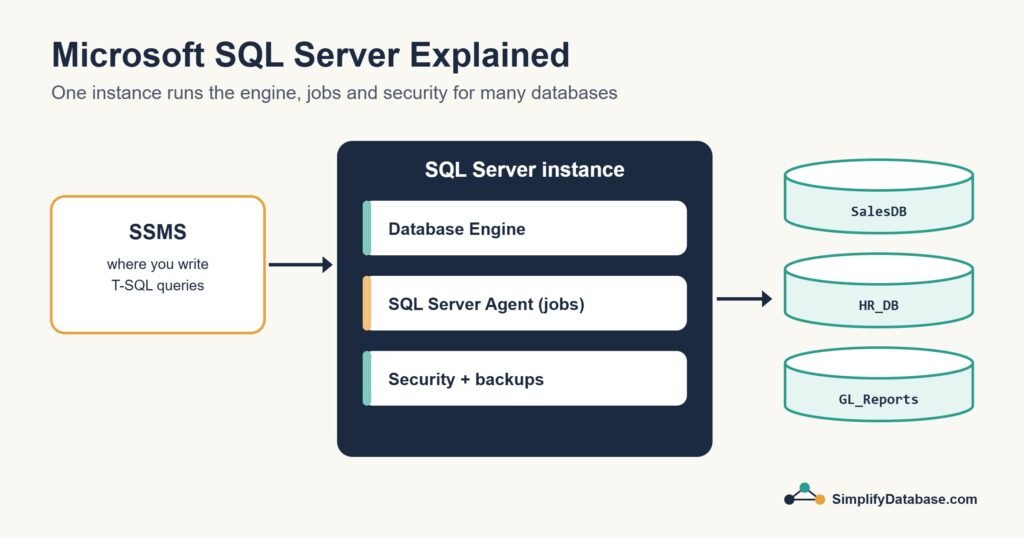
Table of Contents
What Is SQL Server?
SQL Server (people also say “MS SQL” or “MSSQL”) is Microsoft’s relational database. Like every relational database, it stores data in tables of rows and columns, connects them with keys, and answers questions written in SQL. If those words are new, read What Is a Database? first.
Microsoft first released it in 1989, and it has grown into a large platform. Alongside the database itself, it comes with tools for scheduling jobs, moving data between systems and building reports. It runs on Windows and, since 2017, on Linux too. Microsoft also runs it for you in the cloud as Azure SQL.
Unlike MySQL and PostgreSQL, SQL Server is a commercial product: running it in production generally needs a paid licence. But there are free editions, and they’re more than enough to learn on.
Where Is SQL Server Used?
- Business software: accounting, ERP, payroll, HR, point-of-sale and stock systems. Many are built with Microsoft tools like .NET, or with Delphi, and SQL Server is their natural partner.
- Banks, hospitals and government: places that value long-term support from one large vendor.
- Reporting and business intelligence: SQL Server works smoothly with Excel and Power BI.
- Internal company systems of all sizes, from a ten-person office to a multinational.
If your company already uses Windows Server, Active Directory and Microsoft 365, SQL Server usually fits right in.
T-SQL: SQL Server’s Version of SQL
Every database speaks SQL, but each has its own dialect with small differences. SQL Server’s is called T-SQL (Transact-SQL). About 90% of what you write is the same everywhere. These are the differences you’ll notice first:
| Task | SQL Server (T-SQL) | MySQL / PostgreSQL |
|---|---|---|
| First 10 rows | SELECT TOP (10) ... | ... LIMIT 10 |
| Replace an empty value | ISNULL(phone, '-') or COALESCE | COALESCE(phone, '-') |
| Join text | first_name + ' ' + last_name or CONCAT | CONCAT(...) (PostgreSQL also ||) |
| Current date and time | GETDATE() or SYSDATETIME() | NOW() |
| Auto-numbered id | INT IDENTITY(1,1) | AUTO_INCREMENT / GENERATED ... AS IDENTITY |
| Unicode text (e.g. Arabic) | NVARCHAR(100) | VARCHAR(100) with UTF-8 |
T-SQL also adds programming features: variables, IF and WHILE, error handling with TRY...CATCH, and stored procedures. A tiny taste:
DECLARE @total_sales DECIMAL(10,3);

SELECT @total_sales = SUM(amount)
FROM sales
WHERE customer_id = 1;

PRINT @total_sales;
The SQL Server vs MySQL vs PostgreSQL cheat sheet lists 31 everyday tasks side by side, if you switch between them.
Your First SQL Server Database
Here’s the stationery shop from What Is a Database?, created in SQL Server. Run it in SSMS (see the install steps below) one block at a time:
CREATE DATABASE Shop;
GO

USE Shop;
GO

CREATE TABLE customers (
    customer_id INT IDENTITY(1,1) PRIMARY KEY,
    name        NVARCHAR(100) NOT NULL,
    phone       NVARCHAR(20),
    city        NVARCHAR(50)
);

CREATE TABLE sales (
    sale_id     INT IDENTITY(1,1) PRIMARY KEY,
    sale_date   DATE NOT NULL,
    customer_id INT NOT NULL,
    product     NVARCHAR(100) NOT NULL,
    amount      DECIMAL(10,3) NOT NULL,
    CONSTRAINT fk_sales_customers
        FOREIGN KEY (customer_id) REFERENCES customers (customer_id)
);

INSERT INTO customers (name, phone, city) VALUES
    (N'Sara Ahmed',  N'3300 1111', N'Manama'),
    (N'Omar Khalid', N'3300 2222', N'Riffa');

INSERT INTO sales (sale_date, customer_id, product, amount) VALUES
    ('2026-11-02', 1, N'Notebook',  2.500),
    ('2026-11-03', 2, N'Pen set',   4.000),
    ('2026-11-05', 1, N'Backpack', 18.000);

SELECT TOP (2) c.name, s.product, s.amount
FROM sales s
JOIN customers c ON c.customer_id = s.customer_id
ORDER BY s.amount DESC;
-- Sara Ahmed  Backpack  18.000
-- Omar Khalid Pen set    4.000
A few SQL Server habits are visible here. GO tells SSMS to send the batch so far before continuing. IDENTITY(1,1) numbers new rows for you. And the N before text values (N'Sara Ahmed') marks them as Unicode, which you need for Arabic or other non-English text in NVARCHAR columns.
SQL Server Editions: Which One Do You Need?
SQL Server comes in several editions. For SQL Server 2025, the latest version, they are:
| Edition | Cost | What it’s for |
|---|---|---|
| Express | Free | Learning and small real applications. Limits: 50 GB per database, about 1.4 GB of memory for data, up to 4 cores, and no SQL Server Agent. |
| Standard Developer / Enterprise Developer | Free | All Standard or all Enterprise features, but only for development and testing, never for live business use. |
| Standard | Paid | Most small and medium business systems. |
| Enterprise | Paid | Large, critical systems that need the highest performance and availability. |
For learning, install Developer edition. It’s free and has every feature, so nothing in a tutorial will be missing. Use Express when you need a free database for a small live application. Paid editions are licensed per CPU core (or per server plus user licences for Standard), so check Microsoft’s current pricing before planning a real project.
How to Install SQL Server
On Windows
- Go to Microsoft’s SQL Server downloads page and download the free Developer edition.
- Run the installer and choose Basic. It takes about ten minutes.
- Install SQL Server Management Studio (SSMS), the free management tool. It’s a separate download.
- Open SSMS and connect to
localhost(or.\SQLEXPRESSif you installed Express) using Windows Authentication.
On Mac or Linux
SQL Server runs natively on Linux (Ubuntu, Red Hat and SUSE). Microsoft’s Linux quickstarts walk you through the package install for each one. On a Mac, there’s no native version, so the usual way is to run the Linux version in a Docker container, then connect from VS Code. Microsoft’s “Run SQL Server Linux container images with Docker” quickstart has the exact command.
In the cloud
Azure SQL Database is SQL Server run by Microsoft. There’s nothing to install or patch, and Azure has a free offer for small databases, which is handy for learning from any computer.
Tools for Working With SQL Server
- SQL Server Management Studio (SSMS): the classic free tool on Windows. Write queries, browse tables, view execution plans, run backups and manage jobs. Most SQL Server professionals live in it.
- VS Code with the MSSQL extension: a free, lighter option that works on Windows, Mac and Linux.
- sqlcmd: a command-line tool for scripts and automation.
You may see older tutorials using Azure Data Studio. Microsoft retired it in February 2026 and recommends VS Code with the MSSQL extension instead.
Key Features Worth Knowing
- Stored procedures and views: save queries inside the database and reuse them from any application.
- SQL Server Agent: a built-in scheduler for nightly backups, weekly clean-ups and scheduled reports. (Not in Express.)
- Backup and restore: full, differential and transaction log backups, with point-in-time restore.
- Integration Services (SSIS): moves and transforms data between systems, files and Excel.
- Reporting: from SQL Server 2025, on-premises reporting is provided by Power BI Report Server, which replaces SQL Server Reporting Services (SSRS). Existing SSRS reports keep working there.
- Always On availability groups: keep copies of a database on several servers, with automatic failover if one fails.
SQL Server vs MySQL vs PostgreSQL
| SQL Server | MySQL | PostgreSQL | |
|---|---|---|---|
| Made by | Microsoft | Oracle (open source) | Community (open source) |
| Cost | Free editions; paid for most production use | Free (Community edition) | Free |
| Runs on | Windows, Linux (Mac via Docker) | Windows, Mac, Linux | Windows, Mac, Linux |
| SQL dialect | T-SQL | MySQL SQL | PostgreSQL SQL (very standard) |
| Most common in | Company and business software | Websites, WordPress, PHP apps | Modern apps, analytics, startups |
| Main tools | SSMS, VS Code | MySQL Workbench, phpMyAdmin | pgAdmin, psql, VS Code |
None of them is “the best”. They’re all excellent relational databases, and the SQL you learn on one carries over to the others. Read MySQL Explained, the PostgreSQL tutorial and MySQL vs PostgreSQL to compare.
Should You Learn SQL Server?
Yes, if you work in, or want to work in, company IT, finance systems, ERP, or business reporting, or if your employer already uses Microsoft tools. SQL Server skills are in steady demand in exactly those jobs.
MySQL or PostgreSQL may suit you better if you mainly build websites, work on a Mac or Linux, or need a completely free production database.
Either way, you’re learning SQL, and that skill transfers. Many developers (me included) use SQL Server at work and MySQL for websites without any trouble.
Check Your Understanding
- What is the name of SQL Server’s version of SQL?
- Which edition should you install to learn, and why?
- How do you get the first 5 rows of a result in SQL Server?
- Why is there an
NinN'Sara Ahmed'? - Which free tool can you use to manage SQL Server on a Mac?
Answers
- T-SQL (Transact-SQL).
- Developer edition. It’s free and has every feature, so tutorials work exactly as written. (It’s not allowed for live business use.)
SELECT TOP (5) ...(other databases useLIMIT 5).- It marks the text as Unicode, so names in Arabic or other languages are stored correctly in
NVARCHARcolumns. - VS Code with the MSSQL extension, connecting to SQL Server running in Docker or in Azure.
Frequently Asked Questions
Is SQL Server free?
The Express and Developer editions are free. Express can be used for small live applications. Developer can only be used for development and testing. Standard and Enterprise, used by most businesses in production, are paid.
What is the difference between SQL and SQL Server?
SQL is the language. SQL Server is a product from Microsoft that understands that language. It’s like the difference between English and a particular book written in English.
Can I run SQL Server on a Mac?
Not directly. Run the Linux version in Docker on your Mac, or use Azure SQL in the cloud, and connect with VS Code.
Is SQL Server still worth learning in 2026?
Yes. It remains one of the most widely used databases in business, and Microsoft keeps developing it: SQL Server 2025 added features like built-in vector search for AI applications. Business software doesn’t change databases quickly, so SQL Server skills stay valuable for years.
What to Learn Next
- SQL for Complete Beginners: your first queries (everything works in SQL Server, with
TOPinstead ofLIMIT). - SQL Stored Procedures Explained Simply: a T-SQL favourite.
- How to Read a SQL Server Execution Plan: when a query is slow.
- 5 Best SQL Server Books: if you prefer learning from a book.
Related articles
- How to Choose the Right Database Server: a checklist for your next project.
- Database Backup and Restore Explained: protect your data before something goes wrong.
- SQL Server Performance Troubleshooting: a step-by-step guide for slow systems.
- T-SQL Fundamentals (4th Edition) Review: the best book for learning T-SQL properly.